

Open IDML files without InDesign
See every spread, change the words in their frames and send back a PDF or a fresh IDML, all in your browser.
Every spread, as it was laid out.
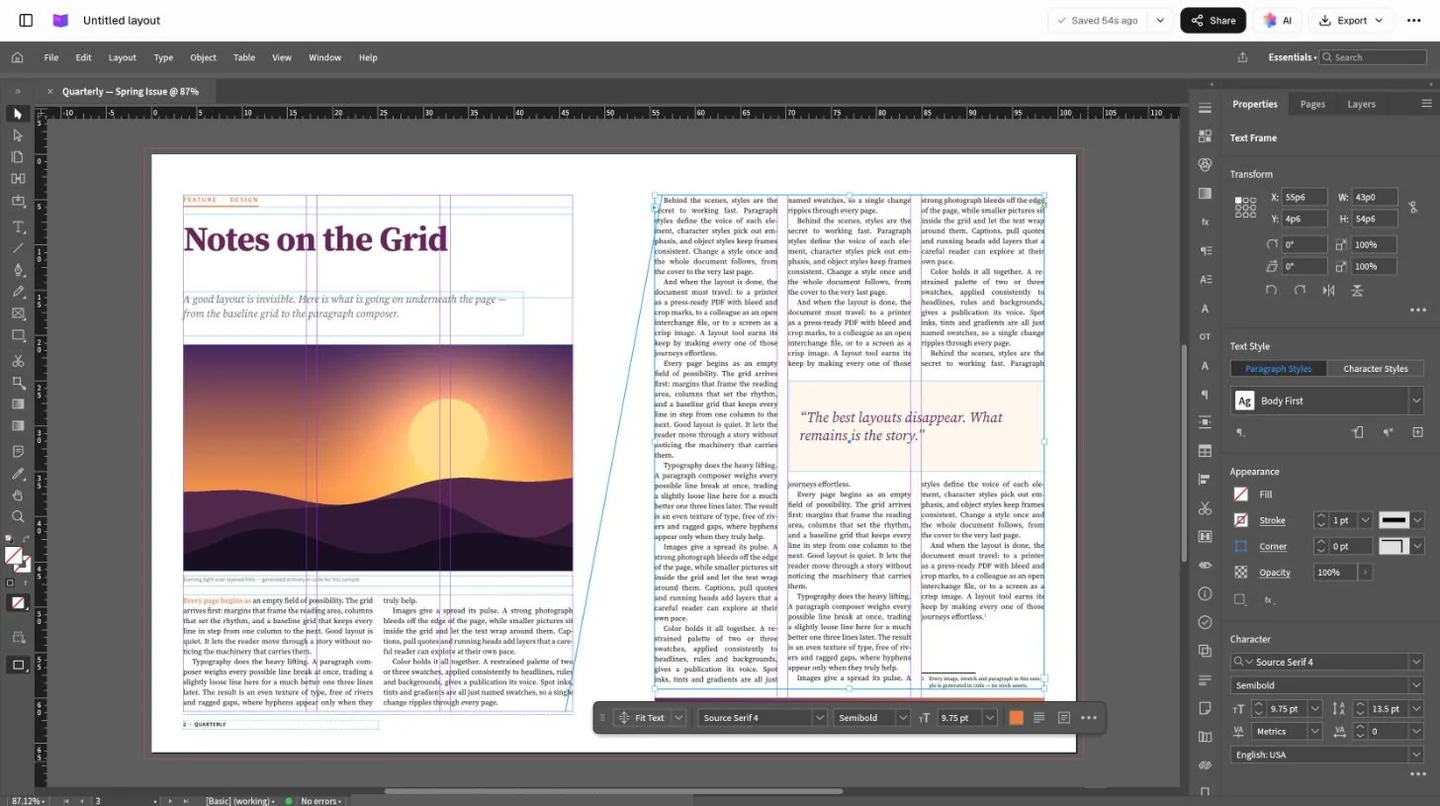
An IDML opens in the Page layout app with its pages, text frames, images, styles and swatches, in an editor that works the way InDesign does.
Ask for the IDML, open it here.
IDML is the InDesign file made to travel. It carries the layout and every word in it.
Only have the .indd?
Ask whoever made it for File › Export › InDesign Markup (IDML). It takes them a moment, and that’s the file that opens here.
Threads and styles come with it
Text flows from frame to frame as it did in InDesign, and headings, body and captions keep their paragraph styles.
Change the words, then check they fit.
Click into a frame and type. When new copy runs longer than its frame, Preflight says so before the printer does.
Type straight into the frame
Prices, dates and names change in place, and the story keeps its paragraph styles.
See what no longer fits
Preflight lists every story that runs past its frame, and how many characters are left over.
Fit it, and check again
Trim the copy or deepen the frame a little, then run Preflight once more before you export.
Send it back the way it’s needed.
Export a PDF for the client to approve and save an IDML for the designer, so the approved words and the working file match.
A PDF for the client
Every page in one print-ready PDF, to approve on screen or send to the printer.
An IDML for the designer
Save a fresh IDML and it opens in Adobe InDesign, so the designer carries on from your edits.

Questions about IDML files.
Something else on your mind? Ask us in the chat, bottom right of the page.
Can I open an IDML file without InDesign?
Yes. Open the .idml on this page and it comes in with its spreads, text frames, images, styles and swatches. Edit it, then export a PDF or save a new IDML.
Can it open .indd files?
No. An .indd file is InDesign’s own working file and only InDesign opens it. Ask whoever made it for File › Export › InDesign Markup (IDML), which is the format made for opening elsewhere.
Will my fonts look the same?
Fonts aren’t stored inside an IDML. Where a font isn’t available in your browser, a substitute is used, which can change line breaks and make text overset. Preflight lists missing fonts, so check the layout before you send a PDF to print.
Why are some images missing?
Most InDesign layouts link to their pictures rather than embedding them, and the linked files stay in the designer’s Links folder. Ones that aren’t inside the IDML show as missing; place them again from your computer, or ask for the packaged images.
Can I send it back to the designer?
Yes. Save it as IDML and it opens in Adobe InDesign. Changes to text, frames and styles carry over; it’s worth a look in InDesign before anything goes to print.
Can I export an e-book?
Yes. As well as PDF and IDML, the layout exports as EPUB, a reflowable e-book for reading on phones, tablets and e-readers.
Where is my file kept?
In your Docsiv workspace Drive, once you save it with your free account. Only your workspace can open it until you share it by link.
Can I edit the images in the layout?
You can move, resize and replace image frames. To retouch a picture itself, edit it in an image editor and place it again.
Starting a layout from scratch?
Describe the flyer, brochure or menu and Docsiv AI lays it out in frames and styles you can keep editing.