

Edit PowerPoint files in your browser
Drop in a .pptx, change what you need, present it, and download it again as PowerPoint or PDF. No PowerPoint to install.
It opens like the PowerPoint you already know.
Here’s a client’s deck, just opened in the Presentations app. There’s nothing to learn before you fix slide seven.
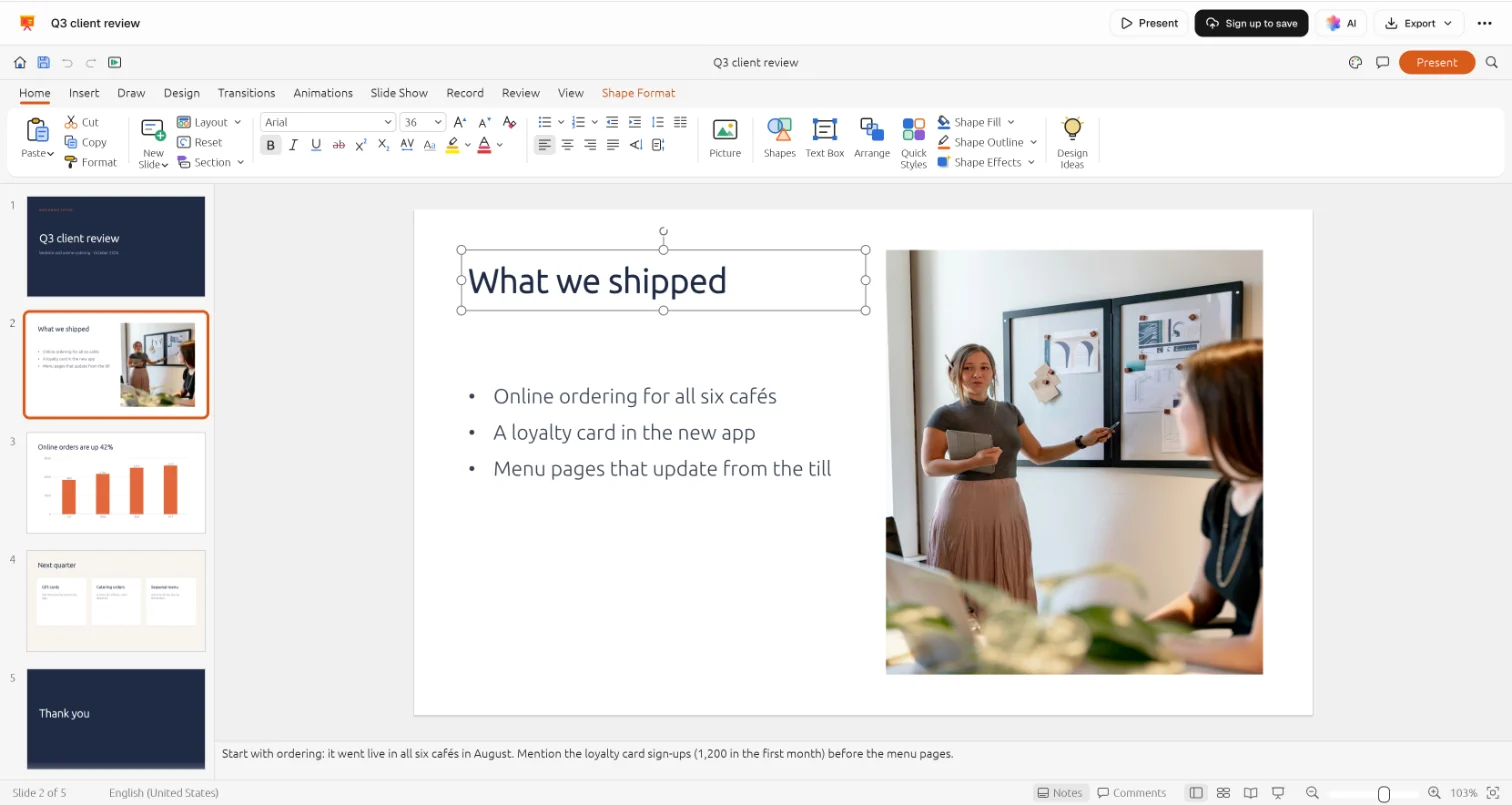
- The ribbon you knowPowerPoint’s tabs in PowerPoint’s order, so every button is where you’d look.
- Every slide down the sideAdd, duplicate and reorder slides, with the deck’s sections kept.
- Click in and typeEdit text in place, and move or restyle shapes, pictures, tables and charts.
- Notes under the slideSpeaker notes open with the deck and go back with it.
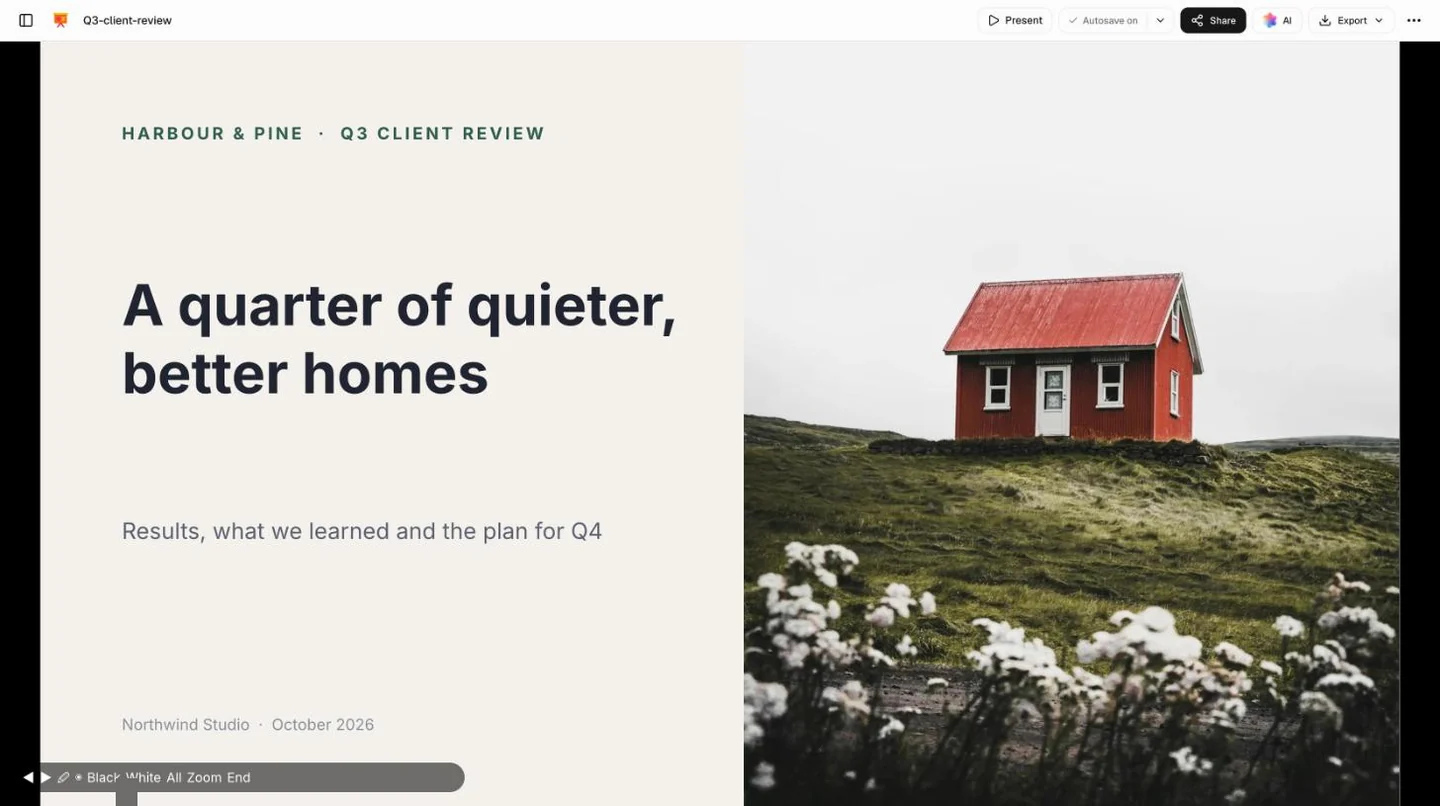
Present it straight from the tab.
No PowerPoint on the meeting-room laptop? Choose Present and the deck runs full screen, with its transitions and animations.
Send it back the way it came.
Download the deck as PowerPoint for the person who sent it, or as a PDF for everyone who just needs to read it.
PowerPoint (.pptx)
Editable slides that open in PowerPoint, Keynote and Google Slides, with their layouts and notes. Send it straight back.
PDF
Every slide on its own page, for people who only need to read the deck, print it or file it.
Kept in your Drive
The presentation saves to your workspace’s Drive as you work, beside the original .pptx, which stays as it was sent.

Or start a deck from a template.
Each opens in the same app, ready to edit, present and download as a .pptx.
 Investor updatesThe quarter’s numbers, what changed and what comes next, for a board or backers.Investor Update
 Case studiesThe client, the problem and the result, with the figure that matters up front.Case Study Deck
 Courses and trainingA session’s slides with room for exercises, presented from any browser.Course Slides
 Partnership proposalsA calm, photo-led deck for asking another company to work with you.Partnership Deck
Find the right starting point, or describe yours and let Docsiv AI draft it.
Explore all templatesQuestions about PPTX files.
Something else on your mind? Ask us in the chat, bottom right of the page.
Is it free to edit a PPTX here?
Yes. Opening a .pptx, editing it, presenting it and downloading it as PowerPoint or PDF are included on the Free plan, along with saving to your workspace’s Drive, sharing by link, Docsiv AI and editing together live.
Where is my presentation kept?
In your workspace’s Drive, once you open it with your free account. Only your workspace can open it until you share a link, and you decide what that link lets people do.
Will it look exactly as it does in PowerPoint?
Everyday decks come through well: masters and layouts, themes, text, shapes, pictures, tables, charts, speaker notes, transitions and animations. Keep the original and look over the slides before you send it back.
What doesn’t come across yet?
SmartArt opens as ordinary shapes you can edit, not as a diagram. EMF and WMF pictures (common in decks made on Windows), waterfall, funnel and other newer chart types, equations, embedded fonts, macros and password-protected files don’t come through yet.
What happens to fonts I don’t have?
Calibri, Cambria, Arial, Times New Roman and Courier New are swapped for open fonts drawn to the same widths (Carlito, Caladea and the Liberation fonts), so lines break where they did. Other fonts get the closest open match, so check tight text boxes before you present.
Can I open .ppt, .key or .odp files?
Not an older .ppt yet, nor Keynote or OpenDocument files. Save or download the deck as .pptx from PowerPoint, Keynote or Google Slides first, then open that.
Can I present from the browser?
Yes. Choose Present and the deck runs full screen, with the original’s transitions and animations. Click or use the arrow keys to move on, press B or W for a black or white screen, and Esc to finish.
Can I start a new presentation instead?
Yes. Choose Start blank or a template, or describe the deck you need and let Docsiv AI draft it. Either way it downloads as .pptx or PDF.
Need a new deck rather than a fix?
Describe the presentation and Docsiv AI drafts it in the same app, ready to edit, present and download as PowerPoint.