

What’s inside the YouTube Thumbnails.
8 posts with real content in place. Rewrite them, reorder them, or add your own.
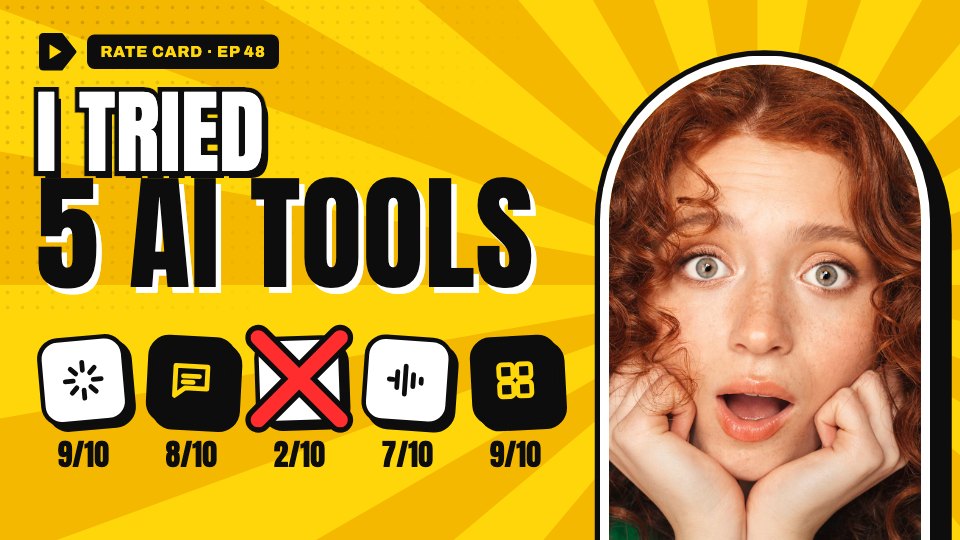
- 1Post 1I tried 5 AI tools: five app tiles with scores, one crossed out in red
- 2Post 2$0 → $10K MRR: a big yellow number and a rising revenue chart
- 3Post 3Pricing your first client: a price tag with the old quote struck through
- 4Post 4Stop charging hourly: a before-and-after of an hourly rate and a project fee
- 5Post 5Cold emails that work: an email window and a red reply-rate sticker
- 6Post 6My 4-day work week: a week calendar with Friday stamped off
- 7Post 7Fire this client?: three red flags with the warning signs
- 8Post 8This proposal won $18K: a proposal card circled in red and three lessons
When to use it.
YouTube Thumbnails is a set of eight 1280×720 thumbnails for a business or marketing channel, all in one look. Each pairs a short, bold title with a host photo in an outlined arch and one simple visual: app tiles, a revenue chart, a price tag, a before-and-after, a calendar or red flags. The high-contrast yellow, black and white palette with one red accent stays readable at the small sizes people browse at, and titles stay clear of the corner where YouTube shows the timestamp.
Made for
- Social media managers
- Brands announcing launches
- Event promoters
- Small businesses
Make it yours in four steps.
Open it in Designs and work through it, or let Docsiv AI do the first pass with your details.
- Step 1
Pick the thumbnail closest to your next video.
- Step 2
Rewrite the title in two to five words and update the episode number.
- Step 3
Replace the host photo with your own and adjust the visual's numbers or labels.
- Step 4
Export at 1280×720 and upload it as your video's custom thumbnail.
Start from the YouTube Thumbnails now.
Questions about this template.
Something else on your mind? Ask us in the chat, bottom right of the page.
Is the YouTube Thumbnails template free?
Yes. Create a free account and it opens in Docsiv's Designs app, ready to edit and share. The Free plan includes every Docsiv app and 500 AI credits a month.
Can I change the colours, fonts and text?
Yes, all of it. The template uses Anton and Archivo with #ffd60a, #0d0d0d, #ffffff, #ff2d2d, and you can change any of them, rewrite every word and add or remove pages.
What can I export it as?
Designs in Docsiv offers: PNG, PDF and HTML exports. Once it's saved, you can also share it with a link.
Can Docsiv AI write the YouTube thumbnail for me?
Yes. Tell Docsiv AI about the client or project and it can draft the content in this template's style, which you then review and edit. AI uses credits; the Free plan includes 500 a month.




Start your posts with Docsiv AI
Describe the client or the project and Docsiv AI writes a first draft of your YouTube thumbnail for you to edit, share and send.