

What’s inside the Press Release.
Real content in every part, ready to rewrite with your own.
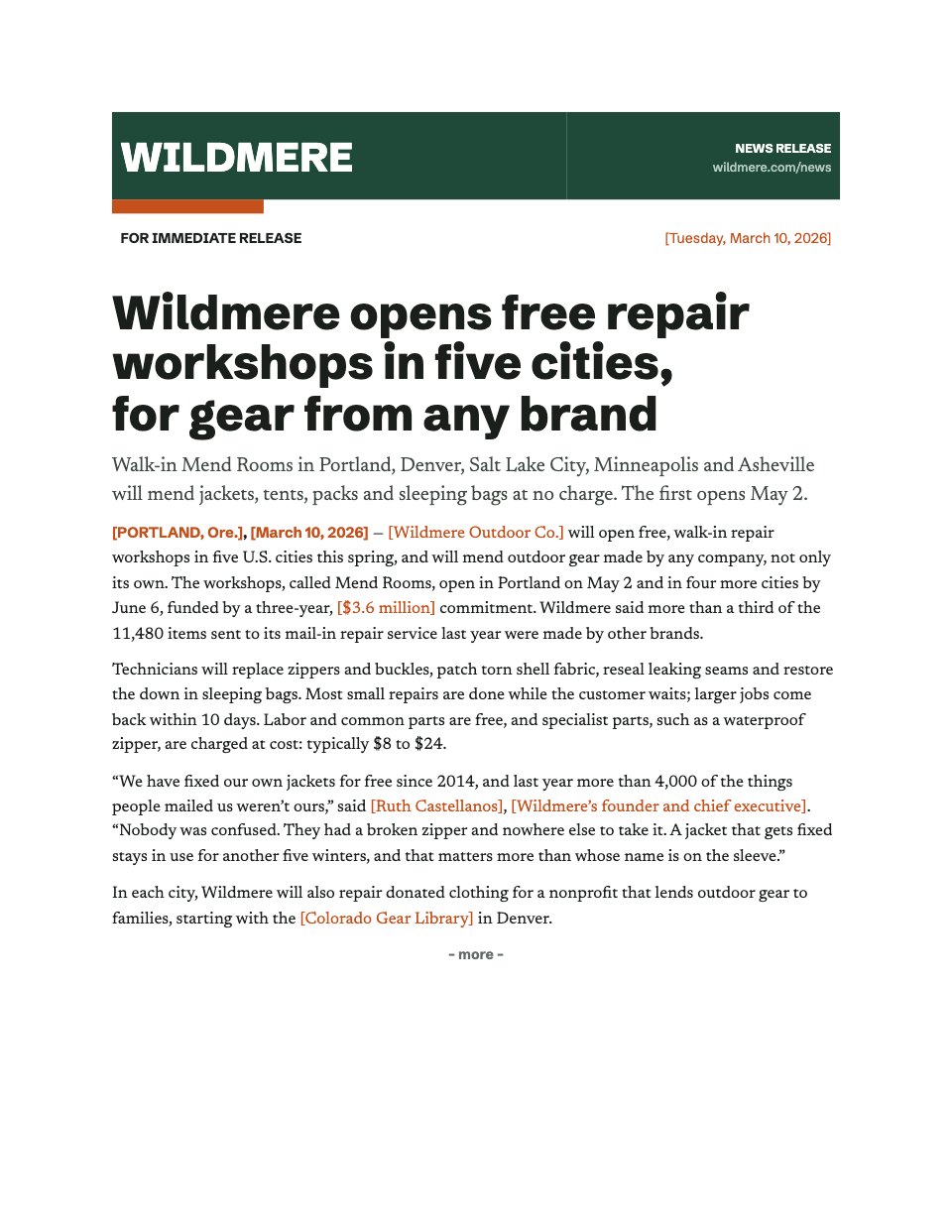
- 1A newsroom masthead with the wordmark, the release line and the date
- 2A headline, subheadline, dateline and a lead that answers who, what, when, where and why
- 3Quotes from the founder and a partner, with names and titles to replace
- 4Details and availability as a table, and the key figures in a tinted fact box
- 5The About boilerplate, a media contact block and the ### end mark
When to use it.
Press Release is a two-page news release written the way journalists want to receive one: the release line and date, a headline and subheadline, a dateline lead that answers who, what, when, where and why, and two quotes that sound like people rather than slogans. The second page carries the details and availability as a table, the key figures in a tinted fact box, the About boilerplate and a media contact block, ending with the ### mark. It suits founders, marketing teams and agencies announcing a launch or an opening. Every name, date, price and address is a tinted fill-in.
Made for
- Founders announcing news
- PR and comms teams
- Agencies writing for clients
- Nonprofits and local businesses
Make it yours in four steps.
Open it in Documents and work through it, or let Docsiv AI do the first pass with your details.
- Step 1
Replace the wordmark in the masthead with your company name, and set the release line and date, or swap in an embargo time.
- Step 2
Rewrite the headline and subheadline, then make the dateline lead answer who, what, when, where and why in its first two sentences.
- Step 3
Put real words in the two quotes, with each speaker's name and title, and update the details table and the four figures in the fact box.
- Step 4
Update the About paragraph and the media contact, then export to Word or PDF and send it.
Start from the Press Release now.
Questions about this template.
Something else on your mind? Ask us in the chat, bottom right of the page.
Is the Press Release template free?
Yes. Create a free account and it opens in Docsiv's Documents app, ready to edit and share. The Free plan includes every Docsiv app and 500 AI credits a month.
Can I change the colours, fonts and text?
Yes, all of it. The template uses Schibsted Grotesk and Newsreader with #1f4a3a, #c4501c, #1b1f1c, #e6eee8, and you can change any of them, rewrite every word and add or remove pages.
What can I export it as?
Documents in Docsiv offers: DOCX, PDF, ODT, RTF and Markdown exports. Once it's saved, you can also share it with a link.
Can Docsiv AI write the press release for me?
Yes. Tell Docsiv AI about the client or project and it can draft the content in this template's style, which you then review and edit. AI uses credits; the Free plan includes 500 a month.







Start your press release with Docsiv AI
Describe the client or the project and Docsiv AI writes a first draft of your press release for you to edit, share and send.