

What’s inside the Freelance Contract.
10 pages with real content in place. Rewrite them, reorder them, or add your own.
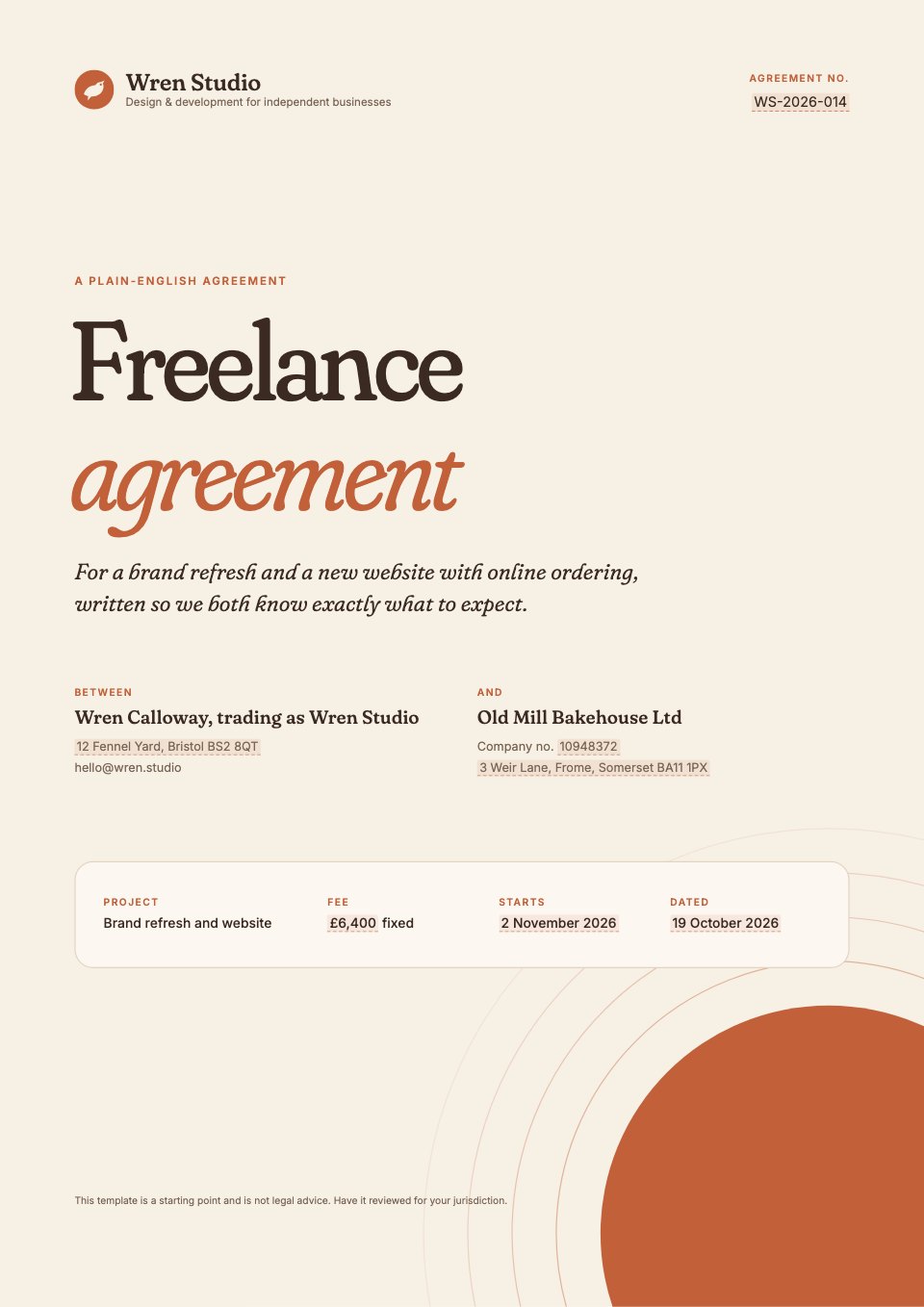
- 1Page 1A cover with the agreement's name, both parties and their addresses, and the project, fee, start date and reference
- 2Page 2The short version: the whole agreement in eight plain-English points, plus contents
- 3Page 3Clauses 1–4: who's who and defined terms, the project, what's included, and the timeline
- 4Page 4Clauses 5–8: the fee and deposit, paying invoices and expenses, two revision rounds, and the client's part
- 5Page 5Clauses 9–12: the kill fee, ownership after final payment, portfolio rights and confidentiality
- 6Page 6Clauses 13–16: keeping in touch, promises and the liability cap, personal data, and ending early
- 7Page 7Clauses 17–20: things outside our control, notices, disagreements and governing law, and everything else
- 8Page 8Schedule 1: the three stages with deliverables and prices, the payment schedule and extra rates
- 9Page 9Schedule 2: a week-by-week timeline, key dates, both contacts and what the client supplies
- 10Page 10A signature page with e-signature blocks for both parties and three next steps
When to use it.
Freelance Contract is a 10-page, plain-English agreement for freelance designers and developers working with small businesses. It opens with a one-page short version, then 20 numbered clauses, each with its own 'In short' summary: scope, timeline, fee and deposit, two revision rounds, a kill fee, ownership after final payment, portfolio rights, communication and ending early. Two schedules set out the deliverables, prices, payment plan and a week-by-week timeline. It ends with a signature page ready to send for e-signature.
Made for
- Agencies signing new clients
- Freelancers and contractors
- Consultants and advisers
- Founders and small businesses
Make it yours in four steps.
Open it in Proposals and work through it, or let Docsiv AI do the first pass with your details.
- Step 1
Replace the highlighted fill-ins with your name, your client's details, the fee and the dates.
- Step 2
Edit Schedule 1 to list your real deliverables and stage prices, and keep the totals matching clause 5.
- Step 3
Adjust the timeline in Schedule 2 and the 'In short' boxes so they match your clauses.
- Step 4
Have it reviewed for your jurisdiction, then send it for e-signature from the signature page.
Start from the Freelance Contract now.
Questions about this template.
Something else on your mind? Ask us in the chat, bottom right of the page.
Is the Freelance Contract template free?
Yes. Create a free account and it opens in Docsiv's Proposals app, ready to edit and share. The Free plan includes every Docsiv app and 500 AI credits a month.
Can I change the colours, fonts and text?
Yes, all of it. The template uses Fraunces and Inter with #f7f0e5, #3a2a21, #c2603a, #f1dccb, #8c9a74, and you can change any of them, rewrite every word and add or remove pages.
What can I export it as?
Proposals in Docsiv offers: Proposal pages, PDF and HTML exports. Once it's saved, you can also share it with a link.
Can Docsiv AI write the freelance contract for me?
Yes. Tell Docsiv AI about the client or project and it can draft the content in this template's style, which you then review and edit. AI uses credits; the Free plan includes 500 a month.
Can my client sign it?
Yes, on the Pro and Team plans: send the proposal for e-signature from Docsiv and follow it under Signatures. E-signatures aren't included on the Free plan.




Start your contract with Docsiv AI
Describe the client or the project and Docsiv AI writes a first draft of your freelance contract for you to edit, share and send.