

What’s inside the Isometric Workspace.
1 artboards with real content in place. Rewrite them, reorder them, or add your own.
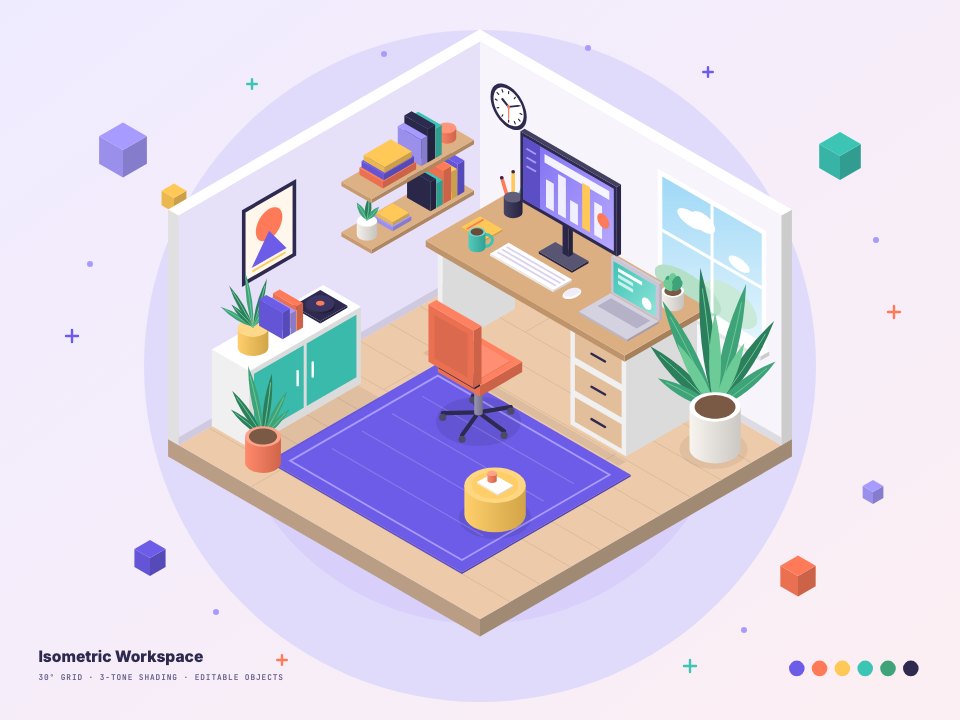
- 1Artboard 1An isometric cut-away workspace: a desk with a monitor, laptop, lamp, keyboard and mug, an office chair on a rug, wall shelves of books, a window, a framed print, a clock, a cabinet with a record and plants, a pouf and potted plants, with floating cubes round the room
When to use it.
Isometric Workspace is an isometric cut-away room for websites, blog headers and presentations about work, productivity or remote teams. It holds a desk with a monitor, laptop, lamp, keyboard and mug, an office chair on a rug, wall shelves of books, a window, a framed print, a clock, a cabinet with a record and plants, a pouf and potted plants, with cubes floating round the room. Everything is built on a true 30° grid with three shaded faces, so each piece is simple to recolour.
Made for
- Web and product designers
- Restaurants, cafés and shops
- Merchandise and apparel makers
- Marketing teams who want art without photos
Make it yours in four steps.
Open it in Vectors and work through it, or let Docsiv AI do the first pass with your details.
- Step 1
Recolour the walls, floor and furniture to suit your brand, one face at a time.
- Step 2
Move, copy or delete objects to furnish the room your way.
- Step 3
Put your own screen or print on the monitor and the frame.
- Step 4
Export as SVG or PNG for your site or slides, or as AI to keep editing.
Start from the Isometric Workspace now.
Questions about this template.
Something else on your mind? Ask us in the chat, bottom right of the page.
Is the Isometric Workspace template free?
Yes. Create a free account and it opens in Docsiv's Vectors app, ready to edit and share. The Free plan includes every Docsiv app and 500 AI credits a month.
Can I change the colours, fonts and text?
Yes, all of it. The template uses Inter and JetBrains Mono with #EFEBFF, #E6E0F8, #EDCBAA, #6C5CE7, #FF7A59, #FFC857, #3CC4B4, #3FA37A, #2E2A4F, and you can change any of them, rewrite every word and add or remove shapes and layers.
What can I export it as?
Vectors in Docsiv offers: AI, SVG, PDF and PNG exports. Once it's saved, you can also share it with a link.
Can Docsiv AI change it for me?
Yes. Tell Docsiv AI what you need, such as your brand's colours, new wording or a new variation, and it makes the changes in Vectors for you to review. AI uses credits; the Free plan includes 500 a month.





Start your illustration with Docsiv AI
Describe the client or the project and Docsiv AI writes a first draft of your isometric illustration for you to edit, share and send.