

What’s inside the Meeting Agenda.
Real content in every part, ready to rewrite with your own.
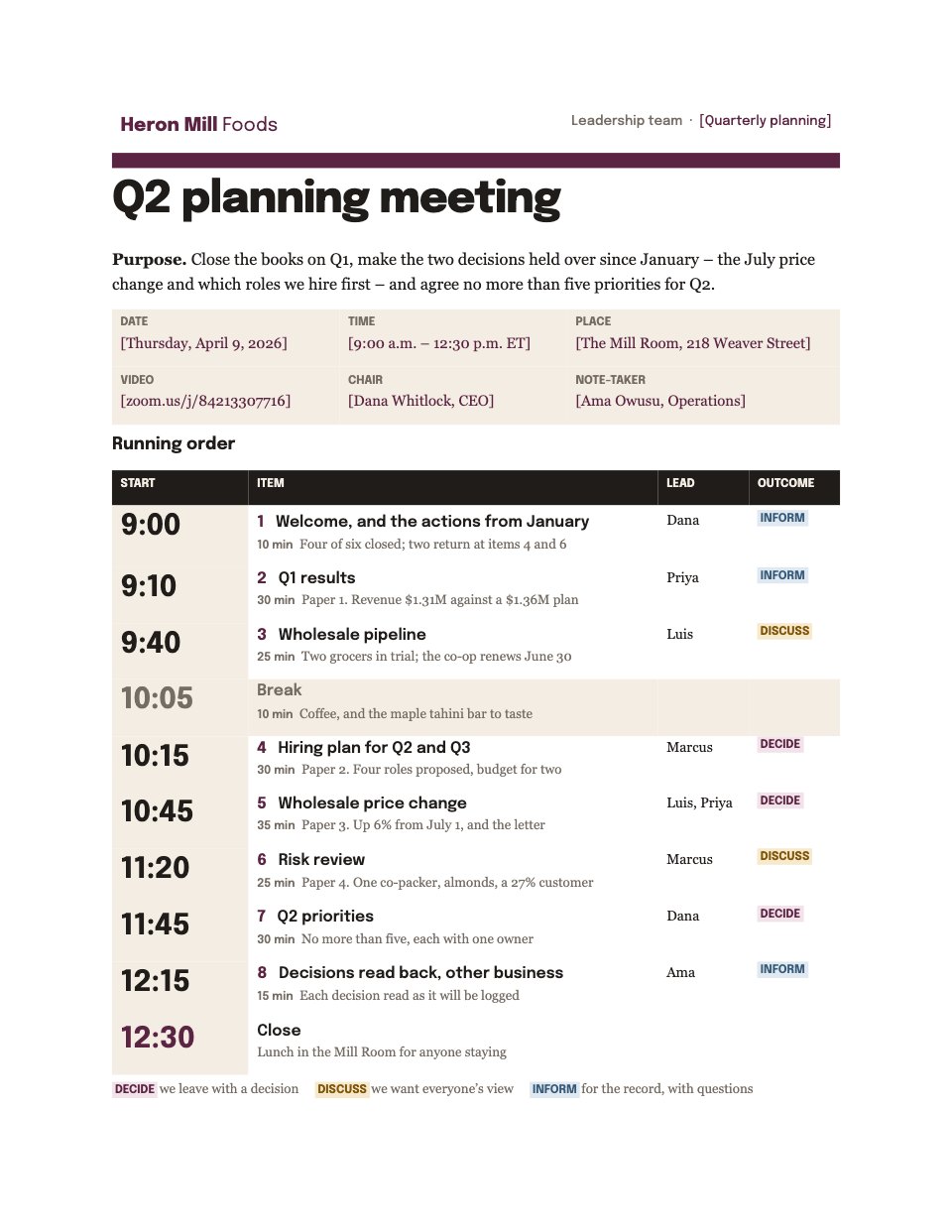
- 1A masthead with the meeting’s purpose, then the date, time, place, video link, chair and note-taker
- 2A timed running order: start times set large on an oat rail, each item’s brief and lead, and a coloured outcome tag
- 3The papers to read beforehand, who wrote them and the item each is for
- 4Who is attending, what each person leads, and apologies
- 5Housekeeping: how decisions are recorded, running over, other business and the next meeting
When to use it.
Meeting Agenda is a two-page agenda for a leadership or management meeting that has to end in decisions. The first page states the purpose in one sentence, gives the date, time, place, video link, chair and note-taker, then sets out a timed running order: each start time large, the item and how long it has, who leads it, and whether the room is there to decide, discuss or simply be informed. The second page lists the papers to read beforehand, who is attending and leading what, and the house rules for recording decisions, running over and the next meeting.
Made for
- Finance and accounts teams
- Operations managers
- In-house marketing and design teams
- Founders running their own back office
Make it yours in four steps.
Open it in Documents and work through it, or let Docsiv AI do the first pass with your details.
- Step 1
Replace the wordmark and the tinted fill-ins: the meeting name, date, time, place, video link, chair and note-taker.
- Step 2
Rewrite the purpose as one sentence that says what the meeting has to settle.
- Step 3
Set the running order: give each item a start time, its minutes and a lead, tag it Decide, Discuss or Inform, and check the times add up to the finish.
- Step 4
List the papers and the people on page two, adjust the house rules, and send the agenda with the papers a week ahead.
Start from the Meeting Agenda now.
Questions about this template.
Something else on your mind? Ask us in the chat, bottom right of the page.
Is the Meeting Agenda template free?
Yes. Create a free account and it opens in Docsiv's Documents app, ready to edit and share. The Free plan includes every Docsiv app and 500 AI credits a month.
Can I change the colours, fonts and text?
Yes, all of it. The template uses Epilogue and Georgia with #5c2443, #1f1c1a, #80560a, #365a77, #f3ede3, and you can change any of them, rewrite every word and add or remove pages.
What can I export it as?
Documents in Docsiv offers: DOCX, PDF, ODT, RTF and Markdown exports. Once it's saved, you can also share it with a link.
Can Docsiv AI write the meeting agenda for me?
Yes. Tell Docsiv AI about the client or project and it can draft the content in this template's style, which you then review and edit. AI uses credits; the Free plan includes 500 a month.










Start your document or form with Docsiv AI
Describe the client or the project and Docsiv AI writes a first draft of your meeting agenda for you to edit, share and send.