

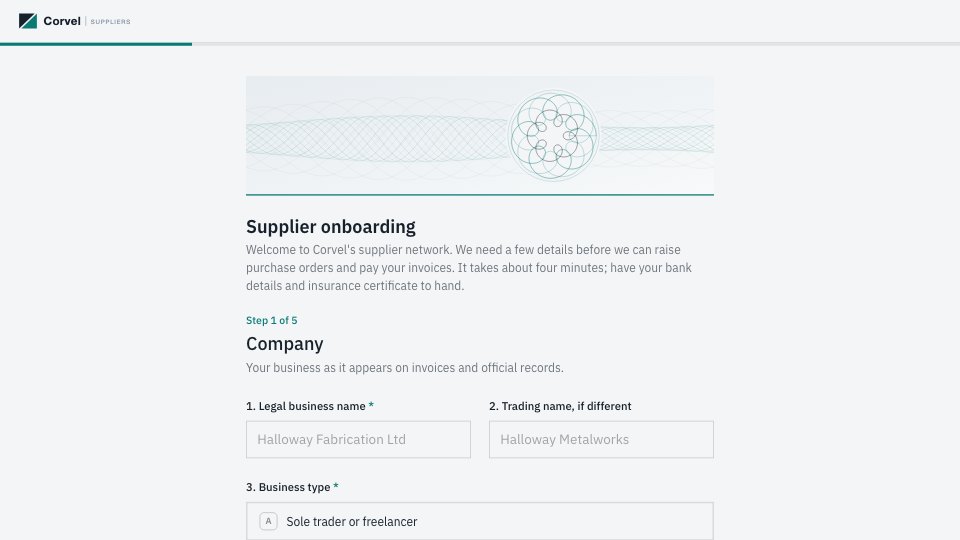
What’s inside the Vendor Onboarding.
Real content in every part, ready to rewrite with your own.
- 1Company: legal and trading names, business type, registration and VAT numbers, registered address
- 2Contacts: the primary contact and the accounts contact, each with an email
- 3Payment: a note on how bank details are protected, account holder, bank, IBAN and sort code or SWIFT, preferred terms
- 4Documents: an insurance certificate, then a W-9 or W-8BEN upload depending on US tax status
- 5Confirm: the signer's role and a typed signature, with the declaration they agree to
When to use it.
Vendor Onboarding is a 20-question, five-step form that gathers everything finance needs before paying a new supplier or freelancer. It covers legal and trading names, business type, registration and VAT numbers, the primary and accounts contacts, bank details, preferred payment terms, an insurance certificate and the right tax form. A short note explains how bank details are protected and verified, it never asks for card numbers, and it closes with the signer's role and a typed signature.
Made for
- Finance and accounts teams
- Operations managers
- In-house marketing and design teams
- Founders running their own back office
Make it yours in four steps.
Open it in Forms and work through it, or let Docsiv AI do the first pass with your details.
- Step 1
Swap in your company name and logo, and edit the note on how you handle bank details.
- Step 2
Adjust the business types, payment terms and required documents to match your finance policy.
- Step 3
Share the link with each new supplier or freelancer before their first purchase order.
- Step 4
Verify bank details by phone with the accounts contact, then set the vendor up in your accounting system.
Start from the Vendor Onboarding now.
Questions about this template.
Something else on your mind? Ask us in the chat, bottom right of the page.
Is the Vendor Onboarding template free?
Yes. Create a free account and it opens in Docsiv's Forms app, ready to edit and share. The Free plan includes every Docsiv app and 500 AI credits a month.
Can I change the colours, fonts and text?
Yes, all of it. The template uses IBM Plex Sans with #f3f5f7, #17212b, #0b7a75, #8a98a6, and you can change any of them, rewrite every word and add or remove questions.
What can I export it as?
Forms in Docsiv offers: Responses exported as CSV. Once it's saved, you can also share it with a link.
Can Docsiv AI write the vendor onboarding form for me?
Yes. Tell Docsiv AI about the client or project and it can draft the content in this template's style, which you then review and edit. AI uses credits; the Free plan includes 500 a month.
Where do the responses go?
Responses are collected in Docsiv with the form, and you can export them as a CSV file.





Start your document or form with Docsiv AI
Describe the client or the project and Docsiv AI writes a first draft of your vendor onboarding form for you to edit, share and send.