

What’s inside the Abstract Backgrounds Kit.
1 artboards with real content in place. Rewrite them, reorder them, or add your own.
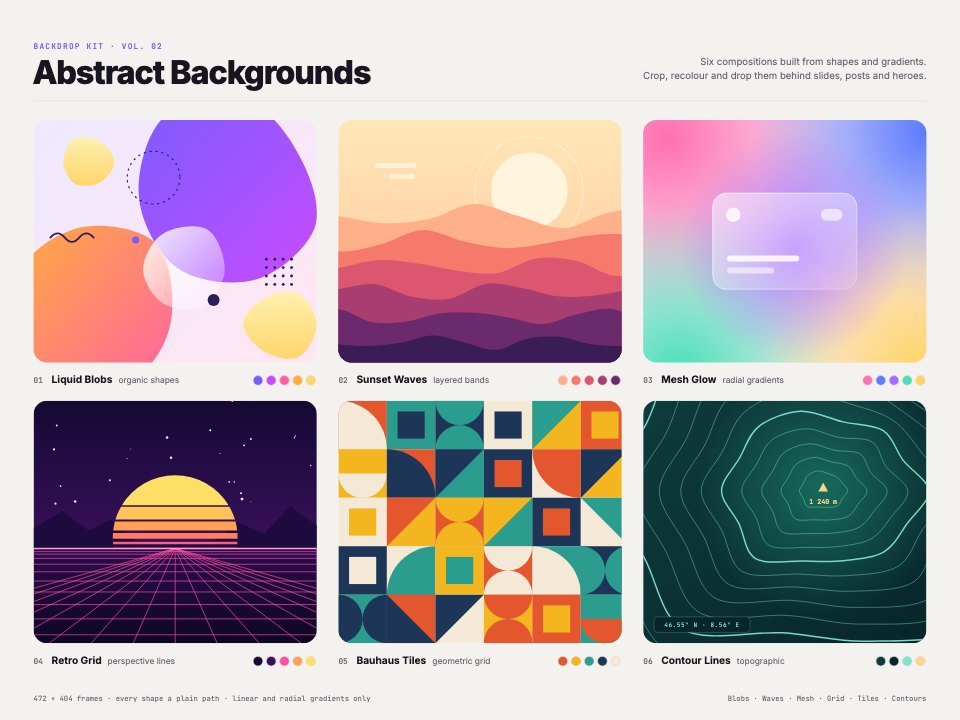
- 1Artboard 1Six abstract background compositions in rounded frames, each numbered with its colour chips: liquid gradient blobs, layered sunset waves, a mesh-like glow of overlapping radial gradients with a glass card, a retro perspective grid with a striped sun, a Bauhaus tile grid and topographic contour lines
When to use it.
Abstract Backgrounds Kit is a set of six abstract compositions to crop behind slides, social posts, hero sections and event screens. There are liquid gradient blobs, layered sunset waves, a mesh-like glow of overlapping radial gradients with a glass card, a retro perspective grid with a striped sun, a Bauhaus tile grid and topographic contour lines. Each sits in its own rounded frame on warm paper, numbered with its colour chips, and every curve is a plain editable path.
Made for
- Packaging and print designers
- Presentation and web designers
- Brands building a visual system
- Makers of wrapping paper and textiles
Make it yours in four steps.
Open it in Vectors and work through it, or let Docsiv AI do the first pass with your details.
- Step 1
Choose a background and resize its frame to your slide, post or banner.
- Step 2
Recolour the shapes and gradients from its colour chips to your brand's.
- Step 3
Move or reshape the blobs, waves and lines until the crop works behind your text.
- Step 4
Export as PNG for slides and posts, or SVG for websites.
Start from the Abstract Backgrounds Kit now.
Questions about this template.
Something else on your mind? Ask us in the chat, bottom right of the page.
Is the Abstract Backgrounds Kit template free?
Yes. Create a free account and it opens in Docsiv's Vectors app, ready to edit and share. The Free plan includes every Docsiv app and 500 AI credits a month.
Can I change the colours, fonts and text?
Yes, all of it. The template uses Inter and JetBrains Mono with #f4f2ee, #7b5cff, #dc5670, #ff6fb1, #ff4fa3, #e4572e, #0e3b3d, and you can change any of them, rewrite every word and add or remove shapes and layers.
What can I export it as?
Vectors in Docsiv offers: AI, SVG, PDF and PNG exports. Once it's saved, you can also share it with a link.
Can Docsiv AI change it for me?
Yes. Tell Docsiv AI what you need, such as your brand's colours, new wording or a new variation, and it makes the changes in Vectors for you to review. AI uses credits; the Free plan includes 500 a month.





Start your pattern with Docsiv AI
Describe the client or the project and Docsiv AI writes a first draft of your abstract background for you to edit, share and send.