

What’s inside the Ornamental Frames & Dividers.
1 artboards with real content in place. Rewrite them, reorder them, or add your own.
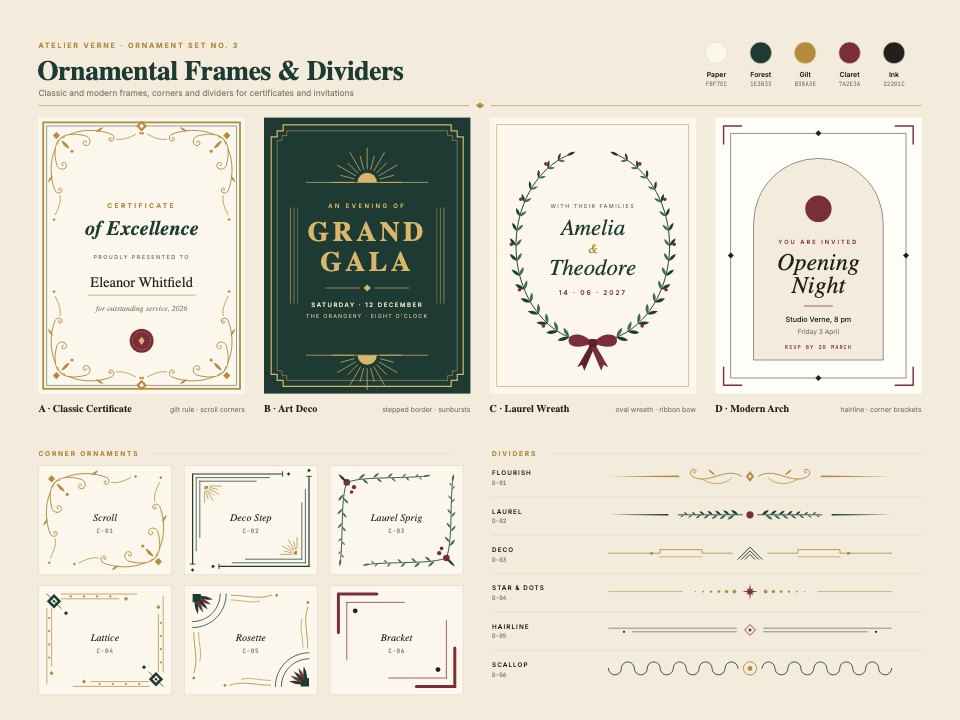
- 1Artboard 1Four frames with sample wording (a classic gilt certificate with scroll corners and a seal, an Art Deco gala frame in gold on forest green, an oval laurel wreath with a claret ribbon for a save-the-date, and a modern arch invitation with corner brackets), six corner ornaments (scroll, deco step, laurel sprig, lattice, rosette, bracket) and six dividers (flourish, laurel, deco, star and dots, hairline, scallop), with the palette's hex values
When to use it.
Ornamental Frames & Dividers is a set of frames, corners and dividers for certificates, invitations, menus and labels. Four frames come with sample wording: a gilt certificate with scroll corners and a seal, an Art Deco gala frame in gold on forest green, an oval laurel wreath with a claret ribbon for a save-the-date and a modern arch invitation with corner brackets. Below are six corner ornaments and six dividers, all in gilt, forest and claret on parchment.
Made for
- Coffee roasters and food brands
- Event organisers and venues
- Designers making certificates and invitations
- Studios preparing print-ready artwork
Make it yours in four steps.
Open it in Vectors and work through it, or let Docsiv AI do the first pass with your details.
- Step 1
Pick the frame that fits your occasion and resize it to your page.
- Step 2
Replace the sample wording with your own names, dates and details.
- Step 3
Add corners or dividers from the lower half, and change the gilt, forest and claret if you like.
- Step 4
Export as PDF to print, or as SVG or PNG to use in another design.
Start from the Ornamental Frames & Dividers now.
Questions about this template.
Something else on your mind? Ask us in the chat, bottom right of the page.
Is the Ornamental Frames & Dividers template free?
Yes. Create a free account and it opens in Docsiv's Vectors app, ready to edit and share. The Free plan includes every Docsiv app and 500 AI credits a month.
Can I change the colours, fonts and text?
Yes, all of it. The template uses Source Serif 4 and Inter and JetBrains Mono with #f3ecdc, #fbf7ec, #1e3b33, #b38a3e, #7a2e3a, #22201c, and you can change any of them, rewrite every word and add or remove shapes and layers.
What can I export it as?
Vectors in Docsiv offers: AI, SVG, PDF and PNG exports. Once it's saved, you can also share it with a link.
Can Docsiv AI change it for me?
Yes. Tell Docsiv AI what you need, such as your brand's colours, new wording or a new variation, and it makes the changes in Vectors for you to review. AI uses credits; the Free plan includes 500 a month.








Start your print design with Docsiv AI
Describe the client or the project and Docsiv AI writes a first draft of your decorative border for you to edit, share and send.