

What’s inside the Long Table.
8 slides with real content in place. Rewrite them, reorder them, or add your own.
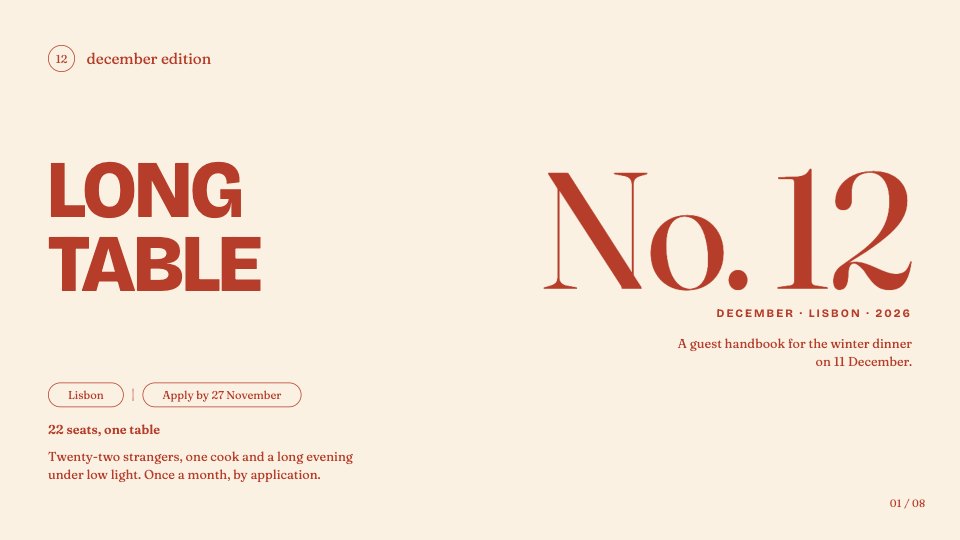
- 1Slide 1A cover with the edition number, city, seat count and application date
- 2Slide 2A letter from the founders
- 3Slide 3Three recent editions as cards with city, seats and date
- 4Slide 4The featured evening: a short description beside when, where, who and price
- 5Slide 5A five-course menu with a pairing for each course
- 6Slide 6A full-slide guest quote
- 7Slide 7The calendar: six upcoming editions with dates and status
- 8Slide 8A closing slide with how to apply and contact details
When to use it.
For supper clubs, dinner series, pop-up kitchens and hosts of small ticketed evenings who want to send guests something worth reading. It opens with the edition and a letter from the founders, shows three recent dinners, then gives the featured evening's details, a five-course menu with pairings, a guest quote and a calendar of upcoming dates with their status. Everything is printed in one rust-red ink on cream paper, with bold uppercase headlines and a warm serif, like a risograph programme.
Made for
- Event organisers
- Teams planning offsites and retreats
- Community and workshop hosts
- Venues and travel guides
Make it yours in four steps.
Open it in Decks and work through it, or let Docsiv AI do the first pass with your details.
- Step 1
Put your own edition number, city and application date on the cover.
- Step 2
Swap the recent dinners, the featured evening's details and the menu for your own.
- Step 3
Update the calendar with your next dates and whether seats are open.
- Step 4
Present it from the browser, export it to PowerPoint or PDF, or share it with a link.
Start from the Long Table now.
Questions about this template.
Something else on your mind? Ask us in the chat, bottom right of the page.
Is the Long Table template free?
Yes. Create a free account and it opens in Docsiv's Decks app, ready to edit and share. The Free plan includes every Docsiv app and 500 AI credits a month.
Can I change the colours, fonts and text?
Yes, all of it. The template uses Bricolage Grotesque and Fraunces with #B53D2A, #FAF1E2, #8E2D1F, #E8D7B6, and you can change any of them, rewrite every word and add or remove slides.
What can I export it as?
Decks in Docsiv offers: Slides, PPTX, PDF and HTML exports. Once it's saved, you can also share it with a link.
Can Docsiv AI write the supper club event presentation for me?
Yes. Tell Docsiv AI about the client or project and it can draft the content in this template's style, which you then review and edit. AI uses credits; the Free plan includes 500 a month.







Start your event deck with Docsiv AI
Describe the client or the project and Docsiv AI writes a first draft of your supper club event presentation for you to edit, share and send.