

What’s inside the Weather Icons.
1 artboards with real content in place. Rewrite them, reorder them, or add your own.
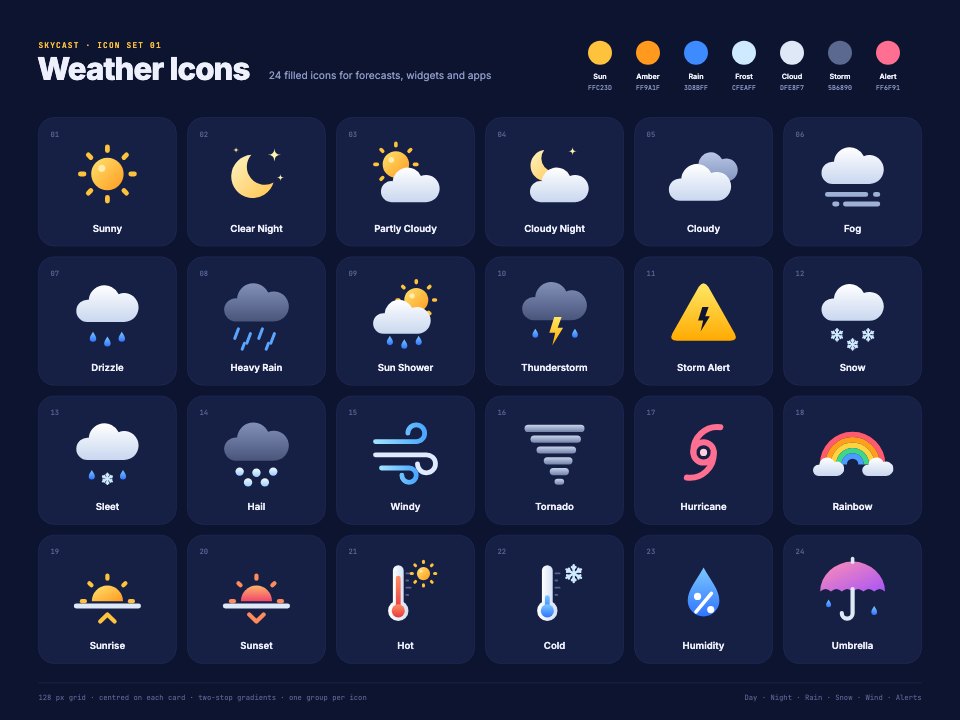
- 1Artboard 1A sheet of 24 filled weather icons on navy cards (sunny, clear and cloudy night, partly cloudy, cloudy, fog, drizzle, heavy rain, sun shower, thunderstorm, storm alert, snow, sleet, hail, windy, tornado, hurricane, rainbow, sunrise, sunset, hot, cold, humidity and umbrella), each numbered and labelled, with the palette's seven swatches and hex values
When to use it.
Weather Icons is a sheet of 24 filled, colourful icons for forecast apps, weather widgets, travel sites and smart-home dashboards. It covers sunny, clear and cloudy night, partly cloudy, cloudy, fog, drizzle, heavy rain, sun shower, thunderstorm, storm alert, snow, sleet, hail, windy, tornado, hurricane, rainbow, sunrise, sunset, hot, cold, humidity and umbrella. Each is built from simple shapes with soft two-stop gradients, numbered and labelled on a deep navy card, with seven palette swatches.
Made for
- Product and UI designers
- Developers who need consistent icons
- Agencies building design systems
- Marketing teams making diagrams and slides
Make it yours in four steps.
Open it in Vectors and work through it, or let Docsiv AI do the first pass with your details.
- Step 1
Pick the conditions your app shows and delete the rest.
- Step 2
Adjust the gradients from the palette swatches to match your interface.
- Step 3
Rename the labels if your forecast uses different terms.
- Step 4
Export each icon as SVG or PNG for your developers, or the sheet as PDF.
Start from the Weather Icons now.
Questions about this template.
Something else on your mind? Ask us in the chat, bottom right of the page.
Is the Weather Icons template free?
Yes. Create a free account and it opens in Docsiv's Vectors app, ready to edit and share. The Free plan includes every Docsiv app and 500 AI credits a month.
Can I change the colours, fonts and text?
Yes, all of it. The template uses Inter and JetBrains Mono with #0d1430, #161f44, #ffc23d, #3d8bff, #dfe8f7, #5b6890, #ff6f91, and you can change any of them, rewrite every word and add or remove shapes and layers.
What can I export it as?
Vectors in Docsiv offers: AI, SVG, PDF and PNG exports. Once it's saved, you can also share it with a link.
Can Docsiv AI change it for me?
Yes. Tell Docsiv AI what you need, such as your brand's colours, new wording or a new variation, and it makes the changes in Vectors for you to review. AI uses credits; the Free plan includes 500 a month.







Start your icon set with Docsiv AI
Describe the client or the project and Docsiv AI writes a first draft of your weather icons for you to edit, share and send.