

What’s inside the Empty State Illustrations.
1 artboards with real content in place. Rewrite them, reorder them, or add your own.
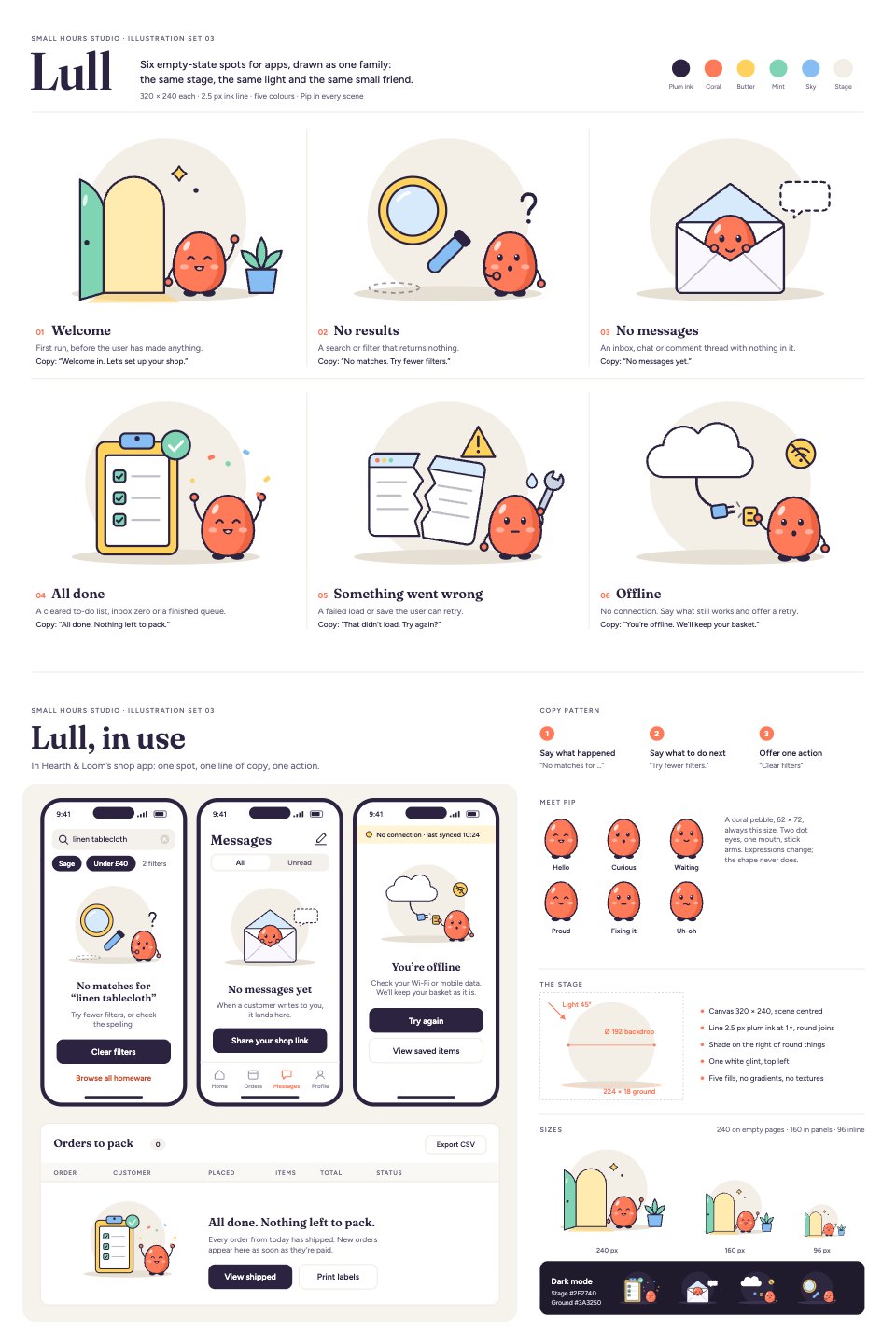
- 1Artboard 1Top sheet, the set: six 320 × 240 spots (welcome at an open door, no results with a magnifier, no messages in an empty envelope, all done beside a ticked clipboard, a torn page for errors, an unplugged cable for offline), each with when to use it and a line of copy, plus the palette. Bottom sheet, in use and rules: three phone screens of a shop app (search with no results, an empty inbox, offline with retry) and an orders table showing all done, Pip's six expressions, the stage construction (backdrop, ground, light, line), sizes at 240, 160 and 96 px, and dark mode
When to use it.
Empty State Illustrations is a family of six spot illustrations for the moments an app has nothing to show: welcome, no results, no messages, all done, error and offline. They're for product designers, developers and founders who want those screens to feel finished. Every spot follows the same rules, a 320 × 240 stage, one 2.5 px ink line, five flat colours and light from the top left, and the same small character, Pip, appears in each with a different expression. A second sheet shows them in phone screens and a web table, with a three-part copy pattern, sizes from 96 to 240 px and dark mode.
Made for
- Web and product designers
- Restaurants, cafés and shops
- Merchandise and apparel makers
- Marketing teams who want art without photos
Make it yours in four steps.
Open it in Vectors and work through it, or let Docsiv AI do the first pass with your details.
- Step 1
Pick the spots your app needs and copy each one onto its screen.
- Step 2
Change the five fills to your brand colours; the ink line and stage keep the family together.
- Step 3
Rewrite the headline, help line and button for each empty state in your product's voice.
- Step 4
Export each spot as SVG for your developers, or as PNG at 240, 160 or 96 px.
Start from the Empty State Illustrations now.
Questions about this template.
Something else on your mind? Ask us in the chat, bottom right of the page.
Is the Empty State Illustrations template free?
Yes. Create a free account and it opens in Docsiv's Vectors app, ready to edit and share. The Free plan includes every Docsiv app and 500 AI credits a month.
Can I change the colours, fonts and text?
Yes, all of it. The template uses Fraunces and Figtree with #2B2340, #FF7A59, #FFD25E, #7FD4B3, #86BDF2, #F3EEE6, and you can change any of them, rewrite every word and add or remove shapes and layers.
What can I export it as?
Vectors in Docsiv offers: AI, SVG, PDF and PNG exports. Once it's saved, you can also share it with a link.
Can Docsiv AI change it for me?
Yes. Tell Docsiv AI what you need, such as your brand's colours, new wording or a new variation, and it makes the changes in Vectors for you to review. AI uses credits; the Free plan includes 500 a month.





Start your illustration with Docsiv AI
Describe the client or the project and Docsiv AI writes a first draft of your empty state illustrations for you to edit, share and send.