

What’s inside the Packaging Dieline.
1 artboards with real content in place. Rewrite them, reorder them, or add your own.
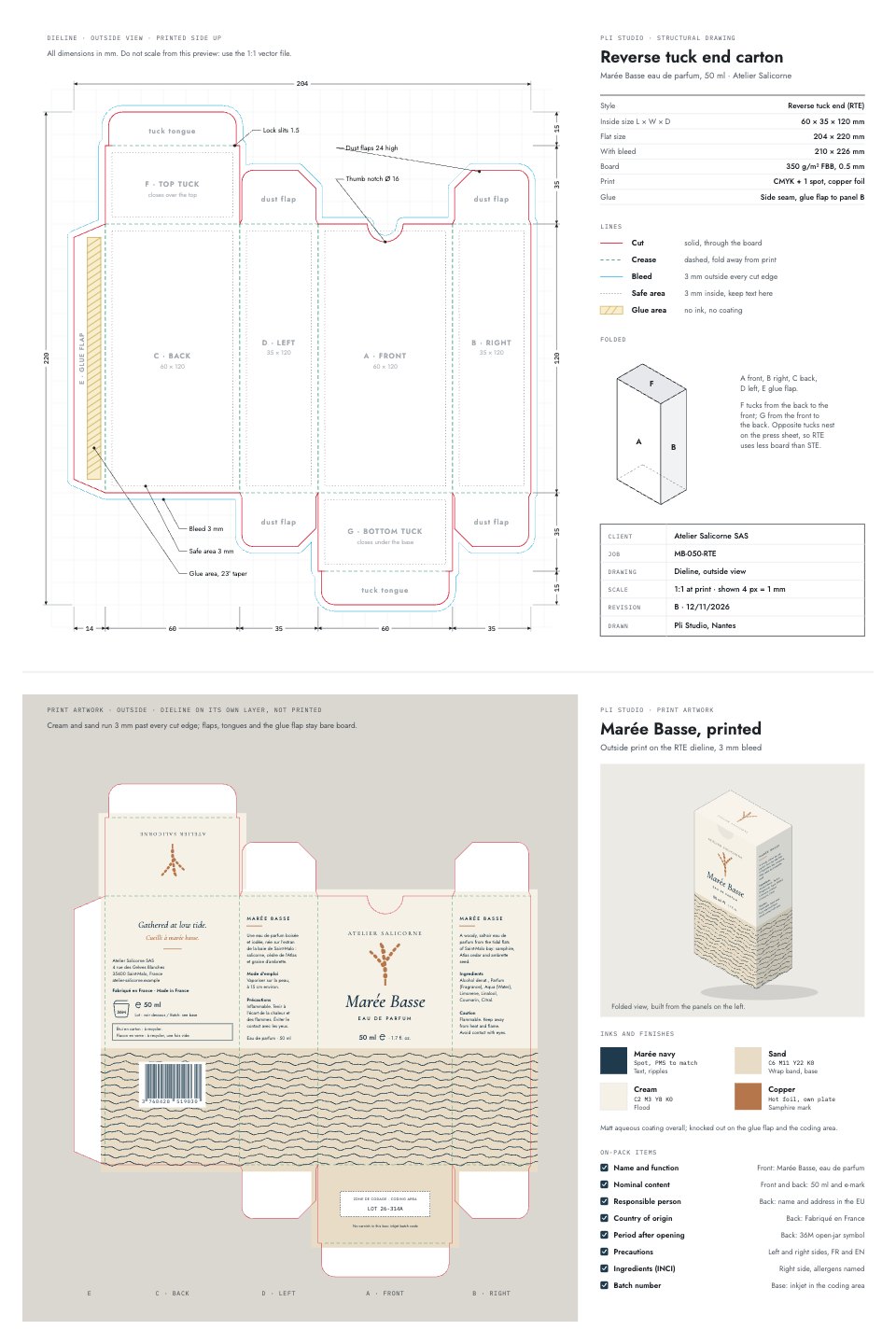
- 1Artboard 1Top sheet, the structural dieline (outside view): reverse tuck end carton 60 × 35 × 120 mm with one closed cut contour, creases, friction-lock slits, a Ø 16 thumb notch, a tapered glue flap with its glue area, four dust flaps with relief cuts, the 3 mm bleed line and 3 mm safe areas, panel names A–G, overall and panel dimensions, a specification table, a line legend, a folded sketch and a title block. Bottom sheet, the printed artwork on the same dieline: cream flood and a sand band of tide ripples wrapping all four walls into bleed, the front (brand, copper samphire mark, Marée Basse, eau de parfum, 50 ml and e-mark), French and English sides with use, precautions and INCI, the back with responsible person, origin, 36M PAO, recycling note and EAN-13, the top tuck rotated to read from the front and a coding area on the base, plus a folded 3D view, inks and finishes, and an EU labelling checklist
When to use it.
Packaging Dieline is a print-ready layout for a reverse tuck end carton, the box used for perfume, cosmetics, candles and supplements. The top sheet is the structural drawing a carton printer expects: cut and crease lines, lock slits, a thumb notch, the glue flap and dust flaps, a 3 mm bleed line, safe areas, every panel dimension, a spec table and a title block. Below it, the same dieline carries finished artwork for a 50 ml eau de parfum, with a folded 3D view, inks and foil, a working EAN-13 barcode and a checklist of EU on-pack labelling.
Made for
- Coffee roasters and food brands
- Event organisers and venues
- Designers making certificates and invitations
- Studios preparing print-ready artwork
Make it yours in five steps.
Open it in Vectors and work through it, or let Docsiv AI do the first pass with your details.
- Step 1
Change the inside length, width and depth to fit your product, and check the flat size against your printer's sheet.
- Step 2
Replace the brand, product name, copy and barcode on each panel, keeping text inside the safe areas.
- Step 3
Swap the cream, sand and navy for your colours and choose your own foil or spot ink.
- Step 4
Ask your carton printer to confirm the board, glue flap and dieline before you send the artwork.
- Step 5
Export the artwork as PDF with the dieline on its own non-printing layer.
Start from the Packaging Dieline now.
Questions about this template.
Something else on your mind? Ask us in the chat, bottom right of the page.
Is the Packaging Dieline template free?
Yes. Create a free account and it opens in Docsiv's Vectors app, ready to edit and share. The Free plan includes every Docsiv app and 500 AI credits a month.
Can I change the colours, fonts and text?
Yes, all of it. The template uses Jost and IBM Plex Mono and Cormorant Garamond with #D7263D, #1E8A5A, #00A0DC, #1E3A4C, #E8DCC6, #F6F1E6, #B5764B, and you can change any of them, rewrite every word and add or remove shapes and layers.
What can I export it as?
Vectors in Docsiv offers: AI, SVG, PDF and PNG exports. Once it's saved, you can also share it with a link.
Can Docsiv AI change it for me?
Yes. Tell Docsiv AI what you need, such as your brand's colours, new wording or a new variation, and it makes the changes in Vectors for you to review. AI uses credits; the Free plan includes 500 a month.








Start your print design with Docsiv AI
Describe the client or the project and Docsiv AI writes a first draft of your box dieline for you to edit, share and send.