

What’s inside the Carbon Footprint Tracker.
Real content in every part, ready to rewrite with your own.
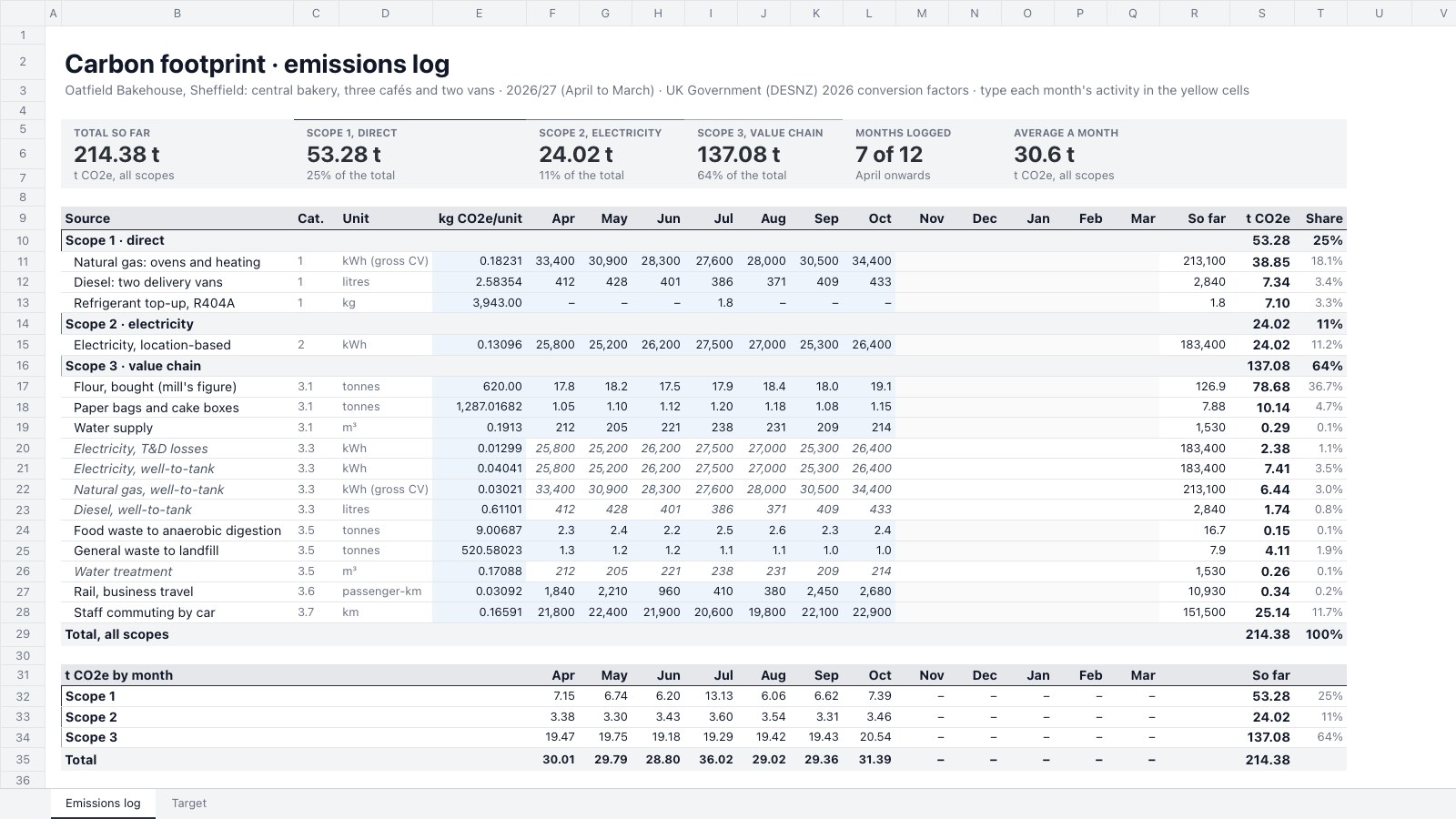
- 1Emissions log: sixteen sources in Scope 1, 2 and 3 (with GHG Protocol categories), each with its unit and DESNZ 2026 factor, twelve months of activity (well-to-tank, T&D and water treatment linked to the rows they come from), the year to date, tonnes CO2e = activity × factor ÷ 1,000, shares, scope subtotals, and t CO2e by scope by month; six tiles
- 2Target: the base year, the 42% cut, the yearly step and this year's allowance; Scope 1 and 2 month by month against last year and the allowance with variance, a running total, an Over/Under status and bars drawn in cells; so-far and full-year forecast rows; tiles with and without July's refrigerant leak; and the main sources so far
When to use it.
Carbon Footprint Tracker is a spreadsheet for small businesses measuring their greenhouse gas emissions month by month, for a sustainability report, a customer questionnaire or a net-zero plan. The emissions log lists each source under Scope 1, 2 or 3 with its GHG Protocol category, unit and UK Government conversion factor, turns the activity you type in into tonnes CO2e, and totals it by scope and month. The Target tab tracks Scope 1 and 2 against a straight-line cut from your base year, with a monthly allowance, variance, a year-end forecast and your largest sources.
Made for
- Sustainability and ESG teams
- Consultants advising on sustainability
- Companies reporting on impact
- Nonprofits and public bodies
Make it yours in four steps.
Open it in Spreadsheets and work through it, or let Docsiv AI do the first pass with your details.
- Step 1
Rename the business and financial year in the titles, and replace the sources with your own: fuels, electricity, purchases, waste, travel and commuting.
- Step 2
Check each conversion factor against the latest government set, and update them every June.
- Step 3
Each month, type your activity from bills, fuel cards and supplier reports into the yellow cells.
- Step 4
On the Target tab, enter your base-year total, the cut you've committed to and last year's months, then watch the variance and forecast.
Start from the Carbon Footprint Tracker now.
Questions about this template.
Something else on your mind? Ask us in the chat, bottom right of the page.
Is the Carbon Footprint Tracker template free?
Yes. Create a free account and it opens in Docsiv's Spreadsheets app, ready to edit and share. The Free plan includes every Docsiv app and 500 AI credits a month.
Can I change the colours, fonts and text?
Yes, all of it. The template uses Roboto with #2b2f36, #e5e7eb, #2b2f36, #6b7280, #a3a9b3, #eef4fb, and you can change any of them, rewrite every word and add or remove rows and columns.
What can I export it as?
Spreadsheets in Docsiv offers: XLSX, CSV and PDF exports. Once it's saved, you can also share it with a link.
Can Docsiv AI write the carbon footprint tracker for me?
Yes. Tell Docsiv AI about the client or project and it can draft the content in this template's style, which you then review and edit. AI uses credits; the Free plan includes 500 a month.

Start your sustainability deck with Docsiv AI
Describe the client or the project and Docsiv AI writes a first draft of your carbon footprint tracker for you to edit, share and send.