

What’s inside the Seating Plan.
Real content in every part, ready to rewrite with your own.
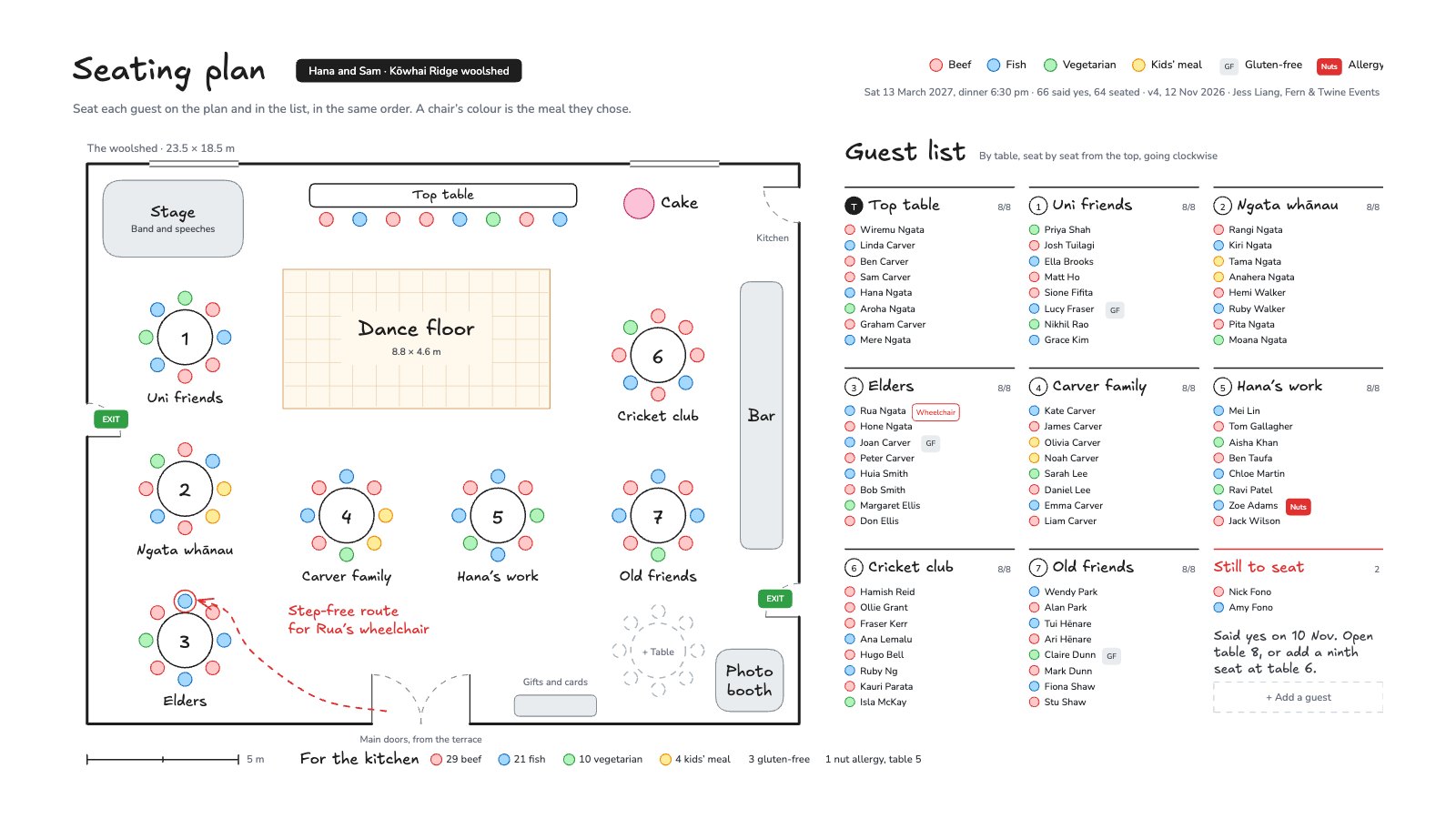
- 1The woolshed to scale: walls, doors with their swings, fire exits, windows, the kitchen door and a 5 m scale bar
- 2The stage, top table, dance floor, bar, cake, gifts and photo booth
- 37 round tables of eight and the top table, every chair coloured by its guest’s meal, and a dashed table for late RSVPs
- 4The step-free route to the wheelchair seat in red, and the meal counts for the kitchen
- 5The guest list by table, seat by seat, with dietary needs, and 2 guests still to seat
When to use it.
Seating Plan is a whiteboard for seating guests at a wedding or dinner. On the left the venue is drawn to scale, with walls, doors, fire exits, the stage, top table, dance floor and bar, and round tables of eight whose chairs are coloured by each guest’s meal. On the right the guest list runs table by table, seat by seat in the same order as the chairs, with gluten-free, allergy and access needs marked. The meal counts for the kitchen and the guests still to seat are counted for you. The example is a vineyard wedding for 66.
Made for
- Event organisers
- Teams planning offsites and retreats
- Community and workshop hosts
- Venues and travel guides
Make it yours in four steps.
Open it in Whiteboard and work through it, or let Docsiv AI do the first pass with your details.
- Step 1
Redraw the walls, doors and fixtures to your venue, keeping the 5 m scale bar.
- Step 2
Drag the tables into place and add or remove tables as your numbers change.
- Step 3
Type each guest into the list in seat order and colour their chair by the meal they chose.
- Step 4
Mark dietary and access needs, then send the kitchen counts to your caterer.
Start from the Seating Plan now.
Questions about this template.
Something else on your mind? Ask us in the chat, bottom right of the page.
Is the Seating Plan template free?
Yes. Create a free account and it opens in Docsiv's Whiteboard app, ready to edit and share. The Free plan includes every Docsiv app and 500 AI credits a month.
Can I change the colours, fonts and text?
Yes, all of it. The template uses Excalifont and Nunito with #ffc9c9, #a5d8ff, #b2f2bb, #ffec99, #e9ecef, #e03131, and you can change any of them, rewrite every word and add or remove notes, shapes and connectors.
What can I export it as?
Whiteboard in Docsiv offers: Excalidraw boards, PNG and SVG exports. Once it's saved, you can also share it with a link.
Can Docsiv AI write the wedding seating chart for me?
Yes. Tell Docsiv AI about the client or project and it can draft the content in this template's style, which you then review and edit. AI uses credits; the Free plan includes 500 a month.
Start your event deck with Docsiv AI
Describe the client or the project and Docsiv AI writes a first draft of your wedding seating chart for you to edit, share and send.