

What’s inside the Run of Show.
3 pages with real content in place. Rewrite them, reorder them, or add your own.
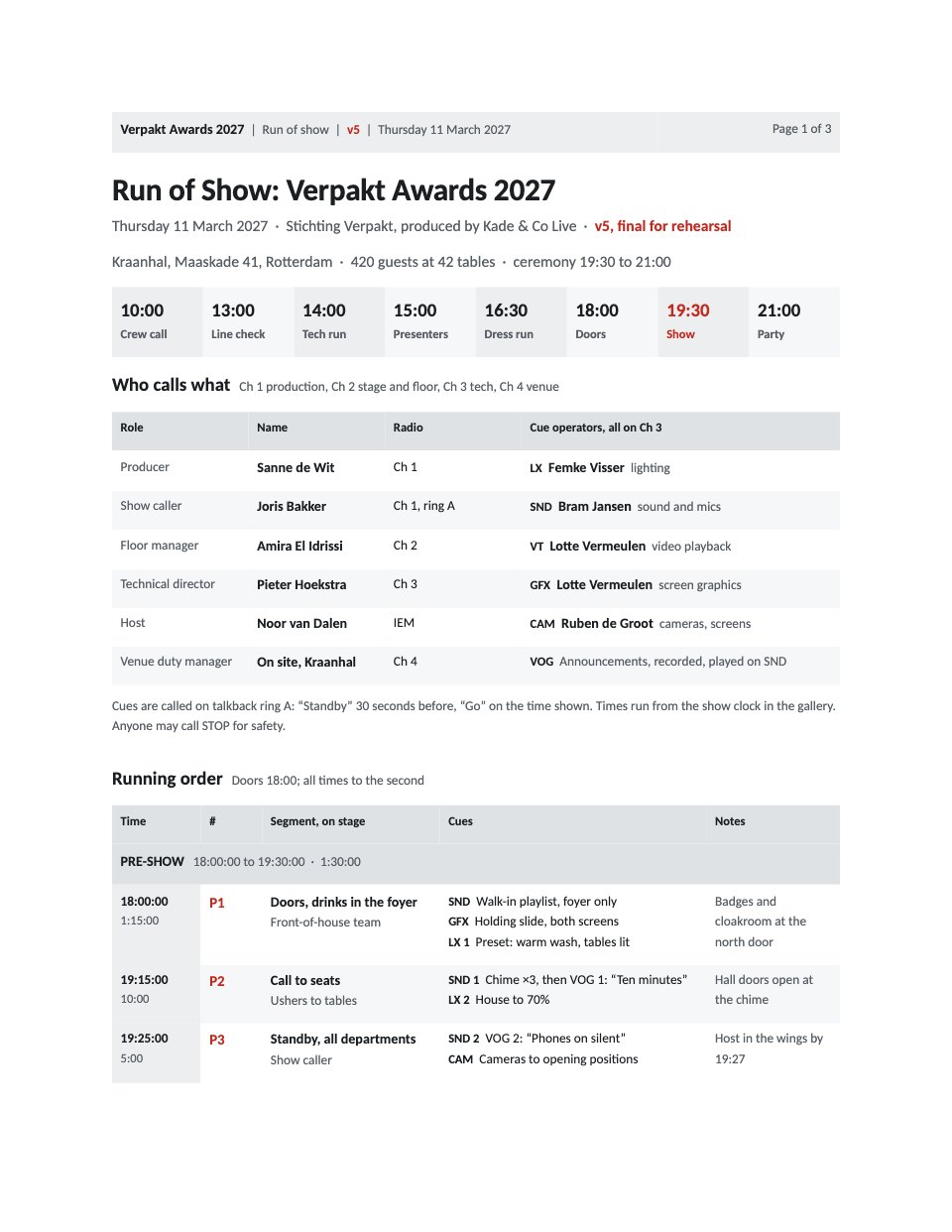
- 1Page 1The event, venue and version, the key times from crew call to party, who is on which radio channel and which operator runs each cue colour, how cues are called, and the pre-show from doors to standby
- 2Page 2Act 1 to the second: opening titles, host and chair, the first award broken down cue by cue as the standard sequence, two more awards, the jury chair’s review, a partner award and the partner film
- 3Page 3Act 2 to the second: four awards, the Grand Prix shortlist and winner, the close, the winners’ photo and the change to the party, then what to do if a winner is missing, a VT fails, the show runs late or must stop
When to use it.
Run of Show is a three-page running order for a live event, shown for an awards night with 420 guests, eight awards and a Grand Prix. Page one gives the key times of the day from crew call to party, who is on which radio channel and which operator runs each cue, how cues are called, and the pre-show from doors to standby. Pages two and three take every segment to the second, with who is on stage, numbered lighting, sound, video, graphics and camera cues and notes, the first award broken down as the standard sequence, and what to do if a winner is missing, a video fails, the show runs late or must stop.
Made for
- Event organisers
- Teams planning offsites and retreats
- Community and workshop hosts
- Venues and travel guides
Make it yours in four steps.
Open it in Documents and work through it, or let Docsiv AI do the first pass with your details.
- Step 1
Put your event, venue, date and version in the header and on page 1, and set the key times of your day.
- Step 2
Fill in your crew, radio channels and cue operators, and the way your show caller calls standby and go.
- Step 3
Write each segment with its length, who is on stage, its cues and notes; the clock times follow from the lengths, so check the act totals.
- Step 4
Adapt the contingencies to your venue, then issue each new version with its number and the time it went out.
Start from the Run of Show now.
Questions about this template.
Something else on your mind? Ask us in the chat, bottom right of the page.
Is the Run of Show template free?
Yes. Create a free account and it opens in Docsiv's Documents app, ready to edit and share. The Free plan includes every Docsiv app and 500 AI credits a month.
Can I change the colours, fonts and text?
Yes, all of it. The template uses Calibri with #c42b20, #dfe2e5, #eceef0, #f6f7f8, #1c1f22, and you can change any of them, rewrite every word and add or remove pages.
What can I export it as?
Documents in Docsiv offers: DOCX, PDF, ODT, RTF and Markdown exports. Once it's saved, you can also share it with a link.
Can Docsiv AI write the run of show for me?
Yes. Tell Docsiv AI about the client or project and it can draft the content in this template's style, which you then review and edit. AI uses credits; the Free plan includes 500 a month.




Start your event deck with Docsiv AI
Describe the client or the project and Docsiv AI writes a first draft of your run of show for you to edit, share and send.