

What’s inside the Decision Log.
2 screens with real content in place. Rewrite them, reorder them, or add your own.
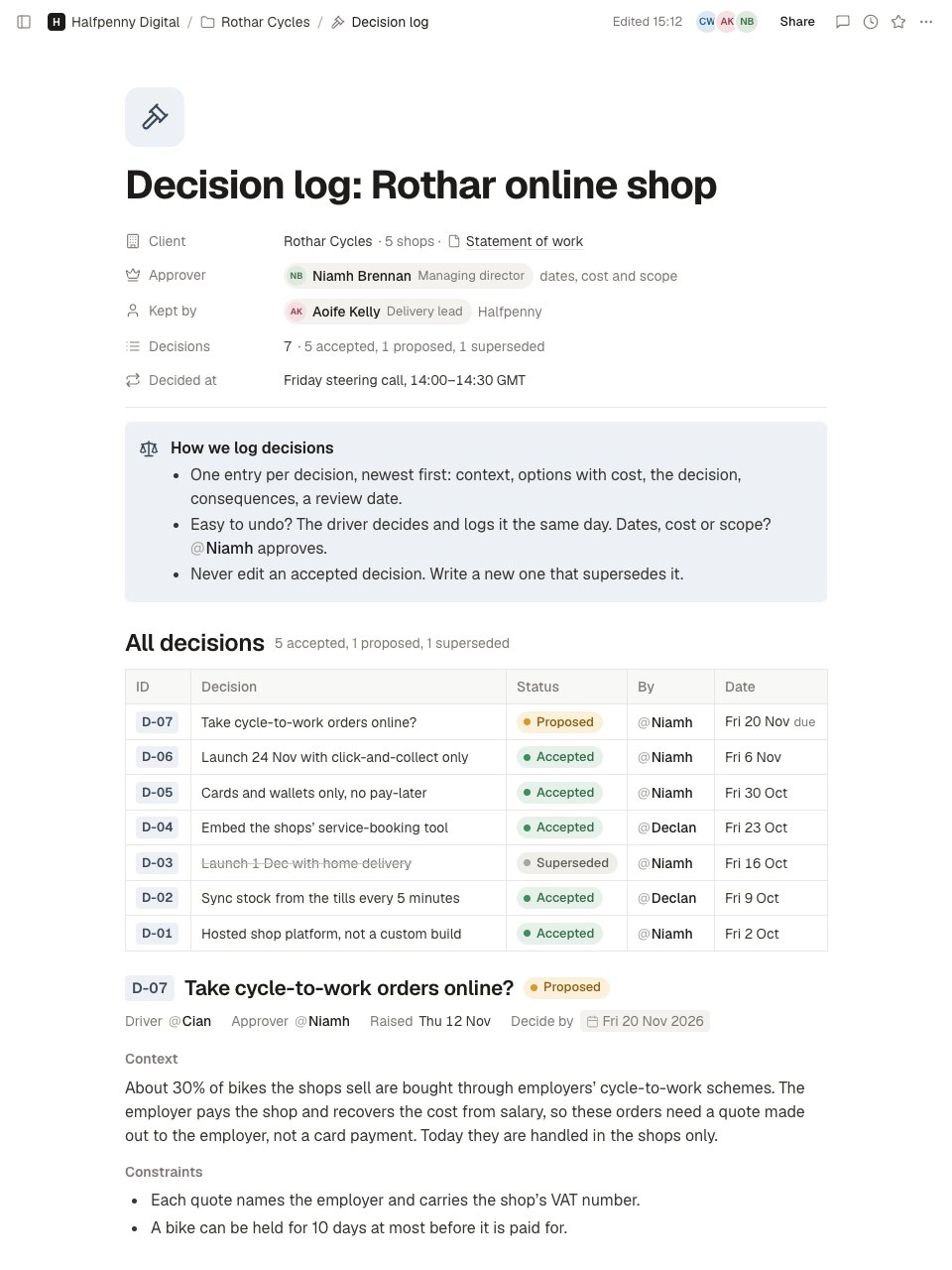
- 1Screen 1The top of the log: client, who approves, who keeps the log, the number of decisions by status and when they are taken; a callout with the rules (one entry each, who may decide what, never edit an accepted one); an index of every decision with ID, status, approver and date; and the newest entry's header and context.
- 2Screen 2Further down: that entry's options with cost, the recommendation and the approver's pending decision; the previous decision in full, with context, options, the chosen one marked, the decision and what it supersedes, consequences and a review date; and older entries folded into a toggle.
When to use it.
Decision Log is a page in Notes for keeping a project's decisions in one place, so nobody has to ask why it was done. Properties at the top name the client, who approves what and who keeps the log, with a count of decisions by status. A callout sets the rules: one entry per decision, who may decide what, and never edit an accepted one. An index lists every decision with its ID, status, approver and date. Each entry gives the driver and approver, the context, the options considered with their cost, the decision in a sentence, its consequences and a review date, with older entries in a toggle.
Made for
- Agencies and consultants running client work
- Project managers and team leads
- Sales and account teams
- Any team that writes things down together
Make it yours in four steps.
Open it in Notes and work through it, or let Docsiv AI do the first pass with your details.
- Step 1
Change the title and the properties to your project: the client, who approves dates, cost and scope, and who keeps the log.
- Step 2
Agree the rules in the callout with your client, so everyone knows which decisions need approval.
- Step 3
Log each decision with the next ID: its context, two or three options with their cost, the decision and what follows from it.
- Step 4
Add a row to the index for every entry, and when a decision changes, write a new one that supersedes it and mark the old one.
Start from the Decision Log now.
Questions about this template.
Something else on your mind? Ask us in the chat, bottom right of the page.
Is the Decision Log template free?
Yes. Create a free account and it opens in Docsiv's Notes app, ready to edit and share. The Free plan includes every Docsiv app and 500 AI credits a month.
Can I change the colours, fonts and text?
Yes, all of it. The template uses Geist with #3b4859, #edf0f4, #1d1c1a, #37352f, #7d7a75, and you can change any of them, rewrite every word and add or remove blocks and sub-pages.
What can I export it as?
Notes in Docsiv offers: Pages, Markdown, Word and PDF exports. Once it's saved, you can also share it with a link.
Can Docsiv AI write the decision log for me?
Yes. Tell Docsiv AI about the client or project and it can draft the content in this template's style, which you then review and edit. AI uses credits; the Free plan includes 500 a month.
Start your notes with Docsiv AI
Describe the client or the project and Docsiv AI writes a first draft of your decision log for you to edit, share and send.