

What’s inside the Conference Website.
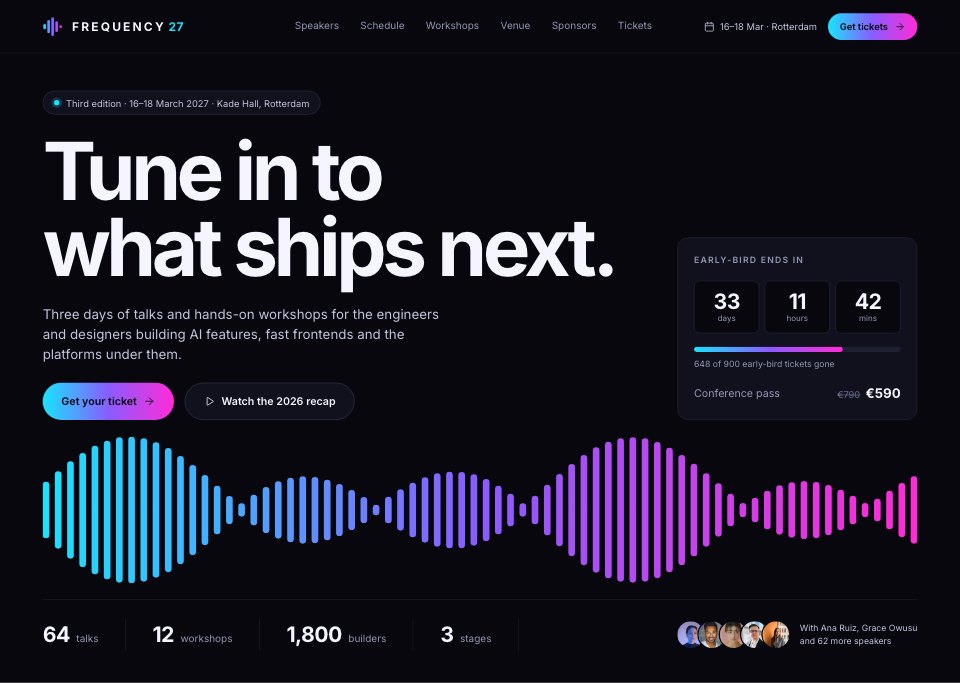
10 screens with real content in place. Rewrite them, reorder them, or add your own.
- 1Screen 1Hero: oversized headline, dates and venue, ticket buttons, early-bird countdown, gradient waveform, numbers and speaker faces
- 2Screen 2About and tracks: why Frequency, the four tracks, last year in numbers and photos
- 3Screen 3Speakers: track filters, eight speaker cards with photos, keynotes in gradient frames
- 4Screen 4Speaker detail: bio, talk abstract, session time and stage, links
- 5Screen 5Schedule: day tabs, three stages side by side, keynote, sessions by track, breaks, saved sessions
- 6Screen 6Session detail: abstract, speaker, room, add to agenda, related talks
- 7Screen 7Tickets: early-bird meter, three passes with the featured one in a gradient frame, quantity, team and student offers
- 8Screen 8Registration: attendee details, workshop choice, invoice and payment
- 9Screen 9Venue and travel: Kade Hall map, getting there, partner hotels
- 10Screen 10Sponsors and footer: sponsor tiers with wordmarks, become a sponsor, newsletter and links
When to use it.
Conference Website is a 10-screen website design for conferences, festivals and industry events. It covers a hero with an early-bird countdown, the tracks, speakers and a speaker's page, a schedule across three stages, a session page, ticket passes and registration, the venue with travel and hotels, and the sponsors with the footer. A blue-black ground, white type and a cyan-to-magenta gradient on a waveform of bars, buttons and the featured ticket give it a bold, after-dark look.
Made for
- Web design agencies and freelancers
- Small businesses planning a new site
- Founders launching a product
- Developers who need a design to build
Make it yours in four steps.
Open it in UI design and work through it, or let Docsiv AI do the first pass with your details.
- Step 1
Replace Frequency 2027 with your event's name, dates and city.
- Step 2
Swap the speaker photos, talks and schedule for your own programme.
- Step 3
Edit the ticket passes, prices, venue and sponsor tiers.
- Step 4
Link the screens into a clickable prototype, or export them as FIG, SVG, PNG or PDF for your developers.
Start from the Conference Website now.
Questions about this template.
Something else on your mind? Ask us in the chat, bottom right of the page.
Is the Conference Website template free?
Yes. Create a free account and it opens in Docsiv's UI design app, ready to edit and share. The Free plan includes every Docsiv app and 500 AI credits a month.
Can I change the colours, fonts and text?
Yes, all of it. The template uses Inter with #07070d, #10111c, #f4f5ff, #19e3ff, #8a5cff, #ff2bd6, and you can change any of them, rewrite every word and add or remove screens and layers.
What can I export it as?
UI design in Docsiv offers: FIG, SVG, PNG and PDF files. Once it's saved, you can also share it with a link.
Can Docsiv AI change it for me?
Yes. Tell Docsiv AI what you need, such as your brand's colours, new wording or another screen, and it makes the changes in UI design for you to review. AI uses credits; the Free plan includes 500 a month.



Start your website design with Docsiv AI
Describe the client or the project and Docsiv AI writes a first draft of your conference website for you to edit, share and send.