

What’s inside the Real Estate Website.
11 screens with real content in place. Rewrite them, reorder them, or add your own.
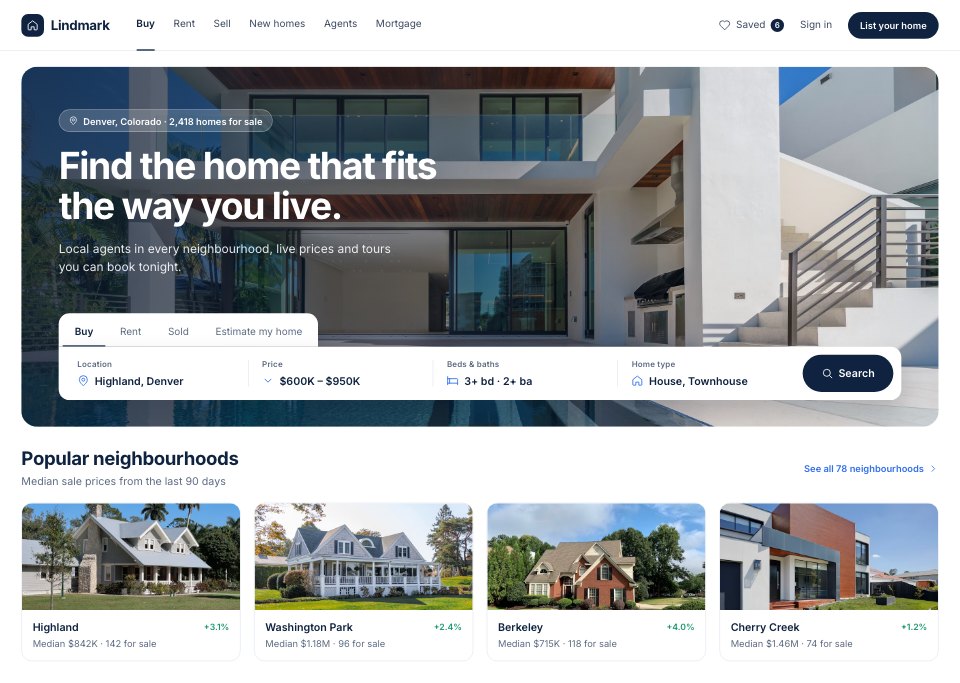
- 1Screen 1Home: photo hero with search (buy, rent, sold), location, price, beds and type, popular neighbourhoods
- 2Screen 2Featured homes and guides: new listings carousel, open houses this weekend, neighbourhood guides
- 3Screen 3Search results with map: filter chips, 142 homes as photo cards, street map with price pins and a selected home
- 4Screen 4Listing detail: photo mosaic, price and facts, overview tabs, description, agent card with tour dates
- 5Screen 5Photo gallery: full-screen viewer with thumbnails and room labels
- 6Screen 6Floor plan and features: two-level plan, room sizes, interior and exterior features
- 7Screen 7Schedule a tour: in person or video, date and time slots, contact details, confirmation
- 8Screen 8Agent profile: bio, sales stats, active listings, client reviews
- 9Screen 9Mortgage calculator: price, down payment, loan type and rate controls, monthly breakdown donut, balance chart
- 10Screen 10Saved homes: shortlist with price changes, side-by-side compare
- 11Screen 11Home valuation: address lookup, estimated value range, recent nearby sales
When to use it.
Real Estate Website is an 11-screen website design for estate agents, brokerages and property start-ups. It covers a photo hero with search, new listings and open houses, results beside a street map with price pins, a listing with its photo gallery and floor plan, booking a tour, an agent's profile, a mortgage calculator with a monthly breakdown, saved homes side by side and a home valuation. White pages, deep navy type, one bright blue for interactive states and large house photos keep it clean.
Made for
- Web design agencies and freelancers
- Small businesses planning a new site
- Founders launching a product
- Developers who need a design to build
Make it yours in four steps.
Open it in UI design and work through it, or let Docsiv AI do the first pass with your details.
- Step 1
Swap Lindmark for your agency's name and set the navy and blue to your brand.
- Step 2
Replace the house photos, prices and neighbourhoods with your own listings.
- Step 3
Edit the agent profile, tour slots and mortgage calculator figures.
- Step 4
Link the screens into a clickable prototype, or export them as FIG, SVG, PNG or PDF for your developers.
Start from the Real Estate Website now.
Questions about this template.
Something else on your mind? Ask us in the chat, bottom right of the page.
Is the Real Estate Website template free?
Yes. Create a free account and it opens in Docsiv's UI design app, ready to edit and share. The Free plan includes every Docsiv app and 500 AI credits a month.
Can I change the colours, fonts and text?
Yes, all of it. The template uses Inter with #ffffff, #f5f7fa, #0f2340, #2f6fed, #1c9a6c, #eef0ec, and you can change any of them, rewrite every word and add or remove screens and layers.
What can I export it as?
UI design in Docsiv offers: FIG, SVG, PNG and PDF files. Once it's saved, you can also share it with a link.
Can Docsiv AI change it for me?
Yes. Tell Docsiv AI what you need, such as your brand's colours, new wording or another screen, and it makes the changes in UI design for you to review. AI uses credits; the Free plan includes 500 a month.







Start your website design with Docsiv AI
Describe the client or the project and Docsiv AI writes a first draft of your real estate website for you to edit, share and send.