

What’s inside the SaaS Landing Page.
9 screens with real content in place. Rewrite them, reorder them, or add your own.
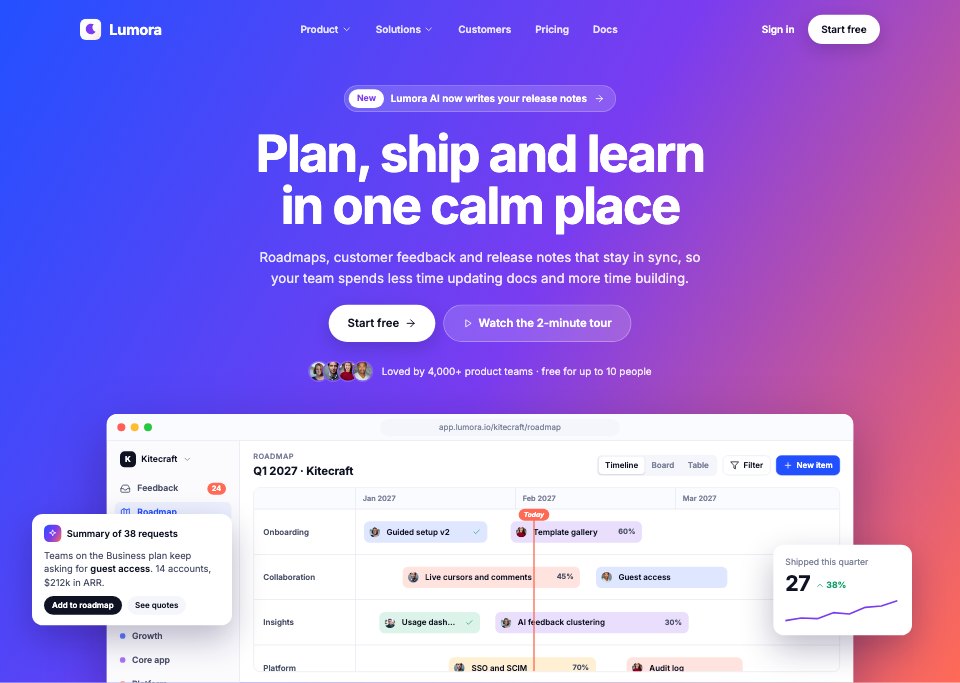
- 1Screen 1Hero: navigation, an announcement, a large headline over the blue-violet-coral gradient, two calls to action, customer avatars and a drawn app window with a roadmap timeline, an AI summary and a KPI card
- 2Screen 2Features: customer wordmarks and a bento grid of five features, each with a small drawn UI (timeline, feedback votes, AI answer, adoption chart, integrations)
- 3Screen 3Product tour: tabs for Plan, Build, Launch and Learn over a large drawn screenshot with callouts
- 4Screen 4Integrations: a hub of eight connected tools around the Lumora mark, two-way sync rows and a webhook example
- 5Screen 5Customer story: one customer's results in big numbers, a quote and a photo
- 6Screen 6Testimonials: a wall of quotes with names, roles and ratings
- 7Screen 7Pricing: a monthly or annual switch, Free, Team and Business plans with the featured plan in a gradient ring, an Enterprise strip and trust notes
- 8Screen 8FAQ: common questions in an accordion with one open
- 9Screen 9Closing and footer: a gradient call-to-action band with stats and a quote, then the footer with a newsletter field, link columns and status
When to use it.
SaaS Landing Page is a 9-section website design for a software product, for founders, marketers and designers launching or relaunching a SaaS site. Each section fills one desktop screen: a hero with a drawn app window, features in a bento grid, a product tour, integrations, a customer story, testimonials, pricing with three plans, an FAQ and a closing call to action with the footer. A blue, violet and coral gradient frames the hero and closing band, with white sections, product screenshots drawn in UI and large tight Inter headlines.
Made for
- Web design agencies and freelancers
- Small businesses planning a new site
- Founders launching a product
- Developers who need a design to build
Make it yours in four steps.
Open it in UI design and work through it, or let Docsiv AI do the first pass with your details.
- Step 1
Swap Lumora for your product's name and change the gradient to your brand colours.
- Step 2
Rewrite the headline, features and product tour around what your product does.
- Step 3
Put in your own plans and prices, customer quotes and FAQ answers.
- Step 4
Link the sections into a clickable prototype, or export them as FIG, SVG, PNG or PDF for your developers.
Start from the SaaS Landing Page now.
Questions about this template.
Something else on your mind? Ask us in the chat, bottom right of the page.
Is the SaaS Landing Page template free?
Yes. Create a free account and it opens in Docsiv's UI design app, ready to edit and share. The Free plan includes every Docsiv app and 500 AI credits a month.
Can I change the colours, fonts and text?
Yes, all of it. The template uses Inter with #2350ff, #7a3cf0, #ff6a55, #0f1222, #f5f6fb, #ffffff, and you can change any of them, rewrite every word and add or remove screens and layers.
What can I export it as?
UI design in Docsiv offers: FIG, SVG, PNG and PDF files. Once it's saved, you can also share it with a link.
Can Docsiv AI change it for me?
Yes. Tell Docsiv AI what you need, such as your brand's colours, new wording or another screen, and it makes the changes in UI design for you to review. AI uses credits; the Free plan includes 500 a month.



Start your website design with Docsiv AI
Describe the client or the project and Docsiv AI writes a first draft of your SaaS landing page for you to edit, share and send.