

What’s inside the Restaurant Website.
10 screens with real content in place. Rewrite them, reorder them, or add your own.
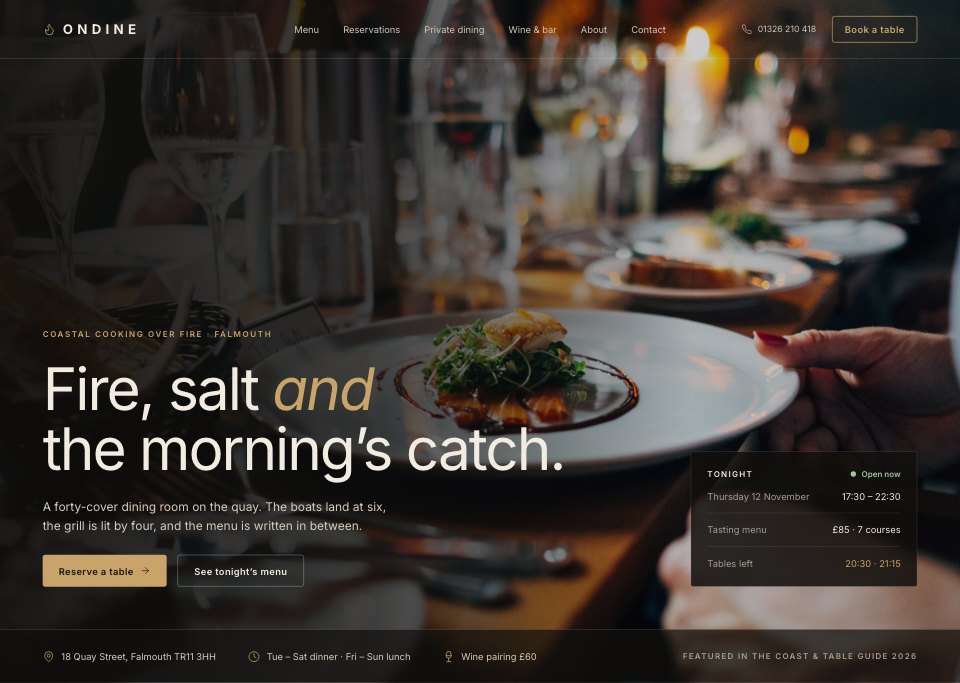
- 1Screen 1Home: full-bleed dining photo, headline, reserve button, tonight’s hours and tables, address strip
- 2Screen 2Home, the kitchen: the chef’s story, three signature dishes, the fire and the boats
- 3Screen 3Menu: dinner tab, four courses with prices and dietary tags, featured dish photo, tasting menu card
- 4Screen 4Tasting menu: seven courses in order, the cellar and zero-proof pairings, booking note
- 5Screen 5Reservations: guests, November calendar with booked and closed days, time slots, seating choice, summary bar
- 6Screen 6Reservation confirmed: the booking, add to calendar, what to know before you come
- 7Screen 7Private dining: three rooms with capacities and minimum spend, a selected room and the enquiry form
- 8Screen 8Wine and bar: the cellar by region, wines by the glass, cocktails and zero-proof
- 9Screen 9About: the story of the room, Jun and the team, the boats and farms we buy from
- 10Screen 10Contact and finding us: harbour map, opening hours, phone, email and the footer
When to use it.
Restaurant Website is a 10-screen website design for restaurants, bars and the designers who build their sites. It covers a photo-led home page and the kitchen's story, the dinner and tasting menus, booking a table on a calendar with time slots and its confirmation, private dining rooms with an enquiry form, the wine and bar list, the team and suppliers, and a harbour map with opening hours and the footer. A warm near-black ground, cream type, one brass accent and full-bleed food photos give it a moody, evening feel.
Made for
- Web design agencies and freelancers
- Small businesses planning a new site
- Founders launching a product
- Developers who need a design to build
Make it yours in four steps.
Open it in UI design and work through it, or let Docsiv AI do the first pass with your details.
- Step 1
Replace Ondine with your restaurant's name and swap in your own food and dining room photos.
- Step 2
Rewrite the dinner and tasting menus with your dishes, prices and dietary tags.
- Step 3
Edit the booking times, private rooms, wine list and opening hours.
- Step 4
Link the screens into a clickable prototype, or export them as FIG, SVG, PNG or PDF for your developers.
Start from the Restaurant Website now.
Questions about this template.
Something else on your mind? Ask us in the chat, bottom right of the page.
Is the Restaurant Website template free?
Yes. Create a free account and it opens in Docsiv's UI design app, ready to edit and share. The Free plan includes every Docsiv app and 500 AI credits a month.
Can I change the colours, fonts and text?
Yes, all of it. The template uses Inter with #110f0d, #1a1714, #f2ebe0, #a69c8e, #c9a46a, and you can change any of them, rewrite every word and add or remove screens and layers.
What can I export it as?
UI design in Docsiv offers: FIG, SVG, PNG and PDF files. Once it's saved, you can also share it with a link.
Can Docsiv AI change it for me?
Yes. Tell Docsiv AI what you need, such as your brand's colours, new wording or another screen, and it makes the changes in UI design for you to review. AI uses credits; the Free plan includes 500 a month.



Start your website design with Docsiv AI
Describe the client or the project and Docsiv AI writes a first draft of your restaurant website for you to edit, share and send.