

What’s inside the Cookbook.
16 pages with real content in place. Rewrite them, reorder them, or add your own.
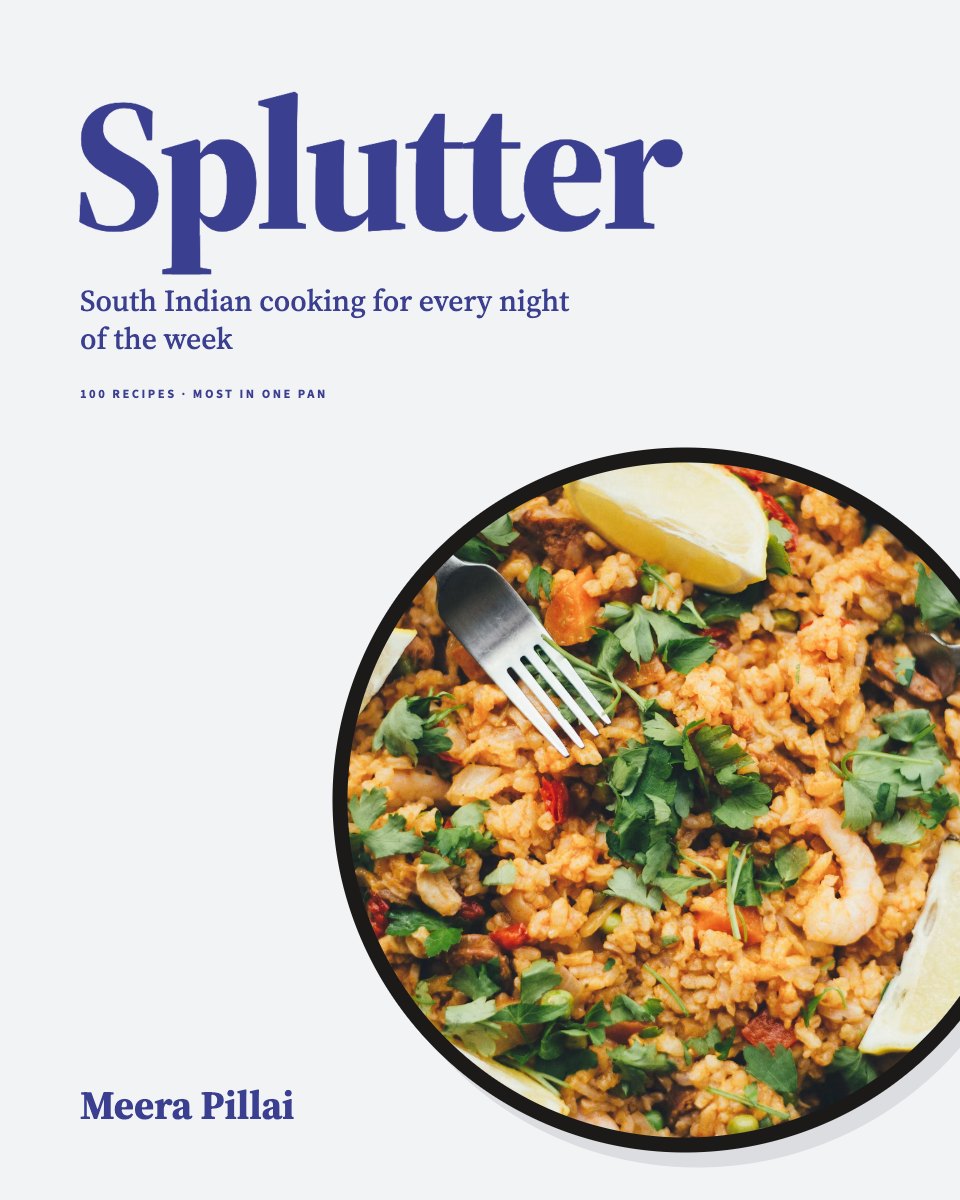
- 1Page 1Front cover: the title, subtitle and author on light grey, a circular pan photo and mustard seeds flying out of it
- 2Page 2Contents (page 4): seven chapters and the back matter with page numbers, kitchen notes and the symbol key
- 3Page 3Chapter opener, Tadka (page 5): a spice photo, a turmeric band, the chapter’s introduction and its recipe list
- 4Page 4How to temper (page 6): the introduction, what one tadka needs, and steps 1–3 drawn in the pan with what each sounds like
- 5Page 5How to temper (page 7): steps 4–6, the order spices go in as a timeline in seconds, and what to do when it goes wrong
- 6Page 6The spice box (page 8): a photo of whole spices, the masala dabba drawn from above and the seven spices in it
- 7Page 7Twelve spices (page 9): each with its Malayalam name, what it tastes of, how long it keeps and the pages that use it, then how to toast and grind
- 8Page 8Coconut chutney (page 10): a drawing of the bowl, serves, prep, cook and keeping times, ingredients, method and notes
- 9Page 9Gunpowder podi (page 11): the same short-recipe page with makes and keeps, ingredients, method and notes
- 10Page 10Chapter opener, From the sea (page 48): a full-bleed sea photo with the chapter number and title
- 11Page 11From the sea (page 49): a pull quote and the chapter’s introduction on light grey, its recipe list and how to buy fish
- 12Page 12Salmon moilee (page 54): a full-bleed photo with a caption and where the recipe is
- 13Page 13Salmon moilee (page 55): the recipe with serves, prep and cook times, grouped ingredients, six method steps and notes
- 14Page 14Pepper prawn spaghetti (page 58): the recipe with a tinted tip box under the method
- 15Page 15Pepper prawn spaghetti (page 59): the photo across the top, a caption and three cook’s notes
- 16Page 16Back cover: blurb, two quotes, the author’s photo and note, publisher, MRP and ISBN barcode
When to use it.
Cookbook is a set of 16 print-ready pages for chefs, food writers, supper clubs and restaurants making a book of their recipes. The sample is a South Indian home cookbook: a front cover, contents with kitchen notes and symbols, a chapter opener, a two-page technique drawn step by step, the spice box with a table of twelve spices, two short recipes, a second chapter opener, and two full recipes with grouped ingredients, numbered method, serves and times and cook’s notes, each facing a full-page photo. The back cover carries a blurb, quotes and an ISBN barcode.
Made for
- Self-publishing authors
- Chefs and food writers
- Small publishers
- Studios making a company book
Make it yours in four steps.
Open it in Reports and work through it, or let Docsiv AI do the first pass with your details.
- Step 1
Put your title, subtitle and name on the front cover, and swap the pan photo for your own dish.
- Step 2
Rename the chapters on the contents page, then match the page numbers on each chapter opener and in the running heads.
- Step 3
Duplicate a recipe page for each dish and type its serves, times, ingredients by stage, method and notes.
- Step 4
Replace the photos with your own, add your blurb, price and ISBN to the back cover, and export a print-ready PDF.
Start from the Cookbook now.
Questions about this template.
Something else on your mind? Ask us in the chat, bottom right of the page.
Is the Cookbook template free?
Yes. Create a free account and it opens in Docsiv's Reports app, ready to edit and share. The Free plan includes every Docsiv app and 500 AI credits a month.
Can I change the colours, fonts and text?
Yes, all of it. The template uses Source Serif 4 and Source Sans 3 with #3b3f8f, #f2f3f5, #ffffff, #111827, #c9cbee, and you can change any of them, rewrite every word and add or remove pages.
What can I export it as?
Reports in Docsiv offers: Report pages with charts, PDF and HTML exports. Once it's saved, you can also share it with a link.
Can Docsiv AI write the cookbook for me?
Yes. Tell Docsiv AI about the client or project and it can draft the content in this template's style, which you then review and edit. AI uses credits; the Free plan includes 500 a month.










































Start your book with Docsiv AI
Describe the client or the project and Docsiv AI writes a first draft of your cookbook for you to edit, share and send.