

What’s inside the Event Budget.
Real content in every part, ready to rewrite with your own.
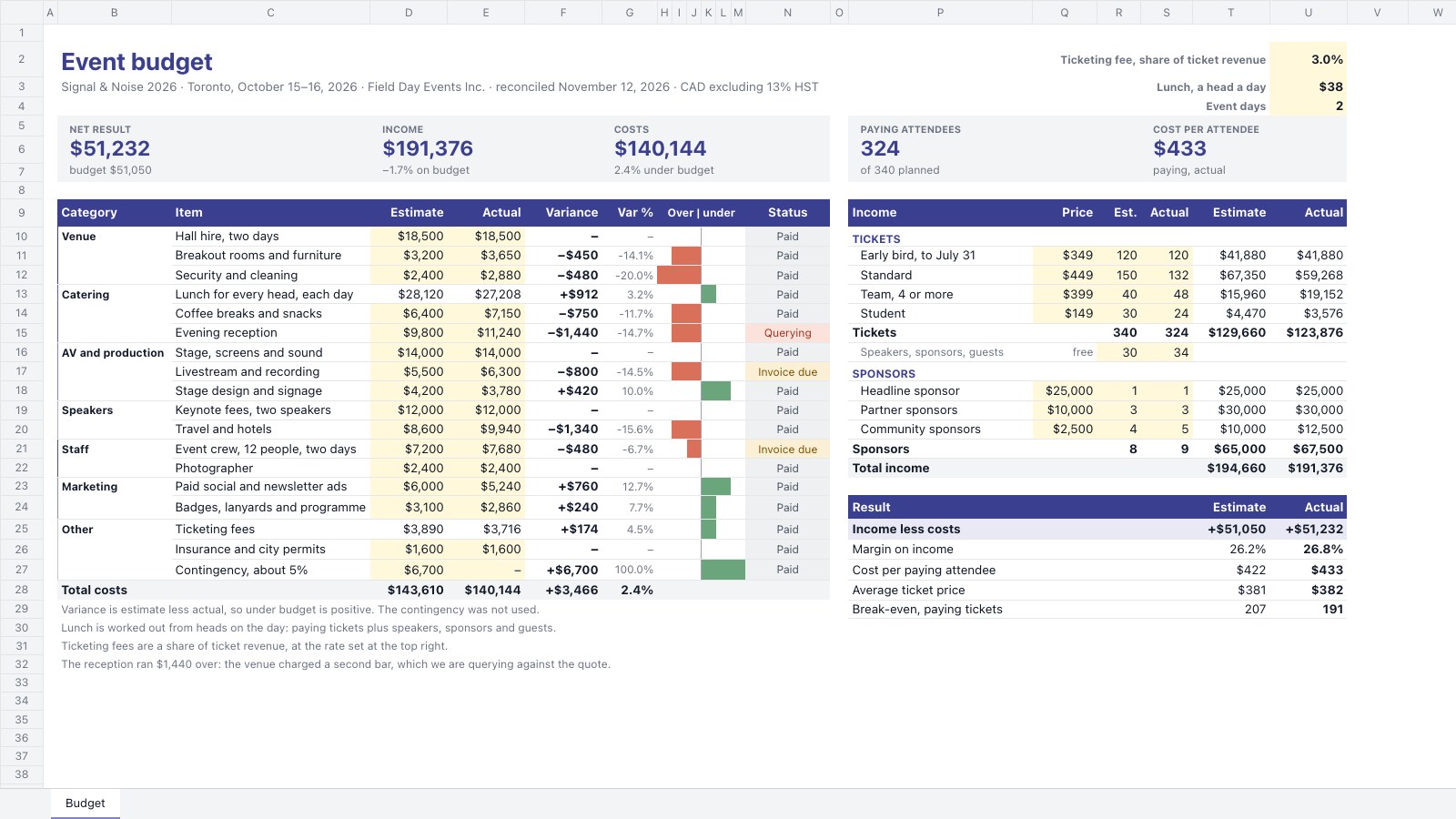
- 118 cost lines in seven categories with estimate, actual, variance, variance %, an over-or-under bar drawn in cells and a payment status
- 2Four ticket tiers and three sponsor tiers with price and estimated and actual quantities, plus free passes for the head count
- 3The result: income less costs, margin, cost per paying attendee, average ticket and break-even tickets, estimate against actual
- 4Five tiles: net result, income, costs, paying attendees and cost per attendee, each against the budget
When to use it.
Event Budget is a spreadsheet for event organisers, agencies and in-house teams planning a conference, launch or festival and reconciling it afterwards. Costs for venue, catering, AV, speakers, staff, marketing and other lines each have an estimate, an actual, the variance and a payment status, with a bar that shows at a glance what ran over. Income from ticket tiers and sponsors sits beside them, with estimated and actual quantities. The result block works out the net, margin, cost per attendee, average ticket and the tickets needed to break even.
Made for
- Marketing teams
- Agencies planning client spend
- Project managers
- Small business owners
Make it yours in four steps.
Open it in Spreadsheets and work through it, or let Docsiv AI do the first pass with your details.
- Step 1
Change the event name, dates and currency in the title, and set the catering rate, ticketing fee and number of days.
- Step 2
Replace the cost lines with your own suppliers and enter each estimate from their quotes.
- Step 3
Set your ticket prices and sponsor tiers, with the numbers you expect to sell.
- Step 4
After the event, type in the actuals and payment status for each line and share the result with your client or board.
Start from the Event Budget now.
Questions about this template.
Something else on your mind? Ask us in the chat, bottom right of the page.
Is the Event Budget template free?
Yes. Create a free account and it opens in Docsiv's Spreadsheets app, ready to edit and share. The Free plan includes every Docsiv app and 500 AI credits a month.
Can I change the colours, fonts and text?
Yes, all of it. The template uses Aptos with #3b3f8f, #7f83c8, #1c6b34, #a3321f, #fff8db, and you can change any of them, rewrite every word and add or remove rows and columns.
What can I export it as?
Spreadsheets in Docsiv offers: XLSX, CSV and PDF exports. Once it's saved, you can also share it with a link.
Can Docsiv AI write the event budget for me?
Yes. Tell Docsiv AI about the client or project and it can draft the content in this template's style, which you then review and edit. AI uses credits; the Free plan includes 500 a month.
Start your budget with Docsiv AI
Describe the client or the project and Docsiv AI writes a first draft of your event budget for you to edit, share and send.