

What’s inside the Startup Costs.
Real content in every part, ready to rewrite with your own.
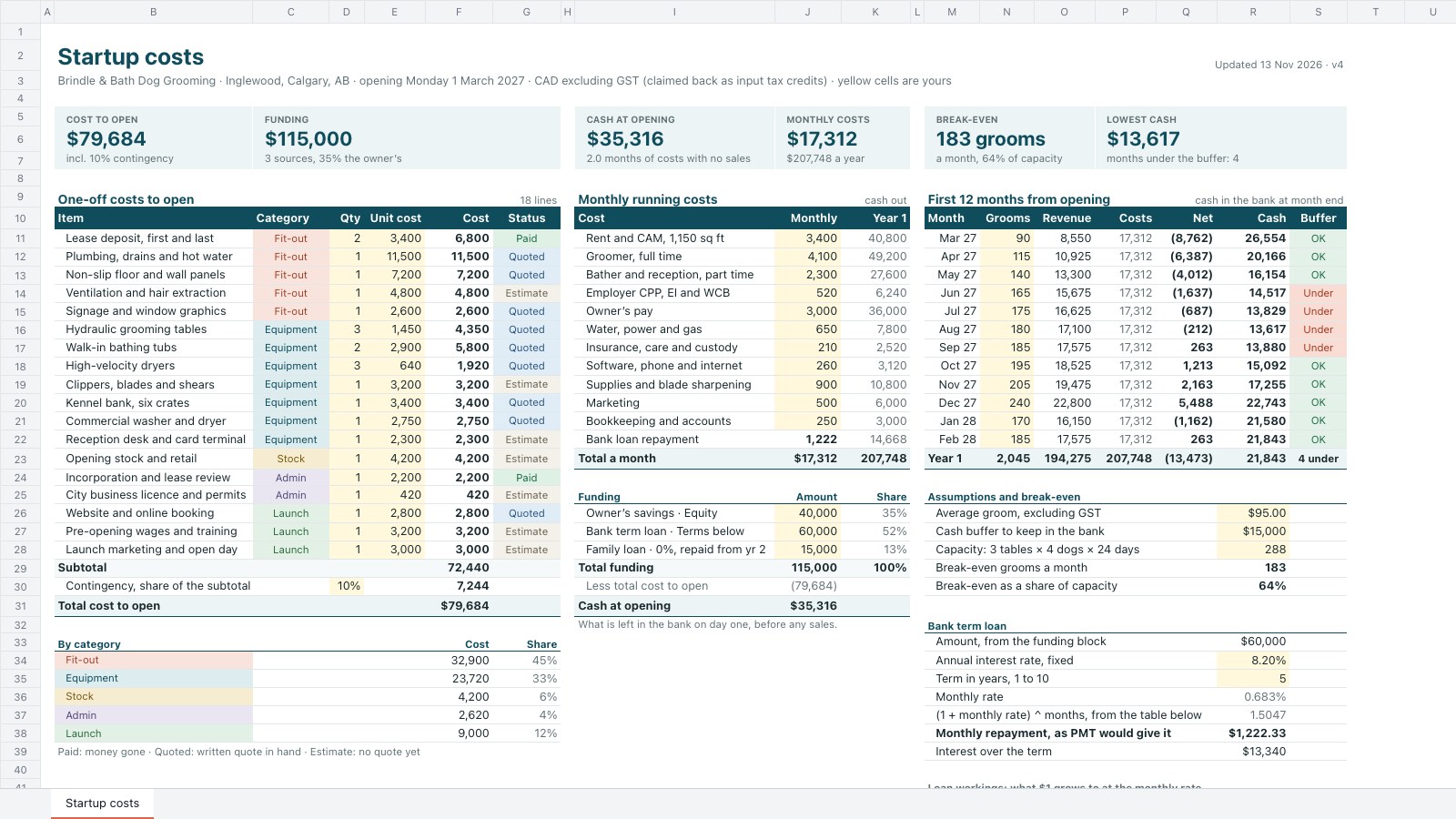
- 1Startup costs: 18 one-off costs to open in five categories (quantity × unit cost, quote status) with a 10% contingency and spend by category; 12 monthly running costs including the loan repayment; three funding sources and the cash left at opening; the first 12 months of grooms, revenue, costs, net and cash with a buffer flag; break-even grooms against capacity; the bank loan worked out like PMT; tiles for cost to open, funding, opening cash, monthly costs, break-even and the lowest cash
When to use it.
Startup Costs is a one-sheet spreadsheet for founders opening a shop, salon, café or studio who need to know what it costs to open and how long the money lasts. One-off costs to open have a quantity, unit cost, category and quote status, plus a contingency. Monthly running costs sit beside the funding sources, with the bank loan repayment worked out and the cash left on opening day. The first twelve months turn your expected customers into revenue, net and a cash balance that is flagged when it drops under your buffer, with the break-even point against capacity.
Made for
- Marketing teams
- Agencies planning client spend
- Project managers
- Small business owners
Make it yours in four steps.
Open it in Spreadsheets and work through it, or let Docsiv AI do the first pass with your details.
- Step 1
Replace the one-off costs with your own quotes, and set each line's category and status as quotes come in.
- Step 2
Enter your monthly running costs, your funding and the bank loan's rate and term.
- Step 3
Set your average sale, capacity and the cash buffer you want to keep, then type the customers you expect each month.
- Step 4
Check the lowest cash and break-even tiles before you sign the lease or the loan, and share the sheet with your bank or adviser.
Start from the Startup Costs now.
Questions about this template.
Something else on your mind? Ask us in the chat, bottom right of the page.
Is the Startup Costs template free?
Yes. Create a free account and it opens in Docsiv's Spreadsheets app, ready to edit and share. The Free plan includes every Docsiv app and 500 AI credits a month.
Can I change the colours, fonts and text?
Yes, all of it. The template uses Inter with #0f4c5c, #edf4f5, #d9654a, #fff8dc, #9a3f27, and you can change any of them, rewrite every word and add or remove rows and columns.
What can I export it as?
Spreadsheets in Docsiv offers: XLSX, CSV and PDF exports. Once it's saved, you can also share it with a link.
Can Docsiv AI write the startup costs for me?
Yes. Tell Docsiv AI about the client or project and it can draft the content in this template's style, which you then review and edit. AI uses credits; the Free plan includes 500 a month.
Start your budget with Docsiv AI
Describe the client or the project and Docsiv AI writes a first draft of your startup costs for you to edit, share and send.