

What’s inside the Zine.
12 pages with real content in place. Rewrite them, reorder them, or add your own.
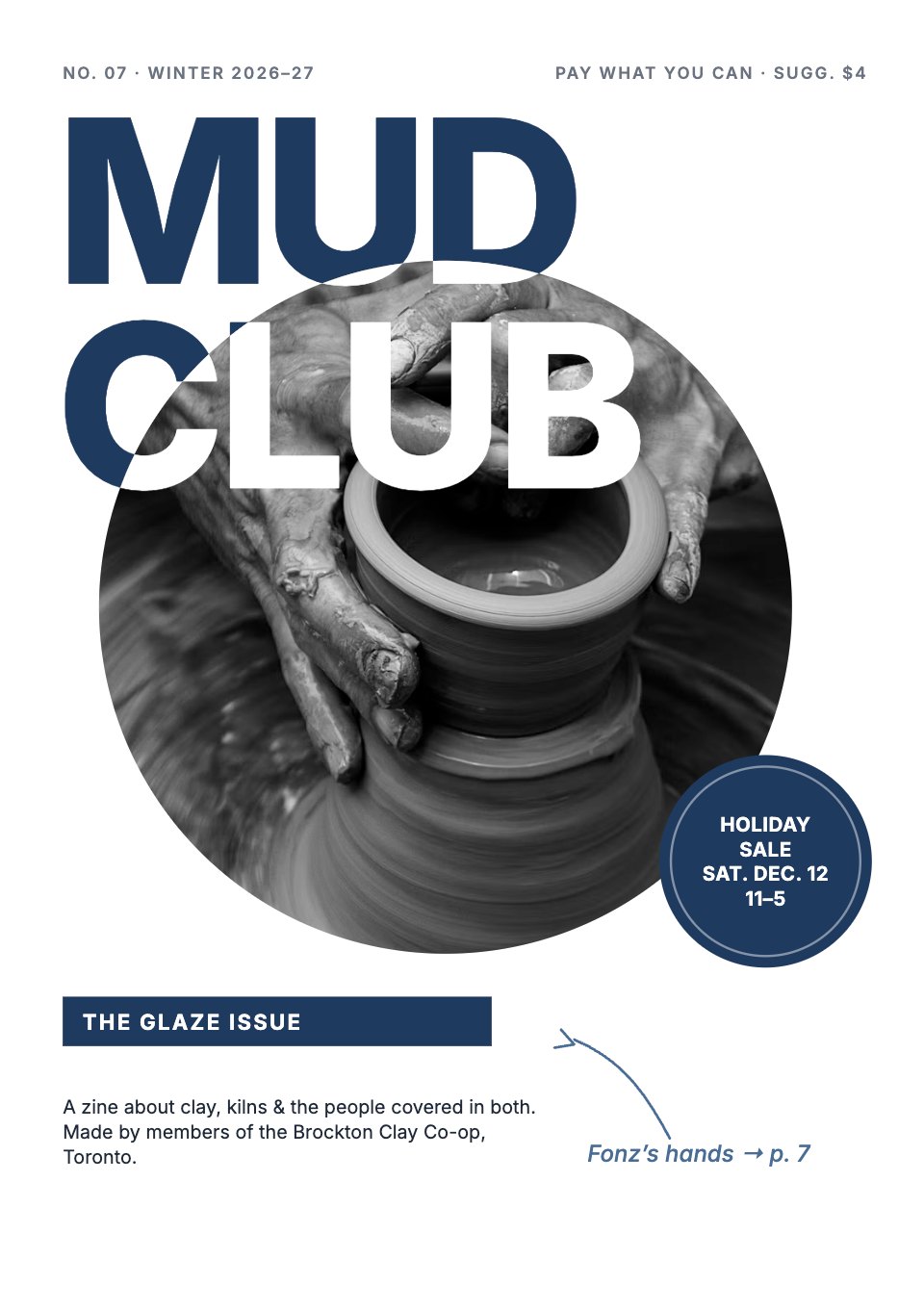
- 1Page 1Front cover: the masthead over a round photo, issue number and theme, price, a sale badge and a pointer to the interview
- 2Page 2Inside front cover: contents, credits, printing notes, land acknowledgement and the call for submissions
- 3Page 3Page 1: the editor’s letter with a small portrait, a pull quote and an italic sign-off
- 4Page 4Page 2: Glaze day opens, with a big headline, a standfirst and a 10 am photo
- 5Page 5Page 3: Glaze day, 11 am to 1 pm: two photos and a drawn three-step guide to dipping
- 6Page 6Page 4: Glaze day, part 2: a full-width photo of a kiln’s worth of pots, a big head and a timestamped caption
- 7Page 7Page 5: a field guide to the co-op’s eight glazes, with a drawn test tile, cone and notes for each
- 8Page 8Page 6: Glaze day, part 3: a full-bleed photo of the kiln shelves, timestamped captions to the Sunday unloading
- 9Page 9Page 7: the interview opener with a pull-quote headline, portrait and first questions
- 10Page 10Page 8: the interview’s end with a mug photo, a pull quote and a drawn guide to a good mug
- 11Page 11Inside back cover: the back page with kiln schedule, class prices with HST, a cut-out coupon and next issue
- 12Page 12Back cover: a navy flood with house rules, a drawn mug, the studio’s address and hours, and the print run
When to use it.
Zine is a 12-page A5 zine template for a community studio, club or collective, styled as a refined indie magazine in navy and cool greys. It runs page by page from the cover and an inside front cover with contents and credits, through the editor’s letter, a four-page photo essay with a field guide, and a two-page interview, to a back page with a schedule, class prices and a cut-out coupon, and a back cover with your address and hours. Full-colour photos, a round badge, drawn diagrams and italic margin notes give it an independent feel, over a tidy grid that keeps it easy to read.
Made for
- Architecture and design studios
- Agencies and creative teams
- Marketing and brand teams
- Companies publishing an annual review
Make it yours in four steps.
Open it in Reports and work through it, or let Docsiv AI do the first pass with your details.
- Step 1
Put your zine’s name, issue number, theme and price on the cover, and swap the cover photo.
- Step 2
Rewrite the editor’s letter and the contents so they match this issue’s pages.
- Step 3
Replace the photo essay and the interview with your own pictures, captions and questions.
- Step 4
Update the schedule, prices and coupon on the back page, then export a PDF to print and fold.
Start from the Zine now.
Questions about this template.
Something else on your mind? Ask us in the chat, bottom right of the page.
Is the Zine template free?
Yes. Create a free account and it opens in Docsiv's Reports app, ready to edit and share. The Free plan includes every Docsiv app and 500 AI credits a month.
Can I change the colours, fonts and text?
Yes, all of it. The template uses Inter with #ffffff, #1f3a5f, #4a6d96, #e7edf4, #1f2937, #6b7280, and you can change any of them, rewrite every word and add or remove pages.
What can I export it as?
Reports in Docsiv offers: Report pages with charts, PDF and HTML exports. Once it's saved, you can also share it with a link.
Can Docsiv AI write the zine for me?
Yes. Tell Docsiv AI about the client or project and it can draft the content in this template's style, which you then review and edit. AI uses credits; the Free plan includes 500 a month.










































Start your magazine with Docsiv AI
Describe the client or the project and Docsiv AI writes a first draft of your zine for you to edit, share and send.