

What’s inside the Lo-fi Wireframe Kit.
6 screens with real content in place. Rewrite them, reorder them, or add your own.
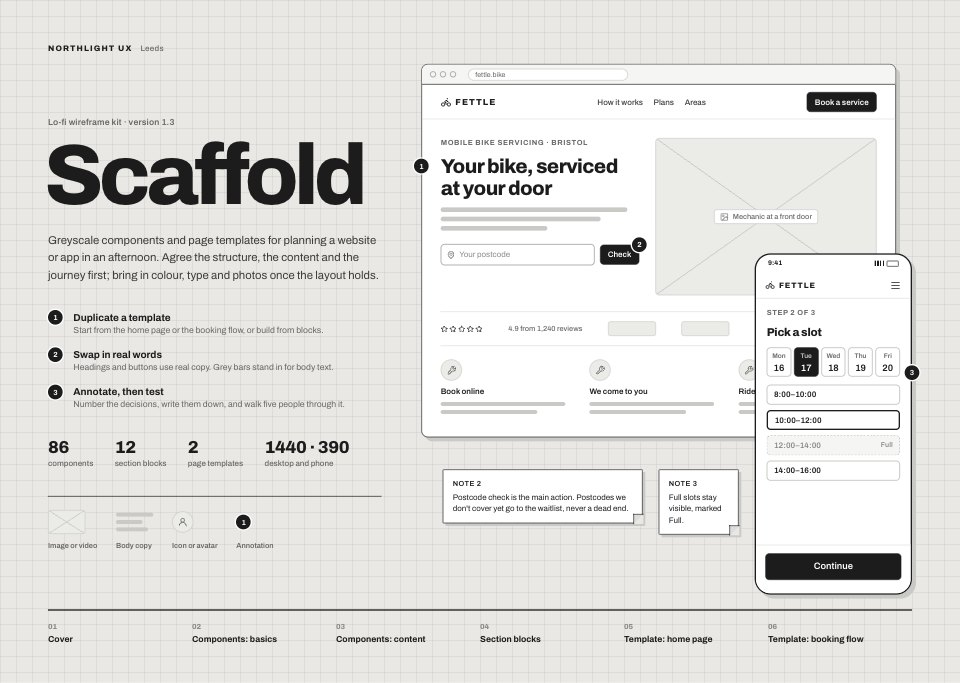
- 1Screen 1Cover and how to use: the kit's name, three steps for using it, the legend (image box, text bars, icon circle, marker) and a wireframe browser and phone from the templates
- 2Screen 2Components, basics: type scale, buttons in four kinds and three sizes, form fields with hint and error, checkboxes, radios, toggles, chips, slider, desktop and mobile navigation, media placeholders, feedback states and the annotation set
- 3Screen 3Components, content and data: service and booking cards, menu and people lists, a bookings table with status chips, stat tiles, empty states, bar, line and donut chart placeholders, a rating breakdown and review card, an accordion, a dialog and a bottom sheet
- 4Screen 4Section blocks: twelve blocks, each at desktop (1440) and phone (390) width: six heroes (split, centred, photo, with form, video, app), features, pricing, testimonials, FAQ, a sign-up band and a footer
- 5Screen 5Template, home page: a desktop home page for a bike-servicing business at two-thirds scale, with seven numbered decisions and the page goal beside it
- 6Screen 6Template, booking flow: five phone screens from postcode to confirmation joined by what moves the rider on, and the three error paths (not covered, no slots, card declined)
When to use it.
Lo-fi Wireframe Kit is a 6-screen greyscale kit for planning a website or app before anyone argues about colour, made for UX designers, agencies and founders running early workshops. It holds basic components (type, buttons, fields, selection, navigation, media and annotation markers), content and data components (cards, lists, a table, stat tiles, chart placeholders, accordions and dialogs), twelve section blocks at desktop and phone width, an annotated home page and a five-screen phone booking flow with its error paths. Headings and buttons use real words while grey bars stand in for body copy.
Made for
- Product designers starting a new app
- Freelancers wireframing for clients
- Agencies running design sprints
- Founders sketching an MVP
Make it yours in four steps.
Open it in UI design and work through it, or let Docsiv AI do the first pass with your details.
- Step 1
Put your client's name and the workshop date on the cover, and rename the Fettle example to your project.
- Step 2
Duplicate the section blocks a page needs, stack them in order, and swap the bars for real headings and buttons.
- Step 3
Number each decision on the home page template and write it down beside the page, with the page goal at the top.
- Step 4
Walk five people through the booking flow, then export the screens as FIG, SVG, PNG or PDF for the design phase.
Start from the Lo-fi Wireframe Kit now.
Questions about this template.
Something else on your mind? Ask us in the chat, bottom right of the page.
Is the Lo-fi Wireframe Kit template free?
Yes. Create a free account and it opens in Docsiv's UI design app, ready to edit and share. The Free plan includes every Docsiv app and 500 AI credits a month.
Can I change the colours, fonts and text?
Yes, all of it. The template uses Archivo with #1c1c1c, #666666, #c9c9c6, #ebebe8, #e9e8e4, #ffffff, and you can change any of them, rewrite every word and add or remove screens and layers.
What can I export it as?
UI design in Docsiv offers: FIG, SVG, PNG and PDF files. Once it's saved, you can also share it with a link.
Can Docsiv AI change it for me?
Yes. Tell Docsiv AI what you need, such as your brand's colours, new wording or another screen, and it makes the changes in UI design for you to review. AI uses credits; the Free plan includes 500 a month.





















Start your uI kit and wireframe with Docsiv AI
Describe the client or the project and Docsiv AI writes a first draft of your wireframe kit for you to edit, share and send.