

What’s inside the Food Delivery App.
10 screens with real content in place. Rewrite them, reorder them, or add your own.
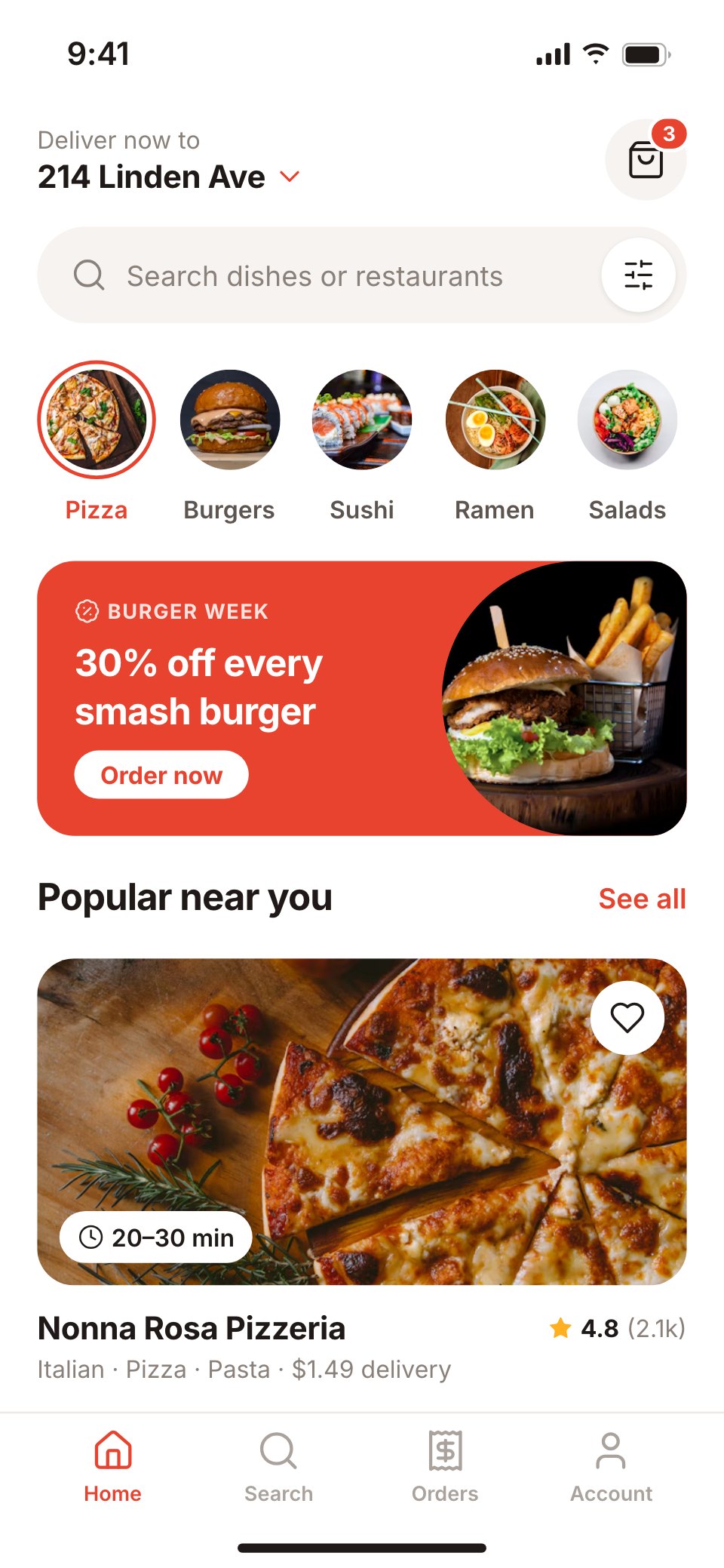
- 1Screen 1Home feed: delivery address, search, food categories, a promo banner and popular restaurants
- 2Screen 2Search: recent searches, cuisines and results with ratings, delivery time and fee
- 3Screen 3Restaurant: a big food photo, rating, time and fee, menu tabs, dishes and the cart bar
- 4Screen 4Dish detail: the dish photo, size and extras, a note for the kitchen and add to cart
- 5Screen 5Cart: items with quantity steppers, suggested add-ons and a promo code
- 6Screen 6Checkout: address, delivery time, the order, a courier tip, payment and the total
- 7Screen 7Order placed: a success state with the order number and arrival time
- 8Screen 8Live order tracking: the courier on a map, the arrival time, order progress and contact buttons
- 9Screen 9Orders: active and past orders with reorder buttons
- 10Screen 10Account: addresses, payment methods, membership and help
When to use it.
Food Delivery App is a 10-screen phone app design for delivery start-ups, restaurant groups and designers building an ordering flow. It follows one evening order from the home feed and search to a restaurant's menu, dish options, the cart, checkout with a courier tip, the order confirmation and live tracking on a map, then past orders and the account. White screens, warm off-white fields and one tomato-red accent sit alongside large food photos with soft corners and a flat-shape map with a red route.
Made for
- Product designers starting a new app
- Startups pitching an app idea
- Agencies designing apps for clients
- Developers who need screens to build from
Make it yours in four steps.
Open it in UI design and work through it, or let Docsiv AI do the first pass with your details.
- Step 1
Put your service's name in place of Forkly and set the red accent to your brand.
- Step 2
Swap the restaurant, dishes and food photos for your own menu.
- Step 3
Edit the checkout, delivery fees and tracking steps to match how your orders work.
- Step 4
Link the screens into a clickable prototype, or export them as FIG, SVG, PNG or PDF.
Start from the Food Delivery App now.
Questions about this template.
Something else on your mind? Ask us in the chat, bottom right of the page.
Is the Food Delivery App template free?
Yes. Create a free account and it opens in Docsiv's UI design app, ready to edit and share. The Free plan includes every Docsiv app and 500 AI credits a month.
Can I change the colours, fonts and text?
Yes, all of it. The template uses Inter with #ffffff, #e8432e, #1f1a17, #f7f3f0, #ffb020, and you can change any of them, rewrite every word and add or remove screens and layers.
What can I export it as?
UI design in Docsiv offers: FIG, SVG, PNG and PDF files. Once it's saved, you can also share it with a link.
Can Docsiv AI change it for me?
Yes. Tell Docsiv AI what you need, such as your brand's colours, new wording or another screen, and it makes the changes in UI design for you to review. AI uses credits; the Free plan includes 500 a month.



Start your app design with Docsiv AI
Describe the client or the project and Docsiv AI writes a first draft of your food delivery app UI for you to edit, share and send.