

What’s inside the Sign-up & Onboarding Flow.
6 screens with real content in place. Rewrite them, reorder them, or add your own.
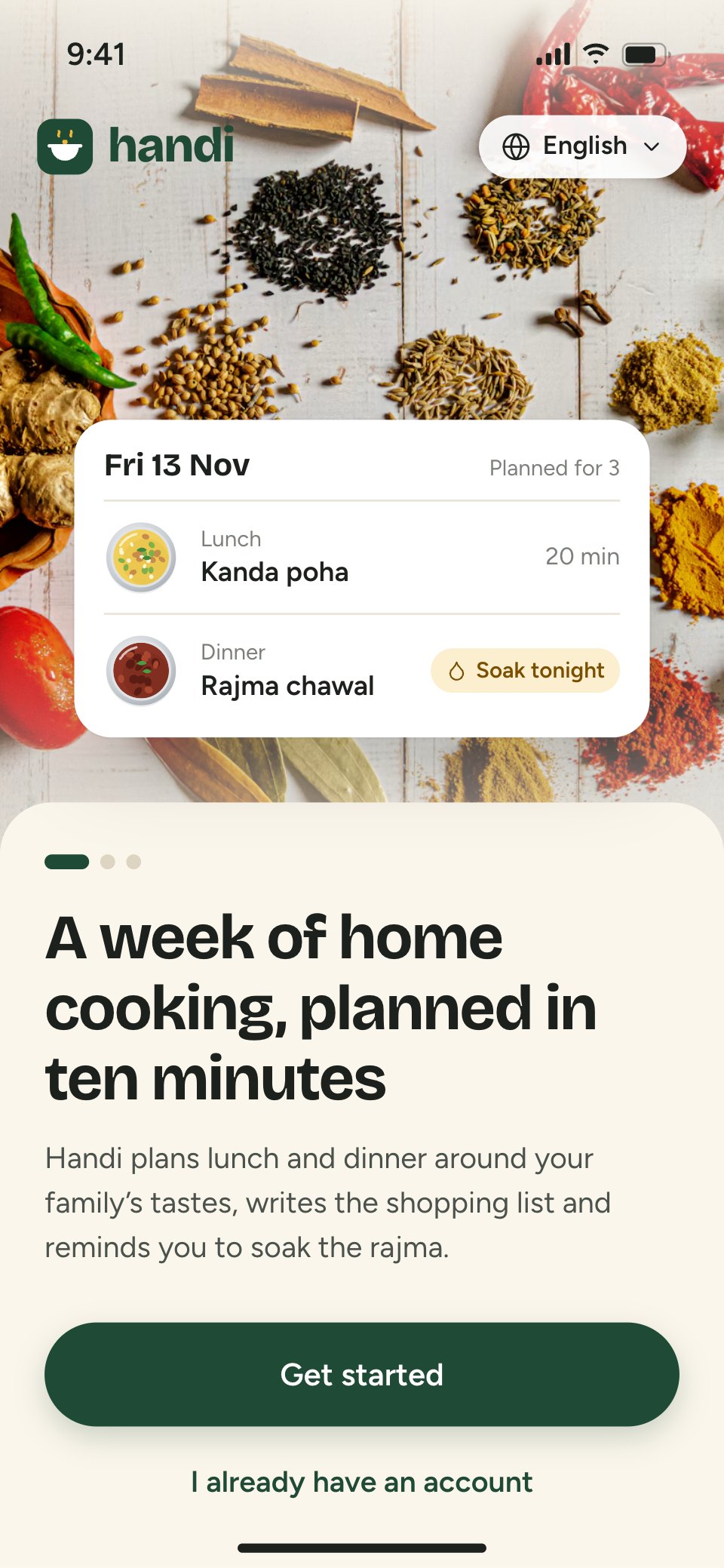
- 1Screen 1Welcome: a photo of whole spices, the wordmark and language picker, a card showing tomorrow’s planned lunch and dinner, the promise, carousel dots, Get started and I already have an account
- 2Screen 2Mobile number: step 1 of 4, +91 country picker, the number field focused and valid, a privacy line, a WhatsApp fallback toggle, Send code, terms, and the iOS number pad
- 3Screen 3Verify: step 2 of 4, six code boxes with five digits in and the sixth focused, the code offered from Messages above the number pad, a resend timer (0:24), wrong number?, and a note on expiry and what happens when a code is mistyped
- 4Screen 4Personalise: step 3 of 4, who you cook for (2 adults, 1 child), diet (veg, egg, non-veg, Jain), spice level on five steps, favourite cuisines as chips, weekday cooking time and dinner time (7:30 PM), and Plan my first week for 3
- 5Screen 5Reminders: example notifications for soaking, starting the dal and the shopping list, three reminder toggles with times, Turn on reminders (then the system prompt) and Not now
- 6Screen 6First-run home: greeting, setup progress (2 of 4), the week strip with prep dots, tonight’s soak reminder with a checkbox, tomorrow’s lunch and dinner, a coach mark on swap, later this week and the tab bar with the list count
When to use it.
Sign-up & Onboarding Flow is a 6-screen phone design for the first minutes in a consumer app, made for product designers and start-ups working on activation. It follows one person signing up for a made-up meal-planning app: a welcome with a preview of the product, sign-up with a mobile number, a one-time code filled from Messages, a single screen of personal questions, reminder permission asked only after showing example notifications, and the first home screen with a coach mark. Cream screens, curry-leaf green, turmeric for tonight's jobs and dishes drawn as steel bowls keep it warm.
Made for
- Product designers starting a new app
- Startups pitching an app idea
- Agencies designing apps for clients
- Developers who need screens to build from
Make it yours in four steps.
Open it in UI design and work through it, or let Docsiv AI do the first pass with your details.
- Step 1
Put your app's name and mark in place of Handi, and set the green and turmeric to your brand.
- Step 2
Rewrite the welcome promise and the personal questions for what your product needs to know.
- Step 3
Change the example notifications on the reminders screen to the ones your app really sends.
- Step 4
Link the screens into a clickable prototype, or export them as FIG, SVG, PNG or PDF for your developers.
Start from the Sign-up & Onboarding Flow now.
Questions about this template.
Something else on your mind? Ask us in the chat, bottom right of the page.
Is the Sign-up & Onboarding Flow template free?
Yes. Create a free account and it opens in Docsiv's UI design app, ready to edit and share. The Free plan includes every Docsiv app and 500 AI credits a month.
Can I change the colours, fonts and text?
Yes, all of it. The template uses Bricolage Grotesque and Figtree with #fbf6ec, #1f4a35, #f2b53a, #fcefd0, #d4532a, #1c211d, and you can change any of them, rewrite every word and add or remove screens and layers.
What can I export it as?
UI design in Docsiv offers: FIG, SVG, PNG and PDF files. Once it's saved, you can also share it with a link.
Can Docsiv AI change it for me?
Yes. Tell Docsiv AI what you need, such as your brand's colours, new wording or another screen, and it makes the changes in UI design for you to review. AI uses credits; the Free plan includes 500 a month.





















Start your app design with Docsiv AI
Describe the client or the project and Docsiv AI writes a first draft of your app onboarding flow for you to edit, share and send.