

What’s inside the Music Player App.
10 screens with real content in place. Rewrite them, reorder them, or add your own.
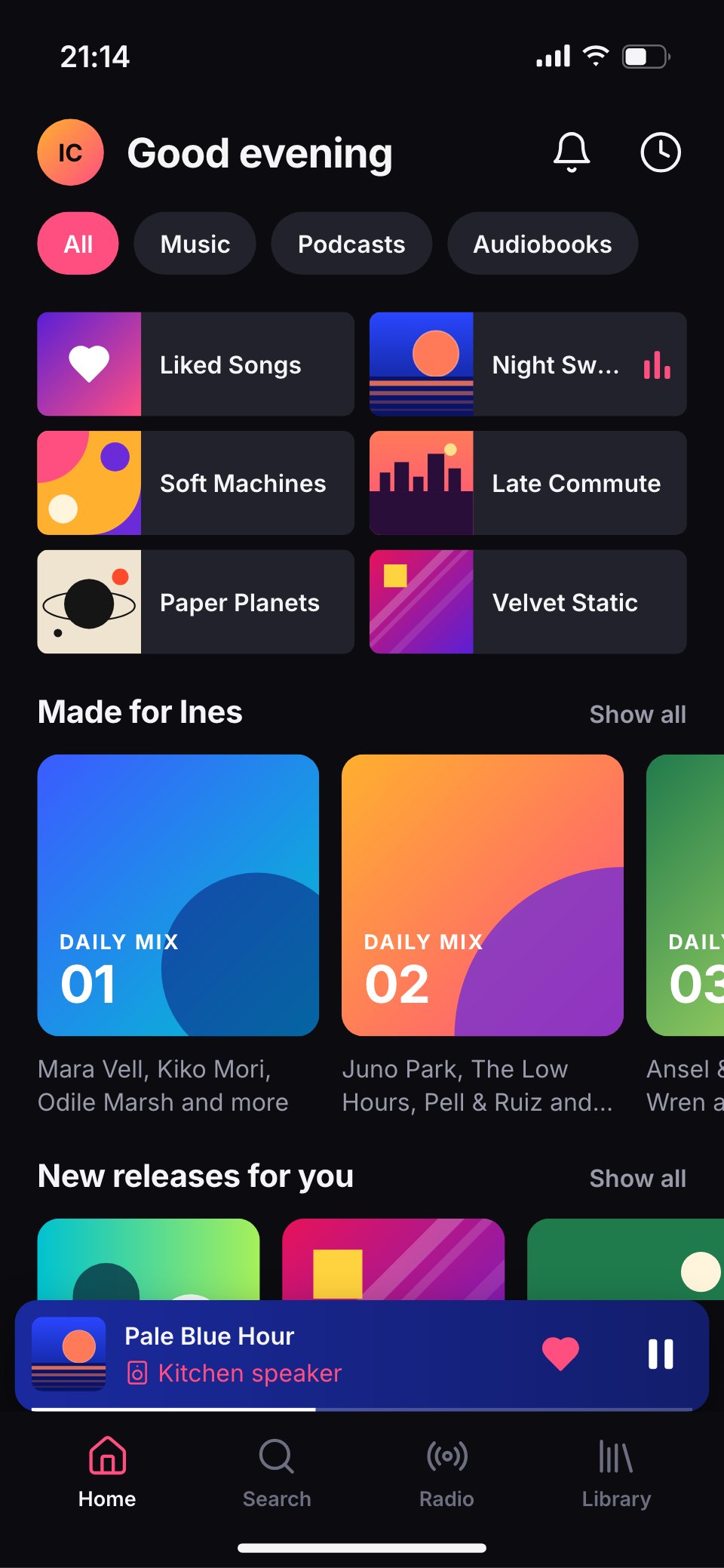
- 1Screen 1Home: a greeting, filter chips, six quick tiles for recent albums and playlists, Daily Mixes as colour blocks and the mini player
- 2Screen 2Search and browse: a search field and genre and mood tiles in bold colour blocks
- 3Screen 3Album: Night Swim by Mara Vell with its cover over a blue wash, like, download and shuffle, and the tracklist with the playing song
- 4Screen 4Now playing: the big cover, title, a scrubber at 1:48 of 4:12, shuffle, skip, pause and repeat, and the speaker it's on
- 5Screen 5Lyrics: the song's words on its colour, the current line bright and the next ones dimmed
- 6Screen 6Queue: now playing, next from the album and songs added by Ines, with handles to reorder
- 7Screen 7Library: playlists, albums and artists sorted by recently played, pinned and downloaded marks
- 8Screen 8Artist: Mara Vell's header, monthly listeners, popular songs and releases
- 9Screen 9Playlist: Late Commute with its cover, owner, songs and a shuffle button
- 10Screen 10Connect a device: speakers and headphones nearby, the kitchen speaker selected and its volume
When to use it.
Music Player App is a 10-screen phone design for a music streaming app, for audio start-ups, labels and designers. It covers the home feed with quick tiles and Daily Mixes, search and browse by genre and mood, an album page, the now-playing screen, lyrics, the queue, the library, an artist page, a playlist and connecting a speaker. The screens are dark, with vivid album covers drawn from flat shapes and gradients, the album's blue washed over the top and one hot pink accent for the playing track.
Made for
- Product designers starting a new app
- Startups pitching an app idea
- Agencies designing apps for clients
- Developers who need screens to build from
Make it yours in four steps.
Open it in UI design and work through it, or let Docsiv AI do the first pass with your details.
- Step 1
Swap Fernwave for your app's name and set the pink accent to your brand.
- Step 2
Replace the album covers, artists, tracks and playlists with your own catalogue or examples.
- Step 3
Edit the player controls, lyrics and queue screens to match your features.
- Step 4
Link the screens into a clickable prototype, or export them as FIG, SVG, PNG or PDF.
Start from the Music Player App now.
Questions about this template.
Something else on your mind? Ask us in the chat, bottom right of the page.
Is the Music Player App template free?
Yes. Create a free account and it opens in Docsiv's UI design app, ready to edit and share. The Free plan includes every Docsiv app and 500 AI credits a month.
Can I change the colours, fonts and text?
Yes, all of it. The template uses Inter with #0b0b10, #17171f, #22222c, #ff4f81, #2238d6, #ffb02e, and you can change any of them, rewrite every word and add or remove screens and layers.
What can I export it as?
UI design in Docsiv offers: FIG, SVG, PNG and PDF files. Once it's saved, you can also share it with a link.
Can Docsiv AI change it for me?
Yes. Tell Docsiv AI what you need, such as your brand's colours, new wording or another screen, and it makes the changes in UI design for you to review. AI uses credits; the Free plan includes 500 a month.



Start your app design with Docsiv AI
Describe the client or the project and Docsiv AI writes a first draft of your music player app UI for you to edit, share and send.