

What’s inside the Blog Website.
4 screens with real content in place. Rewrite them, reorder them, or add your own.
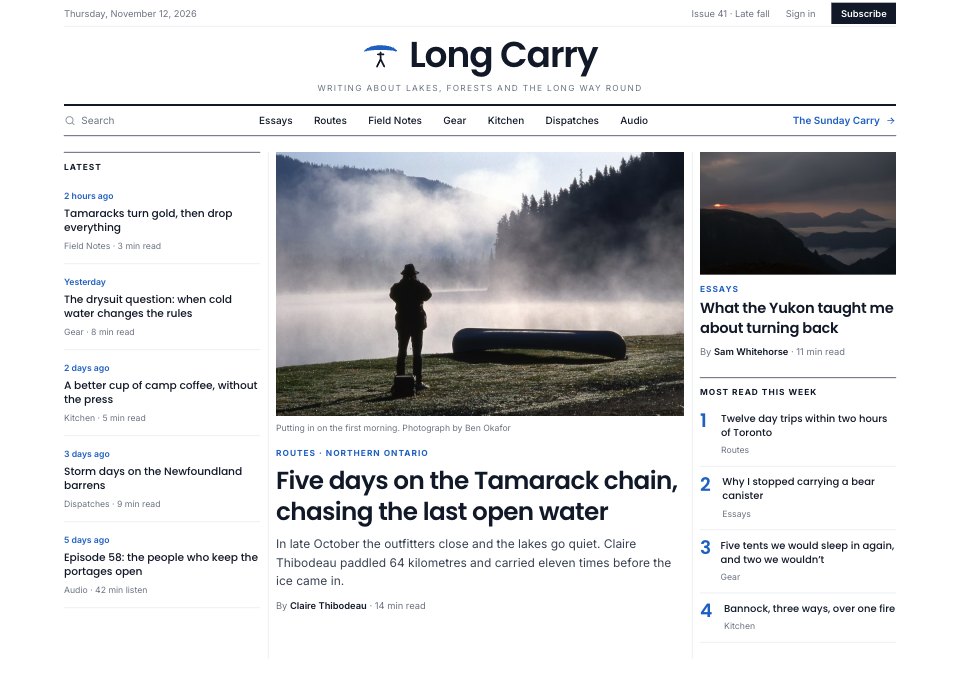
- 1Screen 1Home: date and issue bar, centred masthead and section nav under a heavy rule, the latest five pieces down the left, the lead story with photograph, standfirst and byline in the centre, and a second story with the most-read list on the right
- 2Screen 2Category (Routes): a 120px section title with what it covers and the count, region tabs and activity, length and sort filters, a featured route with its five key numbers, and the other routes in a table of activity, days, distance, grade and season
- 3Screen 3Article: reading-progress bar, kicker, headline, standfirst and a two-person byline with share actions, text with a drop cap, a pull quote and a footnote on cold water, and a right column with a captioned photograph and the route’s fact box
- 4Screen 4Newsletter: the Sunday newsletter’s promise and reader count, an email sign-up with three lists to tick and an explicit consent box, a recent issue shown as it arrives, and three membership tiers in Canadian dollars
When to use it.
Blog Website is a 4-screen website design for independent magazines, writers and brands that publish long reads. It's set up for Long Carry, a made-up Canadian outdoor magazine. The home page has a centred masthead, the lead story, the latest pieces and most read; a section page has filters, a featured piece and a table to compare posts; the article page has a drop cap, pull quote, fact box and footnote; and the newsletter page has list choices, a consent box, a sample issue and memberships. Poppins headlines, column rules and one royal-blue accent make it read like print.
Made for
- Web design agencies and freelancers
- Small businesses planning a new site
- Founders launching a product
- Developers who need a design to build
Make it yours in five steps.
Open it in UI design and work through it, or let Docsiv AI do the first pass with your details.
- Step 1
Replace Long Carry and the canoe mark with your publication's name and logo.
- Step 2
Rename the sections and swap in your own stories, photos, captions and authors.
- Step 3
Change the category table's columns to what your readers compare, and write your article into the text column.
- Step 4
Set your newsletter lists, sender address and membership prices.
- Step 5
Link the screens into a clickable prototype, or export them as FIG, SVG, PNG or PDF for your developers.
Start from the Blog Website now.
Questions about this template.
Something else on your mind? Ask us in the chat, bottom right of the page.
Is the Blog Website template free?
Yes. Create a free account and it opens in Docsiv's UI design app, ready to edit and share. The Free plan includes every Docsiv app and 500 AI credits a month.
Can I change the colours, fonts and text?
Yes, all of it. The template uses Poppins and Inter with #ffffff, #111827, #1f5fbf, #eaf1fb, #6b7280, #e5e7eb, #f3f4f6, and you can change any of them, rewrite every word and add or remove screens and layers.
What can I export it as?
UI design in Docsiv offers: FIG, SVG, PNG and PDF files. Once it's saved, you can also share it with a link.
Can Docsiv AI change it for me?
Yes. Tell Docsiv AI what you need, such as your brand's colours, new wording or another screen, and it makes the changes in UI design for you to review. AI uses credits; the Free plan includes 500 a month.





















Start your website design with Docsiv AI
Describe the client or the project and Docsiv AI writes a first draft of your blog website for you to edit, share and send.