

What’s inside the Clinic Website.
4 screens with real content in place. Rewrite them, reorder them, or add your own.
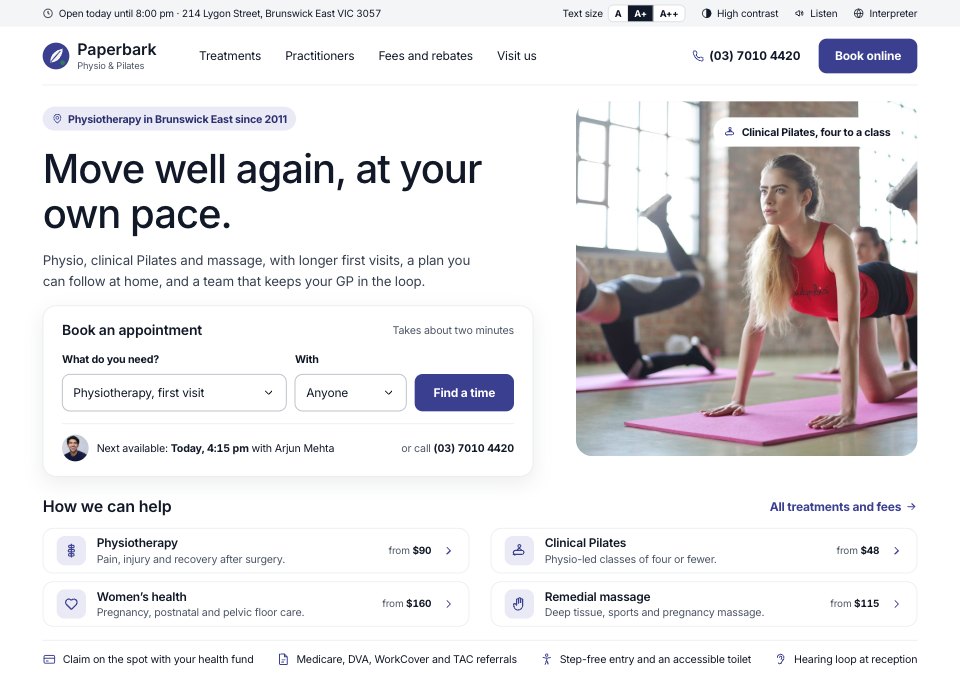
- 1Screen 1Home: an access bar with text size and contrast, the clinic’s promise, a booking box with the next free appointment, a Pilates class photo, the four treatments with their starting fees, and rebates, referrals and access in one line
- 2Screen 2Treatments: the treatment menu with starting fees and an access note, physiotherapy explained with the first 45-minute appointment in four steps, the fee table, then booking, rebates and referrals (HICAPS, Medicare, DVA, WorkCover, TAC) and what to bring
- 3Screen 3Practitioners: filters by treatment with counts, day and language, and six practitioner cards with photo, role, registration, special interests, languages and next free appointment
- 4Screen 4Booking (step 3 of 4): a week strip with free times per day, morning, afternoon and evening slots with taken times struck through and the chosen time focused, and a summary with practitioner, date, place, fee, how to pay and the cancellation policy
When to use it.
Clinic Website is a 4-screen website design for physiotherapy, allied health and wellness clinics that take bookings online. It's set up for Paperbark Physio & Pilates, a made-up clinic in Melbourne. The home page has a two-field booking box with the next free appointment and the treatments with starting fees; the treatment page explains the first visit step by step, with fees, rebates and what to bring; practitioners are filtered by treatment, day and language; and booking shows a week of free times with a fee summary. Large legible type, tall controls and a text-size bar make it easy for every patient.
Made for
- Web design agencies and freelancers
- Small businesses planning a new site
- Founders launching a product
- Developers who need a design to build
Make it yours in five steps.
Open it in UI design and work through it, or let Docsiv AI do the first pass with your details.
- Step 1
Replace Paperbark with your clinic's name, logo, address and phone number.
- Step 2
Edit the treatments, appointment lengths and fees, and the rebates your patients can claim.
- Step 3
Add your practitioners with their photos, registration numbers, interests, languages and days.
- Step 4
Set your opening hours, free times and cancellation policy on the booking screen.
- Step 5
Link the screens into a clickable prototype, or export them as FIG, SVG, PNG or PDF for your developers.
Start from the Clinic Website now.
Questions about this template.
Something else on your mind? Ask us in the chat, bottom right of the page.
Is the Clinic Website template free?
Yes. Create a free account and it opens in Docsiv's UI design app, ready to edit and share. The Free plan includes every Docsiv app and 500 AI credits a month.
Can I change the colours, fonts and text?
Yes, all of it. The template uses Inter with #ffffff, #3b3f8f, #111827, #e9eaf6, #f4f5f7, #2e7d5b, #a3a6e0, and you can change any of them, rewrite every word and add or remove screens and layers.
What can I export it as?
UI design in Docsiv offers: FIG, SVG, PNG and PDF files. Once it's saved, you can also share it with a link.
Can Docsiv AI change it for me?
Yes. Tell Docsiv AI what you need, such as your brand's colours, new wording or another screen, and it makes the changes in UI design for you to review. AI uses credits; the Free plan includes 500 a month.





















Start your website design with Docsiv AI
Describe the client or the project and Docsiv AI writes a first draft of your clinic website for you to edit, share and send.