

What’s inside the Online Store Website.
5 screens with real content in place. Rewrite them, reorder them, or add your own.
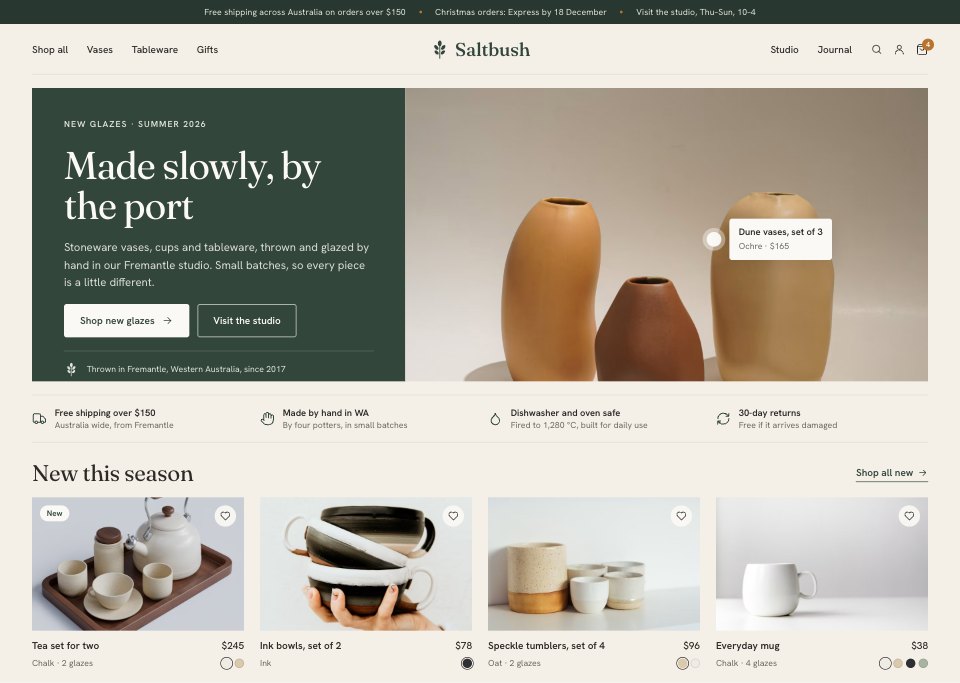
- 1Screen 1Home: announcement bar, a centred-logo header, a split hero with a shoppable hotspot on the product photo, four promises (shipping, made by hand, care, returns) and new products with glaze swatches
- 2Screen 2Collection: breadcrumbs, the collection title and story, filters for glaze, size, price and stock with counts, an active filter chip, sort, and a four-column grid with new, last-few, made-to-order and sold-out states
- 3Screen 3Product: a photo gallery with thumbnails and zoom, rating, name, price with GST and an Afterpay note, glaze choice, quantity and add to cart, stock, dispatch and studio pick-up, accordions for care, size and shipping, then two reviews and related pieces
- 4Screen 4Cart: line items with glaze, stock, quantity and totals, a free-shipping progress bar, a gift note, the order summary with GST included and a Christmas cut-off, and two add-ons
- 5Screen 5Checkout: a one-page checkout with contact, an Australian delivery address, three shipping methods, card payment and billing, beside the order with quantities, a discount field, shipping, the total in AUD and GST
When to use it.
Online Store Website is a 5-screen desktop shop design for makers, small brands and the designers who build their stores. It follows one order at a made-up stoneware studio from a home page with a shoppable hero and new products, through a collection with filters and stock states and a product page with glaze choice and care details, to the cart with a free-shipping bar and gift note and a one-page checkout. Prices, shipping and GST come from one catalogue, so every total agrees. Clay paper, eucalyptus green and catalogue photos keep it warm but clear.
Made for
- Web design agencies and freelancers
- Small businesses planning a new site
- Founders launching a product
- Developers who need a design to build
Make it yours in four steps.
Open it in UI design and work through it, or let Docsiv AI do the first pass with your details.
- Step 1
Put your shop's name and mark in place of Saltbush, and set the green and ochre to your brand.
- Step 2
Swap the product photos, names, prices and glazes for your own catalogue.
- Step 3
Edit the filters, shipping options, free-shipping threshold and tax line to match how you sell.
- Step 4
Link the screens into a clickable prototype, or export them as FIG, SVG, PNG or PDF for your developer.
Start from the Online Store Website now.
Questions about this template.
Something else on your mind? Ask us in the chat, bottom right of the page.
Is the Online Store Website template free?
Yes. Create a free account and it opens in Docsiv's UI design app, ready to edit and share. The Free plan includes every Docsiv app and 500 AI credits a month.
Can I change the colours, fonts and text?
Yes, all of it. The template uses Fraunces and Hanken Grotesk with #f4efe7, #33463c, #b8732e, #dfe3d8, #2b2a26, #fbf9f5, and you can change any of them, rewrite every word and add or remove screens and layers.
What can I export it as?
UI design in Docsiv offers: FIG, SVG, PNG and PDF files. Once it's saved, you can also share it with a link.
Can Docsiv AI change it for me?
Yes. Tell Docsiv AI what you need, such as your brand's colours, new wording or another screen, and it makes the changes in UI design for you to review. AI uses credits; the Free plan includes 500 a month.





















Start your website design with Docsiv AI
Describe the client or the project and Docsiv AI writes a first draft of your ecommerce website for you to edit, share and send.