

What’s inside the Professional Services Website.
5 screens with real content in place. Rewrite them, reorder them, or add your own.
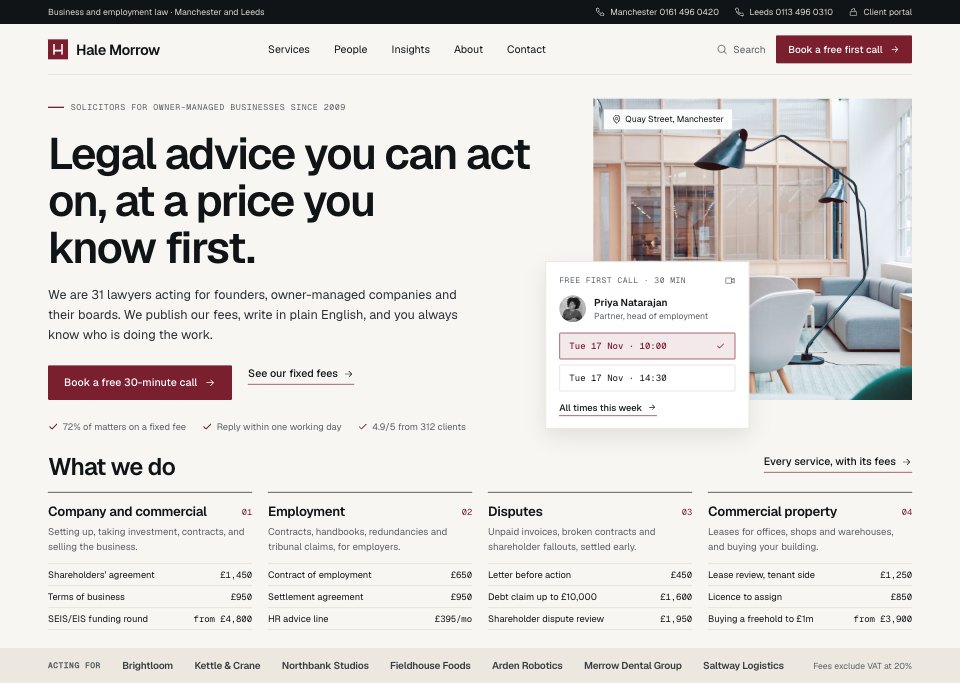
- 1Screen 1Home: the promise in one line, three proof numbers, the office photo with the next free 30-minute call slots, the four services with their most-asked-for fixed fees, and the clients the firm acts for
- 2Screen 2Services: the service menu and the partner who leads it, a fixed-fee table with what each fee includes and how long it takes, and the SRA price information for defending tribunal claims: cost ranges, key stages, timescales, hourly rates and who does the work
- 3Screen 3People: the four partners as black-and-white portrait cards and the lawyers in a table, filtered by practice and office, each with their office, year qualified, direct line and what clients ask them for
- 4Screen 4Insights: a featured guide, the latest articles by topic with author and reading time, the next breakfast briefing and the monthly newsletter sign-up
- 5Screen 5Contact: an enquiry form that asks for the area of law, company size, the other party (for a conflict check) and any deadline, what happens next, both offices and the regulatory footer with SRA and LLP numbers
When to use it.
Professional Services Website is a 5-screen website design for law firms, accountants and other advisers who want to publish their prices. It's set up for Hale Morrow, a made-up firm of business and employment solicitors in Manchester and Leeds. It covers a home page with fixed fees and free call slots, a service page with its fee table and SRA price information, the partners and lawyers with direct lines, plain-English insights with an event and a newsletter, and a contact page with a conflict-check enquiry form and the regulatory footer. Chalk paper, near-black ink, one oxblood accent and hairline rules make it calm and precise.
Made for
- Web design agencies and freelancers
- Small businesses planning a new site
- Founders launching a product
- Developers who need a design to build
Make it yours in five steps.
Open it in UI design and work through it, or let Docsiv AI do the first pass with your details.
- Step 1
Replace Hale Morrow with your firm's name and set the oxblood accent to your own colour.
- Step 2
Rewrite the practices, fixed fees and price information with your own services and rates.
- Step 3
Swap in your people's portraits, direct lines and the matters clients bring them.
- Step 4
Put your own regulator, registration numbers and offices in the contact page footer.
- Step 5
Link the screens into a clickable prototype, or export them as FIG, SVG, PNG or PDF for your developers.
Start from the Professional Services Website now.
Questions about this template.
Something else on your mind? Ask us in the chat, bottom right of the page.
Is the Professional Services Website template free?
Yes. Create a free account and it opens in Docsiv's UI design app, ready to edit and share. The Free plan includes every Docsiv app and 500 AI credits a month.
Can I change the colours, fonts and text?
Yes, all of it. The template uses Geist and Geist Mono with #f7f6f2, #111417, #7a1f2e, #5b5f64, #ece8e0, #ffffff, #dcd9d1, and you can change any of them, rewrite every word and add or remove screens and layers.
What can I export it as?
UI design in Docsiv offers: FIG, SVG, PNG and PDF files. Once it's saved, you can also share it with a link.
Can Docsiv AI change it for me?
Yes. Tell Docsiv AI what you need, such as your brand's colours, new wording or another screen, and it makes the changes in UI design for you to review. AI uses credits; the Free plan includes 500 a month.





















Start your website design with Docsiv AI
Describe the client or the project and Docsiv AI writes a first draft of your law firm website for you to edit, share and send.