

What’s inside the Nonprofit Website.
4 screens with real content in place. Rewrite them, reorder them, or add your own.
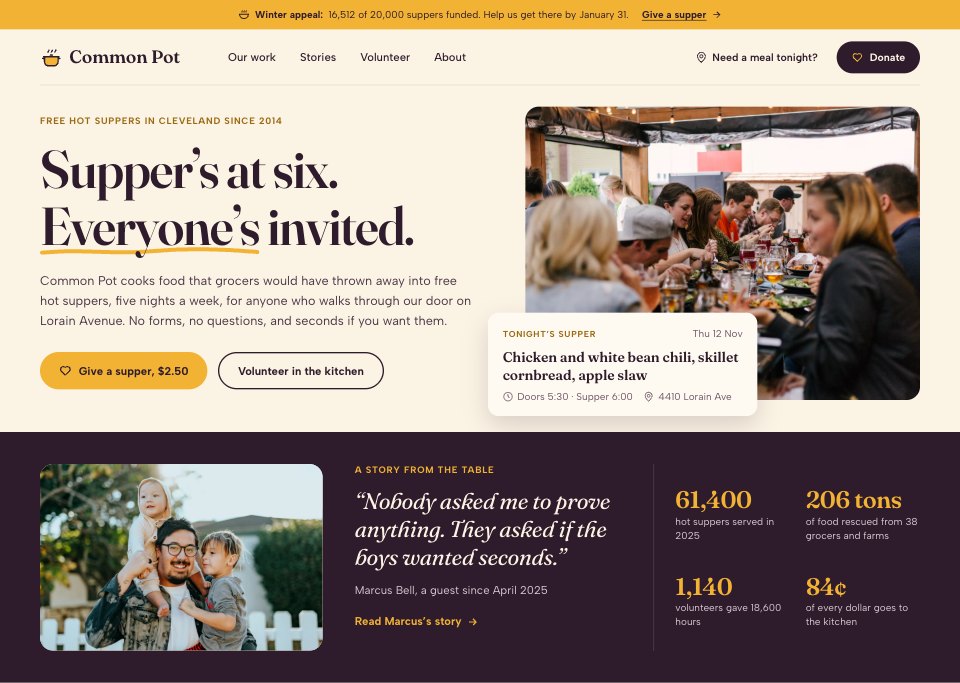
- 1Screen 1Home: the winter appeal bar, the promise in one line with a hand-drawn underline, a photo of the long table with tonight’s supper, time and address, and an aubergine band with a guest’s quote and the year in four numbers
- 2Screen 2Our work: the problem and how the kitchen answers it, four programs (suppers, food rescue, family boxes, kitchen training) each with a photo, a number and when it runs, then suppers served from 2021 to 2025 and where each dollar went, with the annual report, audited financials and Form 990
- 3Screen 3A story: one guest’s story told with consent, with a large photo and caption, standfirst, byline, drop-cap text and a pull quote, an eighteen-month timeline, and a monthly gift tied to the meal in the story
- 4Screen 4Donate: a focused checkout without the site menu, the appeal’s progress over a photo, and step one of three: monthly or one time, amount tiles shown as meals, a custom amount, covering card fees, a tribute or employer match, the running total and the 501(c)(3) tax note
When to use it.
Nonprofit Website is a 4-screen website design for charities, food banks and community groups that raise money from local donors. It's set up for Common Pot, a made-up community kitchen in Cleveland that cooks rescued food into free suppers. The home page has tonight's supper, a guest's quote and the year in numbers; Our work shows four programs, five years of meals and where each dollar went; a long-form story is told with the guest's consent; and the donate page is a three-step checkout that shows every gift as meals. Cream paper, aubergine, turmeric and warm photos give it a human feel.
Made for
- Web design agencies and freelancers
- Small businesses planning a new site
- Founders launching a product
- Developers who need a design to build
Make it yours in five steps.
Open it in UI design and work through it, or let Docsiv AI do the first pass with your details.
- Step 1
Replace Common Pot and the pot mark with your organization's name and logo.
- Step 2
Set what one meal or service costs you, so every gift amount shows what it pays for.
- Step 3
Rewrite the programs, yearly figures and spending from your annual report and accounts.
- Step 4
Swap in a story and photos your guests have agreed to share, and put your EIN in the donate page's small print.
- Step 5
Link the screens into a clickable prototype, or export them as FIG, SVG, PNG or PDF for your developers.
Start from the Nonprofit Website now.
Questions about this template.
Something else on your mind? Ask us in the chat, bottom right of the page.
Is the Nonprofit Website template free?
Yes. Create a free account and it opens in Docsiv's UI design app, ready to edit and share. The Free plan includes every Docsiv app and 500 AI credits a month.
Can I change the colours, fonts and text?
Yes, all of it. The template uses Fraunces and Albert Sans with #fbf3e4, #2e1b2b, #f2b233, #fbe6b3, #6b5566, #fffaf1, #e7d9c3, and you can change any of them, rewrite every word and add or remove screens and layers.
What can I export it as?
UI design in Docsiv offers: FIG, SVG, PNG and PDF files. Once it's saved, you can also share it with a link.
Can Docsiv AI change it for me?
Yes. Tell Docsiv AI what you need, such as your brand's colours, new wording or another screen, and it makes the changes in UI design for you to review. AI uses credits; the Free plan includes 500 a month.





















Start your website design with Docsiv AI
Describe the client or the project and Docsiv AI writes a first draft of your nonprofit website for you to edit, share and send.