

What’s inside the Portfolio Website.
4 screens with real content in place. Rewrite them, reorder them, or add your own.
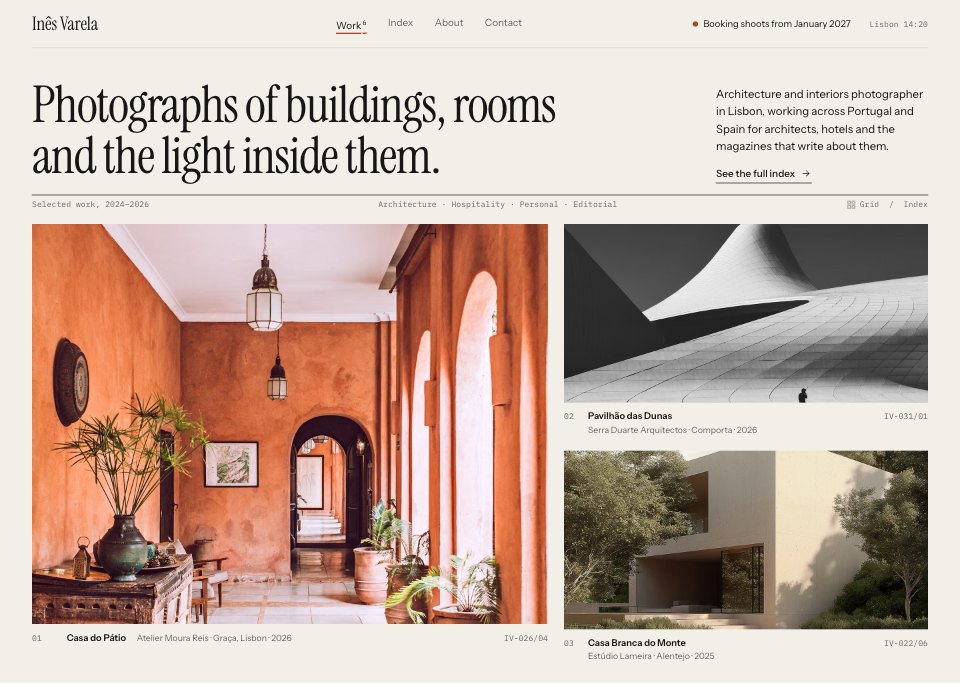
- 1Screen 1Home: the wordmark and availability, a one-line statement in large serif, a short intro and the selected work in a 7 + 5 column grid with numbered captions and frame codes
- 2Screen 2Project: the story, credits (architect, place, dates, publication) and the next project on the left; a lead photograph and two details on the right, each with its frame number
- 3Screen 3About: a black-and-white portrait, the photographer's background in two columns, clients, publications and recognition, and the four steps of a commission with their timings
- 4Screen 4Contact: an enquiry form that asks for type, place, dates, length and usage, next to email, phone and studio, day rates with VAT and licence terms, and the next free shoot days
When to use it.
Portfolio Website is a 4-screen desktop website design for photographers, architects, designers and other freelancers whose work has to speak first. It's set up for a made-up architecture and interiors photographer in Lisbon: a home page led by the work in a 7 + 5 column grid, a project page with the story, credits and captioned frames, an about page with clients, press and how a commission runs, and a contact page with an enquiry form beside rates and the next free days. Warm paper, near-black type, one terracotta accent and a large serif keep it quiet, like a printed monograph.
Made for
- Web design agencies and freelancers
- Small businesses planning a new site
- Founders launching a product
- Developers who need a design to build
Make it yours in four steps.
Open it in UI design and work through it, or let Docsiv AI do the first pass with your details.
- Step 1
Replace Inês Varela with your name and swap the photographs for your own projects, biggest first.
- Step 2
Rewrite each project's story and credits, keeping the frame numbers if you shoot.
- Step 3
Edit the commission steps, clients and press on the about page, then set your rates, tax and licence terms on the contact page.
- Step 4
Link the screens into a clickable prototype, or export them as FIG, SVG, PNG or PDF for your developer.
Start from the Portfolio Website now.
Questions about this template.
Something else on your mind? Ask us in the chat, bottom right of the page.
Is the Portfolio Website template free?
Yes. Create a free account and it opens in Docsiv's UI design app, ready to edit and share. The Free plan includes every Docsiv app and 500 AI credits a month.
Can I change the colours, fonts and text?
Yes, all of it. The template uses Instrument Serif and Instrument Sans and IBM Plex Mono with #f2efe9, #171614, #6b675f, #d8d2c6, #a9472a, #fbfaf7, and you can change any of them, rewrite every word and add or remove screens and layers.
What can I export it as?
UI design in Docsiv offers: FIG, SVG, PNG and PDF files. Once it's saved, you can also share it with a link.
Can Docsiv AI change it for me?
Yes. Tell Docsiv AI what you need, such as your brand's colours, new wording or another screen, and it makes the changes in UI design for you to review. AI uses credits; the Free plan includes 500 a month.





















Start your website design with Docsiv AI
Describe the client or the project and Docsiv AI writes a first draft of your portfolio website for you to edit, share and send.