

What’s inside the Performance Review.
3 pages with real content in place. Rewrite them, reorder them, or add your own.
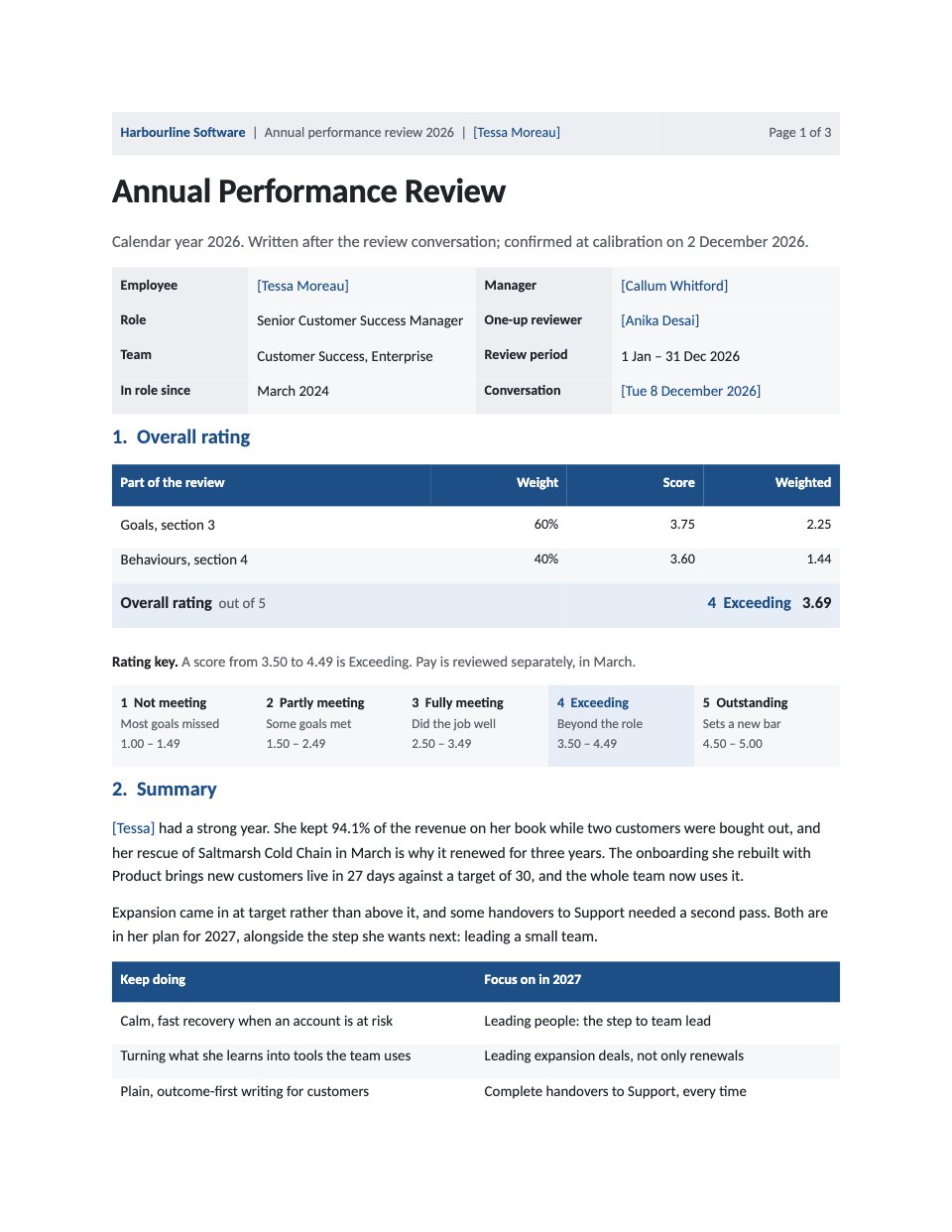
- 1Page 1Who is reviewed, by whom and for which period; the overall rating worked out from the goal and behaviour scores; the five-point rating key with this review’s band shaded; the manager’s summary; what to keep doing and what to focus on
- 2Page 2Four weighted goals with target, result, evidence and a rating; Harbourline’s five behaviours with evidence and ratings; the goal score and the behaviour score that make the overall rating
- 3Page 3A 70-20-10 development plan towards team lead with costs against the learning budget, next year’s check-in dates, the employee’s comments, and lines to sign and date for employee, manager and one-up reviewer
When to use it.
Performance Review is a three-page annual review a manager writes after the review conversation, shown for a customer success manager at a software company. Page one names who is reviewed, by whom and for which period, then works the overall rating out in a table from the goal and behaviour scores, with the five-point rating key beside it and the manager’s summary. Page two rates four weighted goals and five behaviours, each with a result and one specific piece of evidence. Page three holds a 70-20-10 development plan with costs, the employee’s own comments and lines for three signatures.
Made for
- Finance and accounts teams
- Operations managers
- In-house marketing and design teams
- Founders running their own back office
Make it yours in four steps.
Open it in Documents and work through it, or let Docsiv AI do the first pass with your details.
- Step 1
Replace the blue fill-ins in the header and the details table: the employee, manager, one-up reviewer, period and the date you met.
- Step 2
Write your own goals with their weights, targets, results and evidence on page 2, then rate each one and each behaviour from 1 to 5.
- Step 3
Work the goal and behaviour scores into the overall rating table on page 1, and shade the matching band on the rating key.
- Step 4
Agree the development plan and its costs with the employee, ask them to write their comments, then print or send it to sign.
Start from the Performance Review now.
Questions about this template.
Something else on your mind? Ask us in the chat, bottom right of the page.
Is the Performance Review template free?
Yes. Create a free account and it opens in Docsiv's Documents app, ready to edit and share. The Free plan includes every Docsiv app and 500 AI credits a month.
Can I change the colours, fonts and text?
Yes, all of it. The template uses Calibri with #1d4f86, #e6edf6, #eceef1, #f6f7f8, #1f2328, and you can change any of them, rewrite every word and add or remove pages.
What can I export it as?
Documents in Docsiv offers: DOCX, PDF, ODT, RTF and Markdown exports. Once it's saved, you can also share it with a link.
Can Docsiv AI write the performance review for me?
Yes. Tell Docsiv AI about the client or project and it can draft the content in this template's style, which you then review and edit. AI uses credits; the Free plan includes 500 a month.

Start your document or form with Docsiv AI
Describe the client or the project and Docsiv AI writes a first draft of your performance review for you to edit, share and send.