

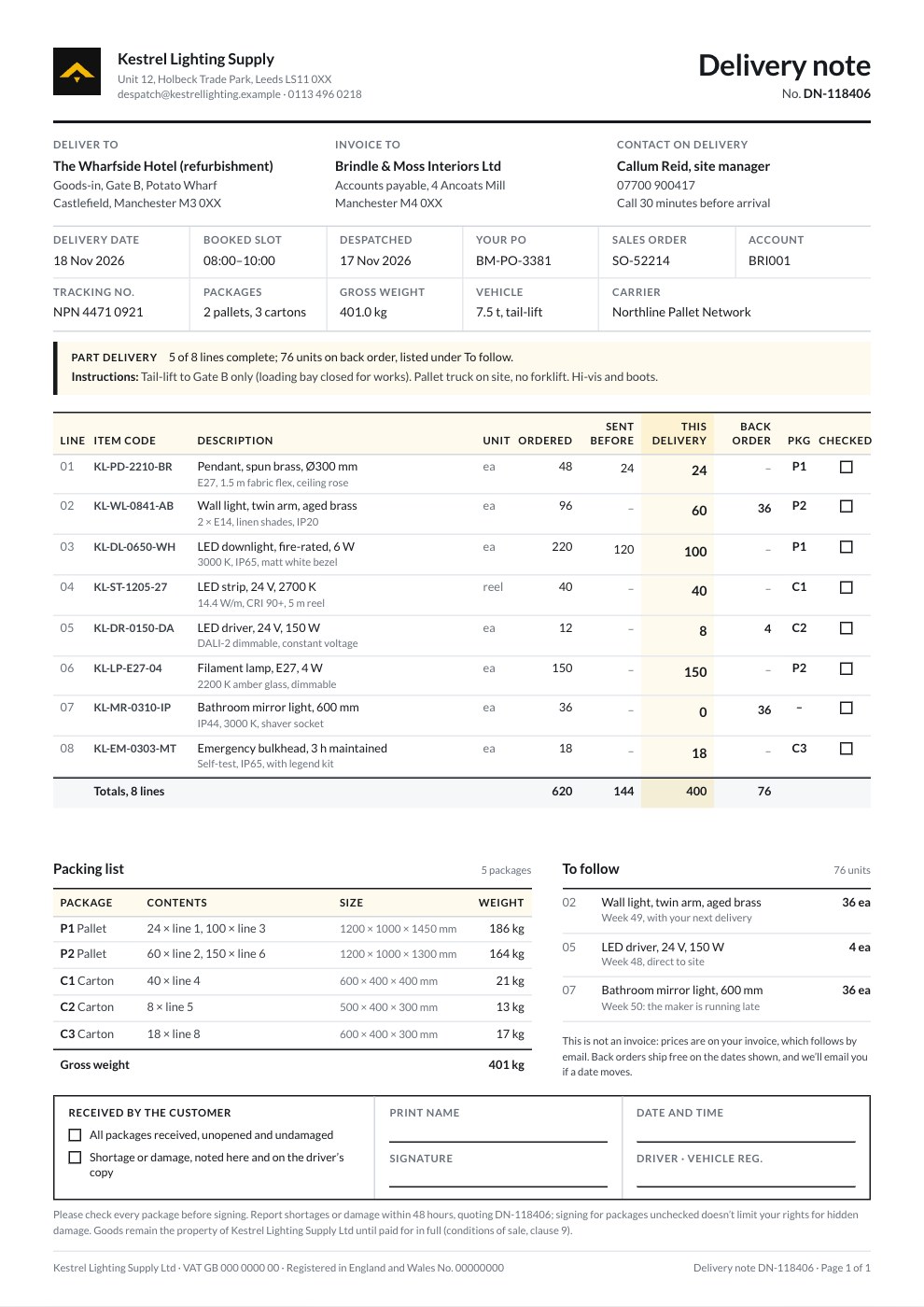
What’s inside the Delivery Note.
Real content in every part, ready to rewrite with your own.
- 1Header: the wholesaler's mark and despatch desk, Delivery note and its number
- 2Deliver to (the hotel site), invoice to (the contractor) and the site contact
- 3Delivery date, booked slot, despatch date, purchase order, sales order, account, carrier, consignment number, packages, gross weight and vehicle
- 4The driver's delivery instructions, and a part-delivery line counting the complete lines and units on back order
- 5Eight lines with item code, unit, ordered, sent before, this delivery and back-order quantities, the package each travels in and a box to tick
- 6A packing list by pallet and carton with sizes, contents and weights, and what's still to follow with dates
- 7A not-an-invoice note, and the received-by box: condition ticks, name, signature, date and time, driver and vehicle
- 8Check-before-signing and retention-of-title terms
When to use it.
Delivery Note is a delivery note and packing slip template for wholesalers, manufacturers and suppliers shipping to a customer or a site. It names where the goods go, who is invoiced and who to call, then the delivery date, booked slot, order references, carrier, tracking number, packages and gross weight. Each line shows what was ordered, sent before, sent now and still on back order, with a box to tick at goods-in. A packing list by pallet and carton, what's still to follow and a received-by box for the customer's signature make it proof of delivery. It has no prices, as a delivery note shouldn't.
Made for
- Finance and accounts teams
- Operations managers
- In-house marketing and design teams
- Founders running their own back office
Make it yours in four steps.
Open it in Invoices and work through it, or let Docsiv AI do the first pass with your details.
- Step 1
Add your logo, brand colour and despatch details, then the delivery address, the customer who's invoiced and the site contact.
- Step 2
Fill in the delivery date and slot, your order and their PO number, the carrier, the tracking number and any instructions for the driver.
- Step 3
List each item with its code and unit and the quantities ordered, sent before and sent now; back orders work themselves out.
- Step 4
Add each package with its size and weight, print two copies and have the received-by box signed on delivery.
Start from the Delivery Note now.
Questions about this template.
Something else on your mind? Ask us in the chat, bottom right of the page.
Is the Delivery Note template free?
Yes. Create a free account and it opens in Docsiv's Invoices app, ready to edit and share. The Free plan includes every Docsiv app and 500 AI credits a month.
Can I change the colours, fonts and text?
Yes, all of it. The template uses Lato with #f2b705, #16191d, #68707b, and you can change any of them, rewrite every word and add or remove pages.
What can I export it as?
Invoices in Docsiv offers: Invoices and PDF exports. Once it's saved, you can also share it with a link.
Can Docsiv AI write the delivery note for me?
Yes. Tell Docsiv AI about the client or project and it can draft the content in this template's style, which you then review and edit. AI uses credits; the Free plan includes 500 a month.

Start your document or form with Docsiv AI
Describe the client or the project and Docsiv AI writes a first draft of your delivery note for you to edit, share and send.