

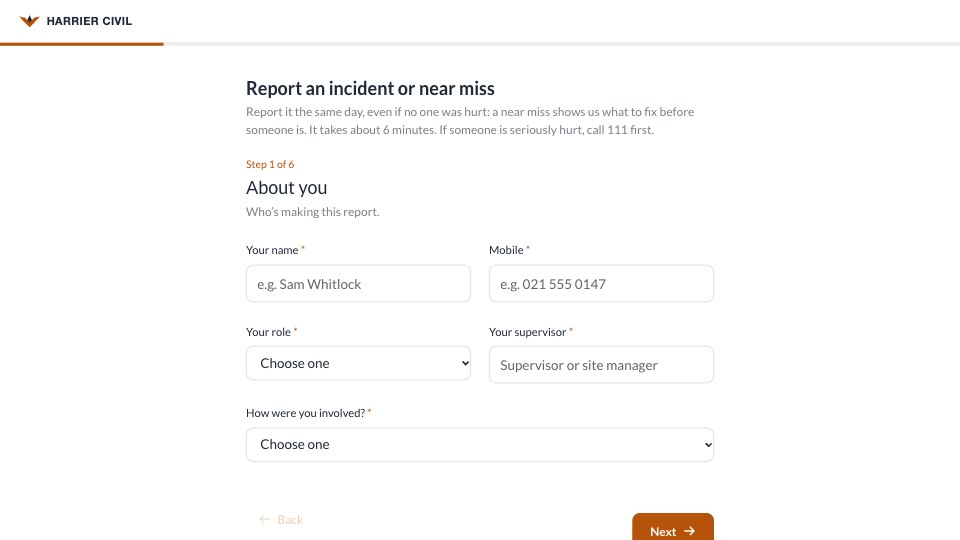
What’s inside the Incident Report Form.
Real content in every part, ready to rewrite with your own.
- 1Welcome and About you: report the same day, near misses too, call 111 first if someone is seriously hurt; then name, mobile, role, supervisor, and how they were involved (it happened to them, they saw it, they’re reporting for someone, or they found the aftermath)
- 2What happened: injury or illness, near miss, damage to plant or property, environmental spill or something else; a one-line summary; the full account; and the task at the time
- 3When and where: date, time, site (dropdown), the exact spot, and conditions such as wet, low light, wind or noise
- 4People and injuries: who was hurt or involved and their role, whether anyone was hurt (none, first aid, doctor, hospital), the injury and body part when someone was, and a notifiable-event note for hospital cases
- 5Witnesses: whether anyone saw it, and up to two witnesses’ names and phone numbers
- 6Actions and sign-off: what was done straight away (first aid, 111, stopped work, made safe, lock-out, told the supervisor), photos of the scene as an upload or a link, whether it’s been changed, and a typed signature
- 7Thank you: who reads the report, a conversation within 24 hours, WorkSafe notification for hospital cases, and free, confidential support
When to use it.
Incident Report Form is a workplace incident and near-miss report for construction, trades and site-based teams, six short steps that take about six minutes on a phone. It asks who’s reporting and how they were involved, what happened with a one-line summary and the full account, when and where with the conditions, who was hurt and how, witnesses, and what was done straight away, with photos, the state of the scene and a typed signature. Injury questions appear only when someone was hurt, and a hospital visit shows a note to notify the regulator.
Made for
- Finance and accounts teams
- Operations managers
- In-house marketing and design teams
- Founders running their own back office
Make it yours in four steps.
Open it in Forms and work through it, or let Docsiv AI do the first pass with your details.
- Step 1
Put your company’s name, logo and colour in the Design tab, and your emergency number in the welcome.
- Step 2
List your own sites, roles, injuries and immediate actions in the dropdowns and tick lists.
- Step 3
Name who reads each report and when they follow up on the thank-you screen, and have your health and safety adviser check the notification wording.
- Step 4
Pin the link in your site induction pack and on a QR code in each site office.
Start from the Incident Report Form now.
Questions about this template.
Something else on your mind? Ask us in the chat, bottom right of the page.
Is the Incident Report Form template free?
Yes. Create a free account and it opens in Docsiv's Forms app, ready to edit and share. The Free plan includes every Docsiv app and 500 AI credits a month.
Can I change the colours, fonts and text?
Yes, all of it. The template uses Lato with #FFFFFF, #1F2937, #B45309, and you can change any of them, rewrite every word and add or remove questions.
What can I export it as?
Forms in Docsiv offers: Responses exported as CSV. Once it's saved, you can also share it with a link.
Can Docsiv AI write the incident report form for me?
Yes. Tell Docsiv AI about the client or project and it can draft the content in this template's style, which you then review and edit. AI uses credits; the Free plan includes 500 a month.
Where do the responses go?
Responses are collected in Docsiv with the form, and you can export them as a CSV file.















Start your document or form with Docsiv AI
Describe the client or the project and Docsiv AI writes a first draft of your incident report form for you to edit, share and send.