

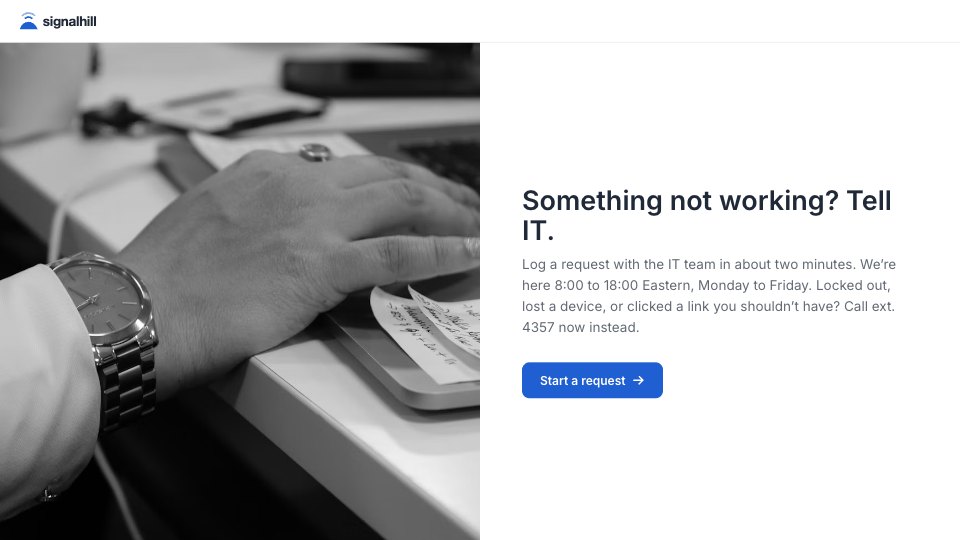
What’s inside the IT Support Request.
Real content in every part, ready to rewrite with your own.
- 1Welcome: what the form is for, support hours (8:00–18:00 Eastern, Monday to Friday), and to phone ext. 4357 instead when locked out, after losing a device or clicking a phishing link, with a photo
- 2What it’s about: work email, then the category from a dropdown (hardware; software; password, sign-in or MFA; Wi-Fi, VPN or network; email, calendar or video calls; printer or scanner; access to a system or folder; new equipment or software; phone; something else), with the device and its asset tag shown only for hardware
- 3How urgent: four levels in the person’s words, each with its priority and response time (critical 30 minutes, high 2 hours, normal 1 working day, low 3 working days), and a call-back number for critical and high
- 4The details: what’s happening and any error message, when it started (date), what they’ve tried, where they’re working today (office, home, travelling), and a screenshot (optional)
- 5Thank-you: the ticket number by email within five minutes, a call for critical and high requests, and the out-of-hours line, with a photo
When to use it.
IT Support Request is a short ticket form for an internal IT team, one question per screen and about two minutes to fill in. Staff give their work email and pick a category, with the device and asset tag asked only for hardware. They choose how much the problem stops them working, in their own words, and each level shows its priority and response time; critical and high requests ask for a number to call back on. Then come what’s happening, when it started, what they’ve tried, where they’re working today and an optional screenshot.
Made for
- Finance and accounts teams
- Operations managers
- In-house marketing and design teams
- Founders running their own back office
Make it yours in four steps.
Open it in Forms and work through it, or let Docsiv AI do the first pass with your details.
- Step 1
Add your company name, logo and colour, and set your support hours and phone extension on the welcome screen.
- Step 2
Rename the categories to match how your IT team splits its work.
- Step 3
Set the response times to the targets your team actually works to.
- Step 4
Send the answers to your helpdesk inbox so tickets are numbered there, and link the form from your intranet.
Start from the IT Support Request now.
Questions about this template.
Something else on your mind? Ask us in the chat, bottom right of the page.
Is the IT Support Request template free?
Yes. Create a free account and it opens in Docsiv's Forms app, ready to edit and share. The Free plan includes every Docsiv app and 500 AI credits a month.
Can I change the colours, fonts and text?
Yes, all of it. The template uses Inter with #FFFFFF, #1F2937, #1F5FD1, and you can change any of them, rewrite every word and add or remove questions.
What can I export it as?
Forms in Docsiv offers: Responses exported as CSV. Once it's saved, you can also share it with a link.
Can Docsiv AI write the IT support request form for me?
Yes. Tell Docsiv AI about the client or project and it can draft the content in this template's style, which you then review and edit. AI uses credits; the Free plan includes 500 a month.
Where do the responses go?
Responses are collected in Docsiv with the form, and you can export them as a CSV file.







Start your document or form with Docsiv AI
Describe the client or the project and Docsiv AI writes a first draft of your IT support request form for you to edit, share and send.