

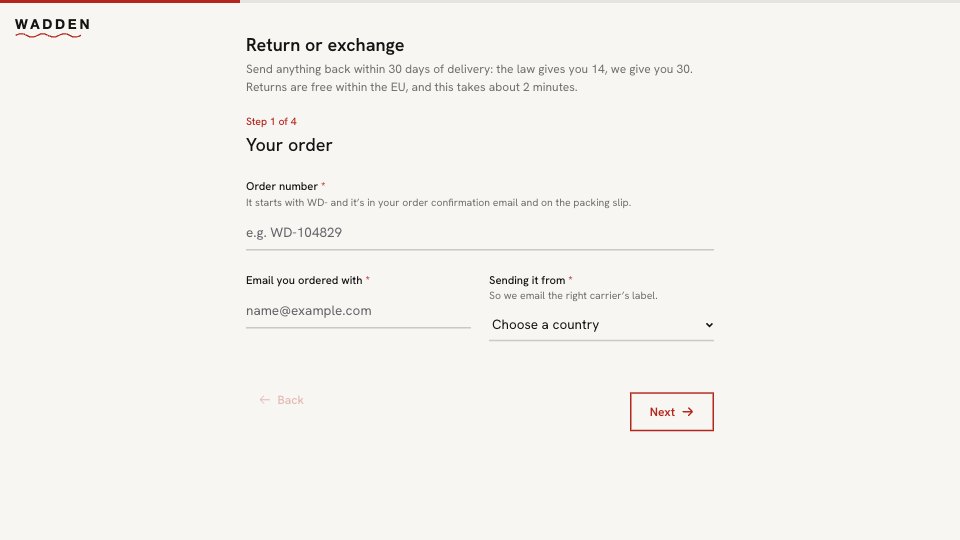
What’s inside the Return Request.
Real content in every part, ready to rewrite with your own.
- 1Welcome and Your order: 30 days to return (the law gives 14), free within the EU, then the order number as short text with where to find it, the email ordered with and the EU country it’s sent from
- 2What’s coming back: the items as a tick list of the range and the reason as a choice, side by side, and a note for mixed returns
- 3Condition and photos: unworn with tags, tried on, or worn or washed (with a note on what can come back), and a photo, uploaded or linked, that’s asked for when something arrived damaged or faulty
- 4Refund or exchange: refund to the original payment method, an exchange (with what they’d like instead) or credit with 10% added, and parcel-point drop-off (free) or collection (€4,95)
- 5Your return is booked: the prepaid label and QR code by email, how to send it within 14 days, and refunds within 5 working days of arrival, with a photo
When to use it.
Return Request is a return and exchange form for online shops, four short steps that take about two minutes. The welcome states the policy in one sentence. Customers give their order number, email and the country they’re sending from, tick the items coming back and choose a reason side by side, then describe their condition. A photo is asked for only when something arrived damaged or faulty, and exchanges ask what they’d like instead. It ends with refund, exchange or store credit, how the parcel travels, and a confirmation that explains the emailed label and when the money arrives.
Made for
- Finance and accounts teams
- Operations managers
- In-house marketing and design teams
- Founders running their own back office
Make it yours in four steps.
Open it in Forms and work through it, or let Docsiv AI do the first pass with your details.
- Step 1
Write your own returns window and costs into the welcome, and change the order-number hint to match your shop.
- Step 2
List your products in the items question, and edit the reasons and conditions.
- Step 3
Set your credit bonus and collection fee on the last step, or remove them.
- Step 4
Link the form from your order emails and returns page, and send the label when a request arrives.
Start from the Return Request now.
Questions about this template.
Something else on your mind? Ask us in the chat, bottom right of the page.
Is the Return Request template free?
Yes. Create a free account and it opens in Docsiv's Forms app, ready to edit and share. The Free plan includes every Docsiv app and 500 AI credits a month.
Can I change the colours, fonts and text?
Yes, all of it. The template uses Hanken Grotesk with #F8F6F2, #141414, #B3261E, and you can change any of them, rewrite every word and add or remove questions.
What can I export it as?
Forms in Docsiv offers: Responses exported as CSV. Once it's saved, you can also share it with a link.
Can Docsiv AI write the return request form for me?
Yes. Tell Docsiv AI about the client or project and it can draft the content in this template's style, which you then review and edit. AI uses credits; the Free plan includes 500 a month.
Where do the responses go?
Responses are collected in Docsiv with the form, and you can export them as a CSV file.



Start your document or form with Docsiv AI
Describe the client or the project and Docsiv AI writes a first draft of your return request form for you to edit, share and send.