

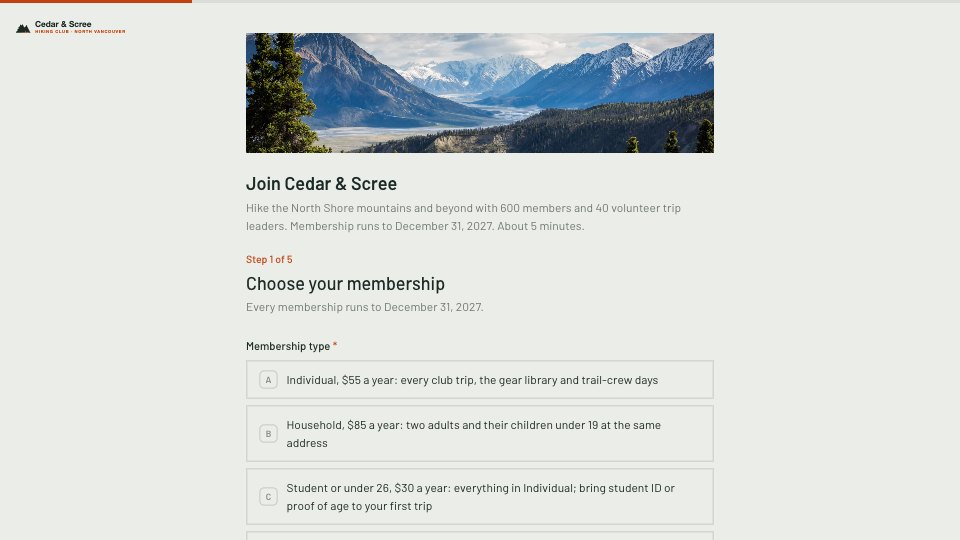
What’s inside the Membership Application.
Real content in every part, ready to rewrite with your own.
- 1Step 1, Choose your membership: the title and intro (membership runs to December 31, 2027, about 5 minutes), then Individual at $55, Household at $85, Student or under 26 at $30, Senior, 65 and over at $40 a year, each with what it includes
- 2Step 2, Your details: name, email, phone, postal code and date of birth (with why we ask: the under-26 rate and trip insurance), an emergency contact’s name and phone, and the other household members’ names when Household is chosen
- 3Step 3, Your hiking: experience from new to hiking to off-trail and alpine (so leaders can match you to trip grades A to D), interests (day hikes, scrambles, backpacking, snowshoeing, trail-crew days, navigation and first-aid courses, socials) and anything trip leaders should know
- 4Step 4, Payment: card link, Interac e-Transfer or cheque by mail, and an optional gift to the trail fund
- 5Step 5, Club rules and waiver: accept the release of liability and the constitution, bylaws and trip rules, say who is signing (a parent or guardian for anyone under 19), then sign and date
- 6Thank you: the membership card and signed release by email, trip sign-ups opening on payment, and the first event, beside a forest photo
When to use it.
Membership Application is a five-step form for clubs and associations, shown here for a volunteer-run hiking club in British Columbia. Applicants pick a membership type with its yearly fee, then give their details, date of birth and an emergency contact, with the other household members for a household membership. They describe their experience and interests so leaders can place them, choose how to pay with an optional gift, and accept the release of liability and club rules before signing. A parent or guardian signs for members under 19.
Made for
- Event organisers
- Workshop hosts
- Teams running sign-ups
- Community groups
Make it yours in five steps.
Open it in Forms and work through it, or let Docsiv AI do the first pass with your details.
- Step 1
Swap in your club’s name, logo, colour and the cover photo.
- Step 2
Set your membership types, fees and the date memberships run to.
- Step 3
Replace the experience levels and interests with your club’s activities.
- Step 4
Link your own release and rules, and have a lawyer check the wording for your province or state.
- Step 5
Put your first event and how members pay on the thank-you screen.
Start from the Membership Application now.
Questions about this template.
Something else on your mind? Ask us in the chat, bottom right of the page.
Is the Membership Application template free?
Yes. Create a free account and it opens in Docsiv's Forms app, ready to edit and share. The Free plan includes every Docsiv app and 500 AI credits a month.
Can I change the colours, fonts and text?
Yes, all of it. The template uses Barlow with #EBEDE8, #1C2A25, #C2410C, and you can change any of them, rewrite every word and add or remove questions.
What can I export it as?
Forms in Docsiv offers: Responses exported as CSV. Once it's saved, you can also share it with a link.
Can Docsiv AI write the membership application form for me?
Yes. Tell Docsiv AI about the client or project and it can draft the content in this template's style, which you then review and edit. AI uses credits; the Free plan includes 500 a month.
Where do the responses go?
Responses are collected in Docsiv with the form, and you can export them as a CSV file.






Start your registration form with Docsiv AI
Describe the client or the project and Docsiv AI writes a first draft of your membership application form for you to edit, share and send.