

What’s inside the E-commerce Admin.
10 screens with real content in place. Rewrite them, reorder them, or add your own.
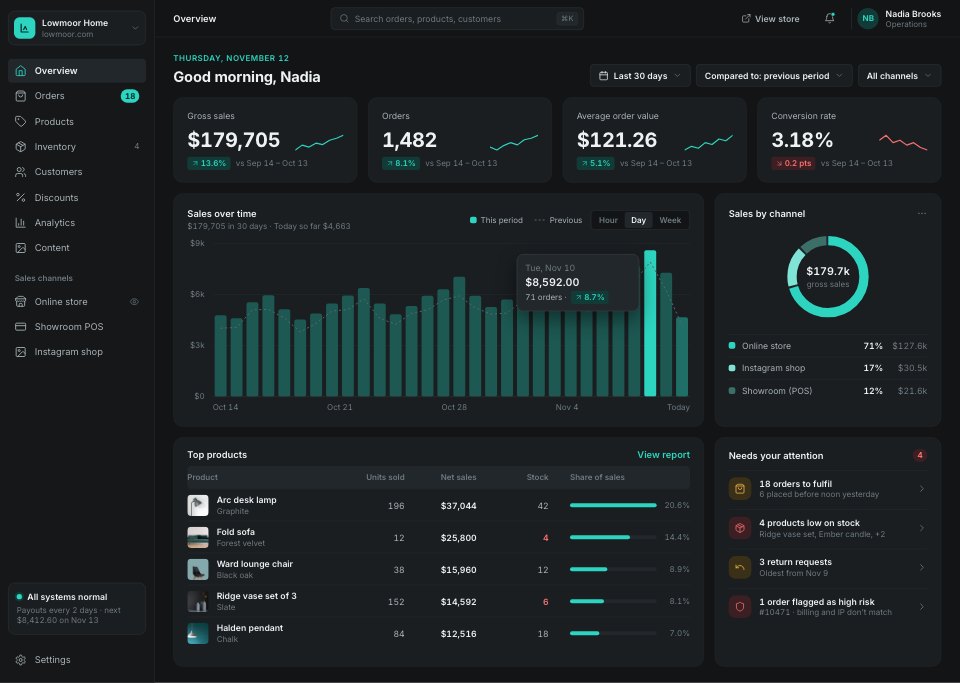
- 1Screen 1Overview: four KPIs with sparklines, daily sales against the previous period, sales by channel, top products and what needs attention
- 2Screen 2Orders: today's numbers, saved tabs, filters, a selected row with bulk actions and a dense order table with payment and fulfilment status
- 3Screen 3Order detail: items to pack with stock warnings, shipping, the payment summary with a discount, timeline, customer, addresses, risk and tags
- 4Screen 4Products: the catalogue with photos, status, stock and variants
- 5Screen 5Product editor: title, rich-text description, media, colour variants with price and stock, status, channels, pricing and margin, organisation and the search listing
- 6Screen 6Inventory: committed, available and incoming stock with levels and status, purchase orders on the way and locations
- 7Screen 7Customers: a segmentable table of customers with orders and lifetime spend
- 8Screen 8Customer detail: one customer's orders, spend, addresses and notes
- 9Screen 9Discounts: codes and automatic discounts with usage and end dates
- 10Screen 10Store settings: store profile, defaults, shipping zones, plan, staff and domain
When to use it.
E-commerce Admin is a 10-screen desktop design for an online shop's back office, for commerce platforms, store owners and designers. It covers an overview with daily sales and sales by channel, a dense order list with bulk actions, an order ready to fulfil with its payment summary and customer, products, a product editor with media, variants and pricing, inventory, customers, a customer's detail, discounts and store settings. Charcoal panels, crisp 44px table rows, product photos and one teal accent give it a focused dark look.
Made for
- SaaS founders and product teams
- Product designers working on dashboards
- Agencies building admin tools for clients
- Developers prototyping a new feature
Make it yours in four steps.
Open it in UI design and work through it, or let Docsiv AI do the first pass with your details.
- Step 1
Rename Lowmoor Home and set the teal accent to your brand.
- Step 2
Swap the product photos, names, prices and stock for your own catalogue.
- Step 3
Edit the order statuses, discount codes and settings to match how your shop runs.
- Step 4
Link the screens into a clickable prototype, or export them as FIG, SVG, PNG or PDF for handoff.
Start from the E-commerce Admin now.
Questions about this template.
Something else on your mind? Ask us in the chat, bottom right of the page.
Is the E-commerce Admin template free?
Yes. Create a free account and it opens in Docsiv's UI design app, ready to edit and share. The Free plan includes every Docsiv app and 500 AI credits a month.
Can I change the colours, fonts and text?
Yes, all of it. The template uses Inter with #121416, #1a1e21, #eef2f3, #2dd4bf, #f5b951, #f87171, and you can change any of them, rewrite every word and add or remove screens and layers.
What can I export it as?
UI design in Docsiv offers: FIG, SVG, PNG and PDF files. Once it's saved, you can also share it with a link.
Can Docsiv AI change it for me?
Yes. Tell Docsiv AI what you need, such as your brand's colours, new wording or another screen, and it makes the changes in UI design for you to review. AI uses credits; the Free plan includes 500 a month.





Start your dashboard design with Docsiv AI
Describe the client or the project and Docsiv AI writes a first draft of your ecommerce admin dashboard for you to edit, share and send.