

What’s inside the Patient Portal.
11 screens with real content in place. Rewrite them, reorder them, or add your own.
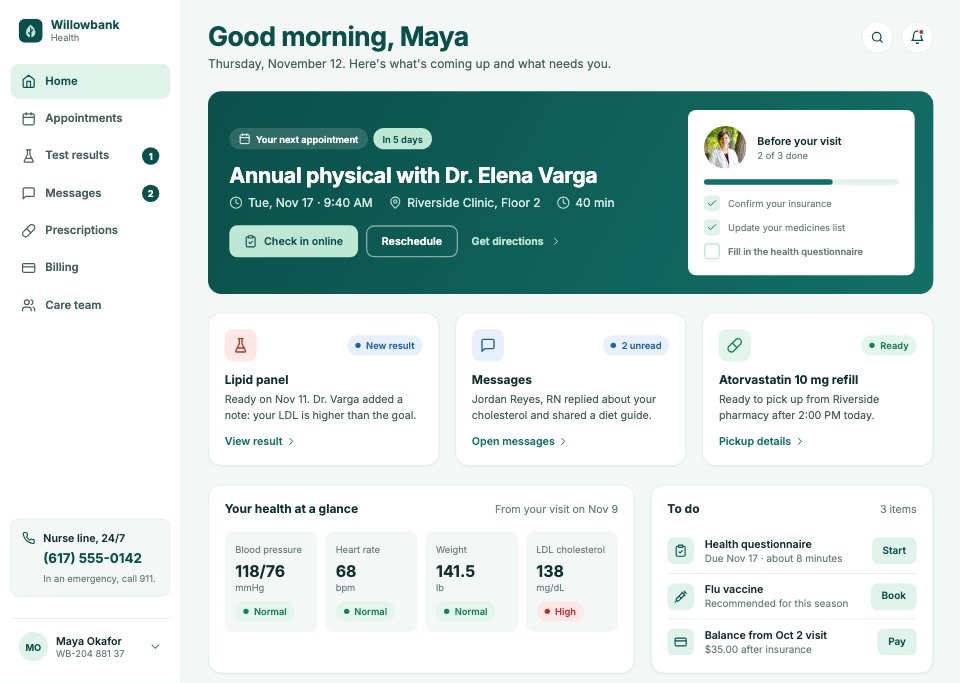
- 1Screen 1Home: a greeting, the next appointment with check-in and a pre-visit checklist, a new result, unread messages and a refill, vitals at a glance and a to-do list
- 2Screen 2Appointments: upcoming and past visits with check-in, directions, video links and visit summaries
- 3Screen 3Book a visit: step 2 of 4 with visit type, clinician, a date strip and time slots, and a summary with the clinic map and coverage
- 4Screen 4Booking confirmed: the visit, add to calendar, what to bring and how to prepare
- 5Screen 5Test results: every result by date, with what needs attention first
- 6Screen 6Test result detail: the doctor's note, each value with its status and healthy range, the trend over time and what can help
- 7Screen 7Messages: conversations with the care team, a thread with an attachment, quick replies and the composer
- 8Screen 8Prescriptions & refills: current medicines, refills ready or due, and the pharmacy
- 9Screen 9Billing & payments: statements, what insurance paid, the balance and a payment form
- 10Screen 10Care team: the patient's doctors and nurses, with their clinics and ways to reach them
- 11Screen 11Profile & settings: personal details, insurance, emergency contacts, sharing access and notifications
When to use it.
Patient Portal is an 11-screen desktop design for a clinic group's patient portal, for healthcare teams, health tech start-ups and designers. It covers a home with the next appointment, appointments, booking a visit in four steps and its confirmation, test results and a result explained with healthy ranges and a trend, messages with the care team, prescriptions and refills, billing, the care team and profile settings. Large 16px body type, 48px controls, deep teal headings and status pills that pair colour with words keep it calm and accessible.
Made for
- SaaS founders and product teams
- Product designers working on dashboards
- Agencies building admin tools for clients
- Developers prototyping a new feature
Make it yours in four steps.
Open it in UI design and work through it, or let Docsiv AI do the first pass with your details.
- Step 1
Put your organisation's name in place of Willowbank Health and set the teal to your brand.
- Step 2
Swap the clinicians, clinics and photos for your own care team.
- Step 3
Edit the visit types, test results and billing details to match your services.
- Step 4
Link the screens into a clickable prototype, or export them as FIG, SVG, PNG or PDF for handoff.
Start from the Patient Portal now.
Questions about this template.
Something else on your mind? Ask us in the chat, bottom right of the page.
Is the Patient Portal template free?
Yes. Create a free account and it opens in Docsiv's UI design app, ready to edit and share. The Free plan includes every Docsiv app and 500 AI credits a month.
Can I change the colours, fonts and text?
Yes, all of it. The template uses Inter with #0b4f4a, #dff3ea, #f3f8f6, #ffffff, #1c7f53, #b0362e, and you can change any of them, rewrite every word and add or remove screens and layers.
What can I export it as?
UI design in Docsiv offers: FIG, SVG, PNG and PDF files. Once it's saved, you can also share it with a link.
Can Docsiv AI change it for me?
Yes. Tell Docsiv AI what you need, such as your brand's colours, new wording or another screen, and it makes the changes in UI design for you to review. AI uses credits; the Free plan includes 500 a month.



Start your dashboard design with Docsiv AI
Describe the client or the project and Docsiv AI writes a first draft of your patient portal UI for you to edit, share and send.