

What’s inside the HR Dashboard.
4 screens with real content in place. Rewrite them, reorder them, or add your own.
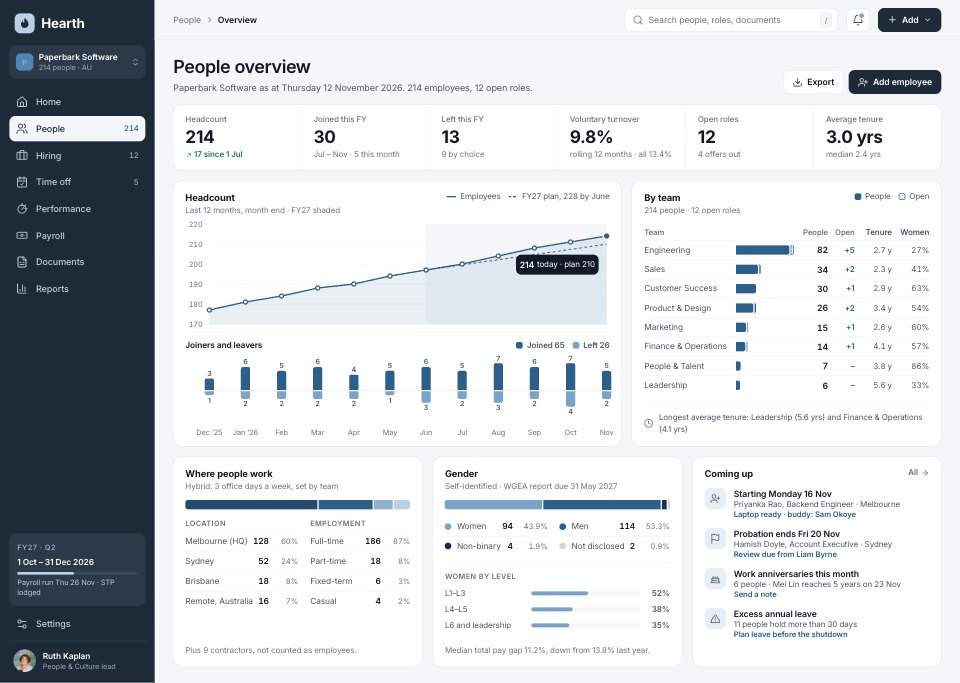
- 1Screen 1Headcount: six KPIs, headcount over 12 months against the FY27 plan, joiners and leavers by month, people and open roles by team, location and employment type, gender with WGEA notes, and what is coming up this week
- 2Screen 2Hiring pipeline: open roles, candidates in process, offers, hires, time to hire and acceptance; all 12 roles with hiring manager, days open, candidates by stage, status and start; the year’s funnel and sources; and the candidate board for the selected role
- 3Screen 3Time off: a team calendar for 14 Dec – 8 Jan with leave by type, pending bookings, Victorian public holidays and the Christmas shutdown; requests waiting for approval with clashes; who is out today, balances, leave liability and the next public holidays
- 4Screen 4Employee profile: photo, role, status, contact and tenure; job details, pay against the band with super and compa-ratio, leave balances (annual, personal/carer’s, long service), booked leave, goals, history and documents on file
When to use it.
HR Dashboard is a 4-screen desktop design for a people platform, for HR teams, HR software start-ups and the designers who build their tools. It's set up for Paperbark Software, a made-up 214-person company in Australia. Headcount has six KPIs, headcount against plan, teams, locations and gender; Hiring has every open role with candidates by stage, the funnel, sources and a candidate board; Time off has a team calendar with public holidays, approvals and leave liability; and the employee profile has job, pay, leave, goals and documents. A navy sidebar, light grey work area and Inter throughout keep it calm and exact.
Made for
- SaaS founders and product teams
- Product designers working on dashboards
- Agencies building admin tools for clients
- Developers prototyping a new feature
Make it yours in four steps.
Open it in UI design and work through it, or let Docsiv AI do the first pass with your details.
- Step 1
Rename Hearth and Paperbark Software, and set the sidebar colour to your brand.
- Step 2
Replace the teams, roles, people and leave types with your own, keeping the totals consistent.
- Step 3
Change the public holidays, leave rules and pay details to your country's.
- Step 4
Link the screens into a clickable prototype, or export them as FIG, SVG, PNG or PDF for handoff.
Start from the HR Dashboard now.
Questions about this template.
Something else on your mind? Ask us in the chat, bottom right of the page.
Is the HR Dashboard template free?
Yes. Create a free account and it opens in Docsiv's UI design app, ready to edit and share. The Free plan includes every Docsiv app and 500 AI credits a month.
Can I change the colours, fonts and text?
Yes, all of it. The template uses Inter with #1e2a38, #f5f6f8, #2c5f8a, #7aa3c9, #16324d, #7c8796, and you can change any of them, rewrite every word and add or remove screens and layers.
What can I export it as?
UI design in Docsiv offers: FIG, SVG, PNG and PDF files. Once it's saved, you can also share it with a link.
Can Docsiv AI change it for me?
Yes. Tell Docsiv AI what you need, such as your brand's colours, new wording or another screen, and it makes the changes in UI design for you to review. AI uses credits; the Free plan includes 500 a month.





















Start your dashboard design with Docsiv AI
Describe the client or the project and Docsiv AI writes a first draft of your HR dashboard for you to edit, share and send.